Team Shieldworkz
Picture a night shift at a water treatment plant. A controls technician needs to load a configuration file onto a workstation that talks to the plant's programmable logic controllers (PLCs). The network is segmented. The firewall rules are tight. The remote access path is locked down. So the technician does what people in operations have done for decades: pulls a USB drive from a pocket and plugs it in.
That single action bypasses nearly every network control the organization has paid for. It does not matter how strong the perimeter is if a file can walk through the front door on a piece of plastic the size of a thumb.
This is the removable media problem in operational technology (OT), and it is far more common than most security programs admit. Industrial environments rely on USB drives, external hard disks, laptops, and memory cards for firmware updates, backups, vendor troubleshooting, and project files. Those same devices are one of the few practical ways for malware to reach systems that were deliberately kept off the internet.
This Blog explains why removable media remains a live risk for industrial operators, what the evidence and real incidents show, where the exposure really sits inside a plant, and how to build a control program that protects production without slowing down the people who keep it running.
Why Removable Media Is Still the Most Underestimated Entry Point in OT
Many industrial organizations have invested heavily in network segmentation, firewalls, and monitoring. That work matters. But it protects the network path. Removable media travels a different path, one that network tools never see.
The air gap is not as solid as it sounds
Plenty of plants describe critical systems as air-gapped, meaning they are physically separated from the internet and the business network. In practice, a true air gap is rare. Systems need patches. Controllers need new logic. Historians need to be exported for reporting. Vendors need to diagnose faults. Each of those tasks creates a reason for a file to cross the boundary, and the easiest way to move a file across a boundary with no network connection is a portable drive.
So the air gap does not stop data movement. It simply moves the movement to a manual process, and manual processes are only as safe as the habits and controls wrapped around them.
What the data says about the trend
Annual threat research based on scans from hundreds of industrial sites worldwide has tracked how attackers treat removable media. The findings are hard to ignore:
Purpose-built for USB: the share of detected threats specifically designed to spread through removable media rose from 19% in the 2020 report to 37% in 2021 and 52% in 2022.
Capable of disruption: roughly 79% to 81% of those threats were assessed as capable of disrupting OT systems.
Built for persistence: about half of the threats were designed to establish remote access or remote control once inside.
Mostly disguised: Trojans, which trick a person into running them, made up roughly three quarters of detected malware.
Put plainly, adversaries are no longer treating USB as an accident of poor hygiene. They are using it deliberately as an initial foothold into environments that are hard to reach any other way.
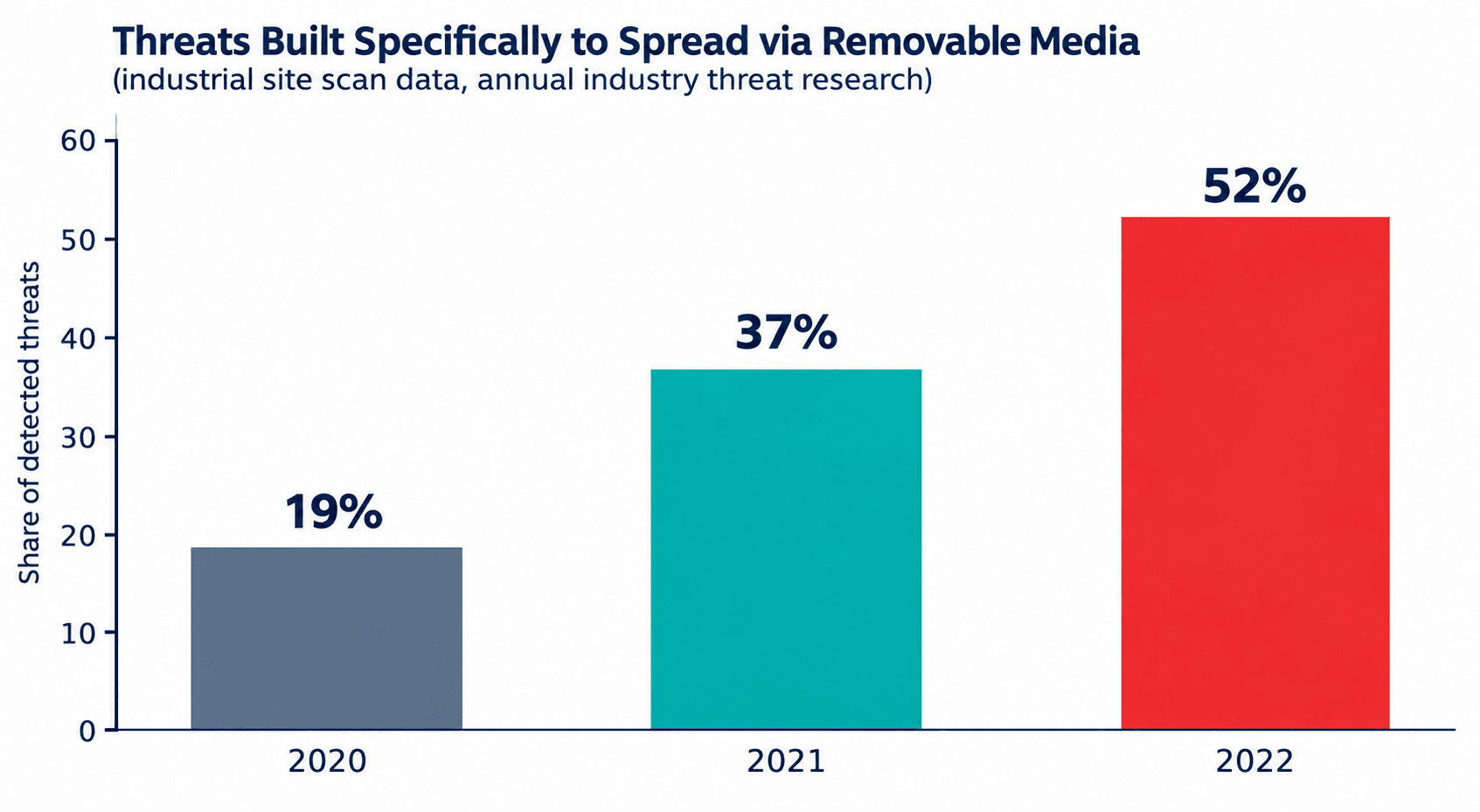
Figure 1: Growth in threats designed specifically for removable media
Real Incidents That Show How USB Risk Reaches Production
The removable media threat is not theoretical. Several well-documented events show how a single portable device can affect physical operations.
Incident | What Happened | How Media Was Involved | Lesson for OT Teams |
Stuxnet (2010) | Malware damaged industrial centrifuges at a uranium enrichment facility in Iran by altering controller logic while showing operators normal readings. | Widely reported to have crossed into an isolated network through infected removable drives before spreading internally. | A fully isolated site can still be reached. Physical media is the bridge. |
Power generation plant (reported 2012) | A turbine control environment at a US power generation facility was infected when a third-party technician used a USB drive to update software. | Contractor-owned media introduced malware onto a control workstation. A second facility reported similar exposure. | Vendor and contractor devices need the same scrutiny as internal ones. Startup was reportedly delayed by roughly three weeks. |
Defense network worm (2008) | A worm spread through a defense network after an infected flash drive was inserted into a laptop on a base overseas. | A single removable device led to the broad compromise of classified and unclassified systems. | Serious enough to trigger a department-wide ban on removable media. Bans are blunt; controlled use is more sustainable. |
Worm-style USB campaigns (2021 onward) | A USB-spreading worm was found across a wide range of organizations, including those in industrial sectors, and was used as an early access step for later attacks. | Infected drives launched hidden commands as soon as a user opened a disguised shortcut file. | Ordinary-looking files and shortcuts on a drive can be the trigger. File-type inspection matters. |
Notice the pattern. In every case the attacker did not need to defeat a firewall. The route in was human, routine, and physical. That is exactly why the risk survives even in well-defended plants.
Where Removable Media Risk Actually Enters an Industrial Site
Most teams picture the risk as an employee plugging in a stray flash drive. That does happen, but the larger exposure usually sits in scheduled, legitimate work. Understanding those flows is the first step toward controlling them.
Source | Typical Use | Why It Is Risky |
Contractor and vendor laptops | Commissioning, troubleshooting, tuning drives, and controllers | Devices are managed by another organization, used across many customer sites, and rarely inspected before connection. |
Engineering USB drives | Moving project files, PLC logic, and configuration backups | Shared between people and stations, often used on both office and control networks. |
Firmware and patch media | Applying updates to controllers, HMIs, and network devices | Files may be downloaded on an unmanaged PC first, then carried to production. |
Portable diagnostic tools | Protocol analyzers and maintenance handhelds | Run outdated software and connect directly to controllers. |
Removable storage for reporting | Exporting historian data or logs to the business side | Two-way use means media may carry malware in the reverse direction. |
Personal devices and chargers | Phones, music players, and charging cables plugged into workstations | Unapproved and unrecorded, and some are built to imitate keyboards. |
A useful way to think about it: every USB port on an OT workstation is an unmonitored network connection waiting for a device to arrive.
The Business Impact: More Than an IT Problem
For CISOs and plant leaders, the argument for action is not only technical. Removable media incidents translate directly into operational and financial consequences.
Unplanned downtime. When malware reaches a control workstation, teams often have to isolate, rebuild, and revalidate before production restarts. In continuous-process industries, hours matter.
Safety exposure. Altered logic or corrupted engineering files can cause equipment to behave in ways operators do not expect.
Quality and product loss. A batch or line running on compromised settings can produce scrap or force a recall.
Regulatory and contractual pressure. Energy, water, transportation, and manufacturing operators face growing expectations to prove control over their OT assets, including how files enter them.
Reputational damage. Customers and communities expect critical services to stay available.
The cost of a scanning checkpoint and a clear procedure is small next to a single unplanned shutdown. That comparison is what usually moves the conversation from the plant floor to the boardroom.
Why Traditional Approaches Fall Short
Blocking every USB port sounds safe but rarely survives contact with operations
A blanket ban is the reflex response, and it can work in narrow situations. But operations still need to move files. When the official route is closed or slow, people find unofficial ones: personal email, cloud storage, a colleague's laptop, or the same USB drive used quietly. A ban with no workable alternative often produces less visibility, not more security.
Standard endpoint tools are not built for legacy industrial systems
Many control workstations run older operating systems that cannot support modern endpoint agents, or where vendors do not permit third-party software. Relying on installed protection alone leaves those machines exposed. Scanning has to happen before the file reaches them.
One antivirus engine is not enough
A single scanning engine misses threats that another would catch. Industrial malware and targeted tools may also use file types that general-purpose scanners never inspect closely, such as project archives, scripts, and logic files.
Emergency work bypasses procedure
Faults do not wait for approvals. If the process is too heavy during a breakdown, technicians will improvise. A workable program plans for urgent situations with a fast, controlled path rather than pretending they will not occur.
Vendors and contractors sit outside your policy
Your policy can govern your employees. It has less influence over a third party's laptop unless the contract and the physical checkpoint require it. Vendor media is one of the largest and least visible gaps in most plants.
Building an OT Removable Media Security Program: Practical Best Practices
The goal is not to stop file movement. It is to make every file that reaches production known, inspected, approved, and traceable. The following practices work together and can be phased in.
1. Start with a clear, enforceable policy
A good policy is short enough that people read it and specific enough that an auditor can test it. It should define:
Which media types are permitted (for example, only company-issued, registered drives) and which are prohibited outright.
Who can approve media use and under what conditions.
How contractor and vendor devices are handled before they touch production.
What happens when a device or file fails inspection.
The consequences and support path when someone cannot follow the process.
2. Inventory where removable media is used today
You cannot control what you have not mapped. Walk the sites and record which stations have open ports, which staff carry media, which vendors connect, and which workflows depend on file transfer. Most organizations discover legitimate use cases they did not know existed. Those need proper channels, not surprise prohibitions.
3. Place a scanning checkpoint before production
The single most valuable control is a dedicated inspection point, typically a media scanning kiosk or a hardened standalone station, that every drive and file passes through before entering an OT zone. It should sit in a controlled area, be isolated from production, and be simple enough that technicians will use it every time.
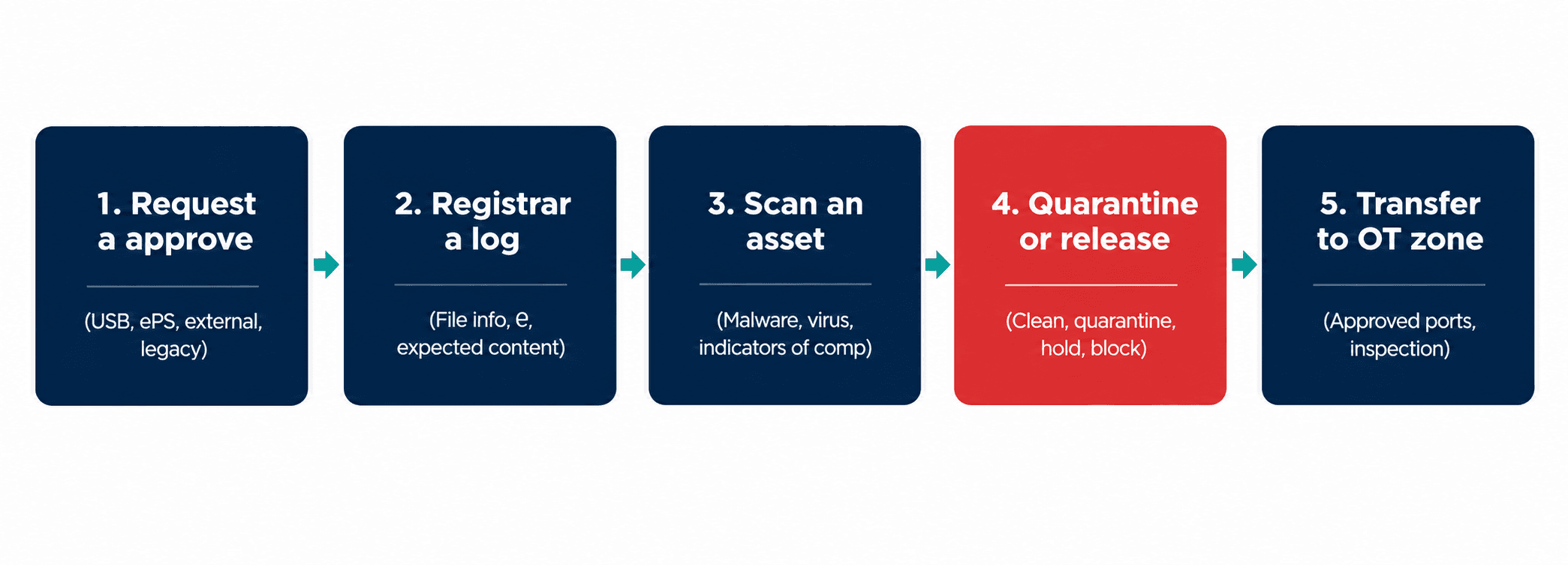
Figure 2: A controlled removable media transfer workflow
4. Inspect deeply, not just for viruses
Effective malware inspection for OT goes beyond a single signature check. Look for:
Multiple scanning engines so that a threat missed by one is caught by another.
File-type validation, confirming a file is what its extension claims to be, and flagging executables disguised as documents.
Script, macro, and shortcut analysis, since these are common triggers on infected drives.
Inspection of industrial project files and archives, including compressed packages that hide their contents.
Autorun and hidden-partition detection on the device itself, not only its files.
Reputation and integrity checks for firmware, comparing hashes against the vendor's published values where available.
5. Restrict access at the port and the user level
Scanning does little good if unscanned media can still be plugged directly into a control station. Layer technical restrictions on top of process:
Disable or lock unused USB ports on OT workstations, servers, and HMIs, physically where possible and by configuration where not.
Allow only registered devices, identified by hardware identifiers, and block unknown storage.
Prevent devices from acting as keyboards or network adapters unless explicitly approved.
Use role-based permissions so only authorized engineers can approve or use media in each zone.
Consider read-only or write-once media for firmware and backup restores.
6. Quarantine failures and make the outcome visible
When a file fails inspection, it should never simply be deleted and forgotten. Move it to a secure quarantine, notify the owner and the security team, and record the reason. Repeated failures from the same source tell you something about a vendor, a workstation, or a habit that needs attention. Where a file is business-critical, offer a clean-and-revalidate path, such as sanitizing the document or requesting a fresh copy from the trusted source.
7. Log everything and connect it to monitoring
Every scan, approval, rejection, and transfer should leave a record: who, what device, which file, when, which zone, and what the result was. Feed those logs into the security operations workflow. During an investigation, this record answers the hardest question quickly: how did this file get here?
8. Govern contractor and vendor media before they arrive
Write scanning requirements into contracts and site access procedures. Ask vendors to send files ahead of visits so they can be inspected in advance. Require that vendor laptops pass the same checkpoint as everything else. Where feasible, provide company-controlled equipment for vendor use on the plant floor.
9. Offer secure alternatives so people do not go around the rules
Reduce dependence on USB where you can. A managed secure transfer service through a controlled intermediate zone lets files move in one direction, with inspection, without a portable drive at all. Not every site can eliminate removable media, but the more workflows you move to controlled channels, the smaller the attack surface becomes.
10. Train people with real scenarios
Awareness sessions that cite abstract warnings are forgotten. Sessions built around the plant's own workflows, and around the incidents described above, are remembered. Teach technicians what a suspicious drive looks like, why a personal charger on a control PC matters, and how to reach the fast path in an emergency.
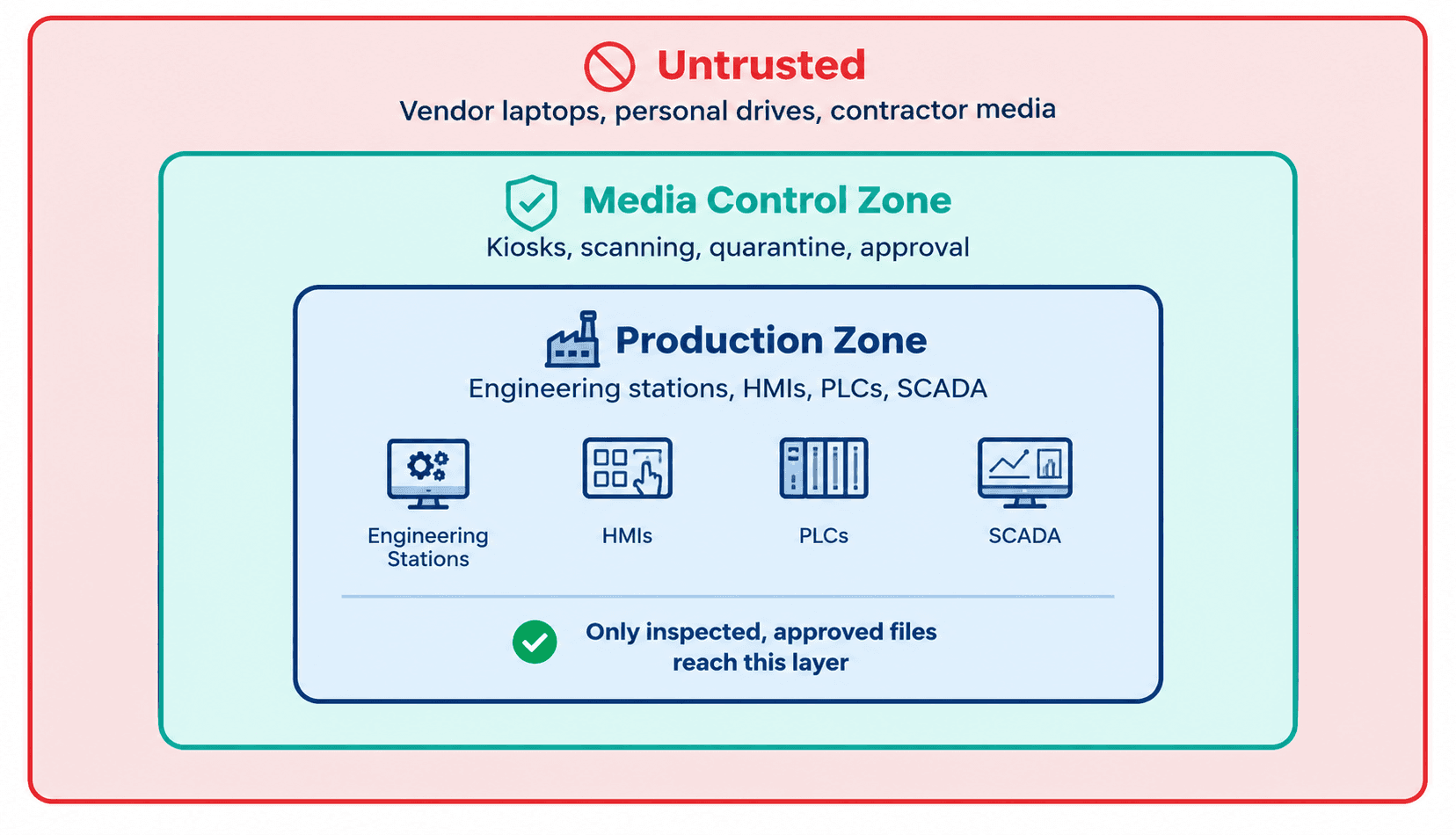
Figure 3: Layered control zones between untrusted media and production systems
Questions Every OT Leader Should Be Able to Answer Today
A quick way to test your exposure is to ask a handful of direct questions. If the answers are unclear, the gap is probably real.
Can we list every removable device approved for use in each production zone?
When a vendor arrives with a laptop, what exactly happens before it connects to a control system?
If a file was loaded onto a PLC programming station last month, could we trace where it came from within an hour?
Which workstations still have open USB ports, and who decided they should?
What is the approved procedure at 2 a.m. during a breakdown, and do night-shift teams know it?
When did we last test the scanning process with a harmless test file to confirm it actually blocks and records what it should?
These questions matter because the answers reveal how the program behaves under pressure, not how it reads on paper. Audits often focus on documents. Attackers focus on the moments when the documents are ignored.
It also helps to look beyond a single site. A large operator may have one well-run plant and several smaller facilities where a maintenance supervisor still carries a personal drive. Attackers do not need to compromise your best-protected site. They need one weak entry point, and the smaller or more remote location is often the easier one. Consistent standards across every site, with local flexibility only where operations truly require it, keep that weakest link from setting your real level of risk.
Where Does Your Organization Stand? A Simple Maturity View
Level | What It Looks Like | Typical Gap |
Ad hoc | No written policy. USB ports open. Media shared freely between stations. | No visibility into what enters production. |
Basic | Policy exists and some ports are disabled. Scanning depends on individual effort. | Inconsistent enforcement and no central records. |
Managed | Dedicated scanning checkpoint, registered media, and approval workflow at major sites. | Vendor media and emergency work may still bypass controls. |
Controlled | Multi-engine inspection, quarantine, port control, and full logging tied to security monitoring. | Continuous tuning and coverage of smaller or remote sites. |
Optimized | Secure transfer channels replace most drive use. Metrics are reviewed by leadership. | Sustaining discipline as sites, vendors, and tools change. |
Most organizations we speak with sit between Basic and Managed. The jump to Controlled is usually achievable in a few months when it is planned in phases.
A Practical 90-Day Roadmap
Days 1 to 30, discover: Map media flows and USB exposure at priority sites. Identify the highest-risk workstations and the vendors who connect most often. Draft the policy.
Days 31 to 60, control: Deploy a scanning checkpoint at the highest-priority site. Register approved media. Lock unused ports on critical stations. Begin logging.
Days 61 to 90, extend and measure: Roll out to additional sites, incorporate vendor requirements into contracts, train staff, and start reporting metrics to leadership.
Metrics That Show the Program Is Working
Leaders need evidence, not assurances. Useful measures include:
Percentage of media entering OT zones that has passed through the scanning checkpoint.
Number of files quarantined and the leading reasons.
Count of unregistered devices detected or blocked at workstations.
Average time from request to approved transfer, to confirm the process is workable.
Percentage of vendor visits that follow the media procedure.
Number of USB-enabled ports on critical systems, trending downward.
The time-to-approve metric deserves attention. If it climbs, people will start finding workarounds. Security that is too slow is security that gets bypassed.
How Shieldworkz Supports Organizations
Shieldworkz focuses exclusively on the security of industrial and critical infrastructure environments. Our approach recognizes that a control that stops production is not a control operators will keep. We help organizations build removable media programs that fit real plant workflows. Our support includes:
Removable media risk assessment: identifying where USB drives, laptops, and external storage enter your OT environment, and ranking exposure by site, system, and criticality.
Policy and procedure design: building clear approval, registration, and exception processes that reflect how your engineers, operators, and vendors actually work.
Media scanning and inspection design: recommending checkpoint architecture, multi-layer malware inspection, file-type validation, and quarantine handling for industrial file types.
Access restriction and hardening guidance: reducing exposed ports and controlling which devices may connect to PLCs, HMIs, engineering stations, and SCADA servers.
Logging and monitoring integration: connecting media activity to your security operations workflow so incidents can be traced in minutes, not weeks.
Vendor and contractor security requirements: supporting contract language, site access rules, and inspection procedures for third-party devices.
Secure file transfer architecture: designing controlled, one-directional transfer paths that reduce reliance on portable drives.
Training and readiness: workshops for engineers, operators, and leadership built around your own environment and incident scenarios.
Incident readiness: response playbooks for suspected malicious media, including containment, forensic collection, and safe restart.
Whether you operate a single plant or a multi-site portfolio across energy, utilities, manufacturing, water, or transportation, we work alongside your security and operations teams to strengthen protection while keeping production moving.
Frequently Asked Questions
1.Is it realistic to ban USB drives in an industrial plant?
In some tightly controlled zones, yes. Across an entire operation, rarely. Most plants have legitimate reasons to move files. A controlled process with scanning, registration, and logging usually delivers better security than a ban that people quietly work around.
2.What is a media scanning kiosk?
It is a dedicated station, kept separate from production systems, where removable media is inspected before it is allowed into an OT zone. It checks files for malware and disguised file types, records the result, and quarantines anything suspicious.
3.Do air-gapped systems still need removable media controls?
Absolutely. Air-gapped systems are exactly where removable media becomes the primary route for malware. The isolation makes portable drives more important as an attacker's path, not less.
4.How often should removable media controls be reviewed?
At least annually, and after any major change to vendors, sites, or systems. Review metrics quarterly so gaps appear before an incident exposes them.
Conclusion
Removable media is not a legacy nuisance. It is a direct, physical route into the systems that run your plant, and the data shows that attackers increasingly design their tools around it. Network controls alone cannot address it, and blanket bans rarely last.
The organizations that manage this risk well do three things consistently. They know every route by which files reach production. They inspect and record everything that crosses that line. And they give their people a fast, reliable, approved way to do their jobs so there is no reason to go around the process.
Closing the USB risk gap is one of the most cost-effective improvements an OT security leader can make. It protects uptime, safety, and trust, and it can be started with a focused assessment and a single well-placed checkpoint.
Book a Free Consultation with Our Experts
Not sure where removable media is entering your plant, or how well your current controls would hold up? Talk with a Shieldworkz OT security specialist. In a focused, no-obligation session, we will review your current file transfer and USB practices, highlight the most urgent exposure points, and outline a practical path forward that suits your operations. Complete the form or contact our team to schedule your free consultation today.
Additional resources:
OT Cyber Threat Intelligence Advisory - Middle East here
NIS2 Directive Achieving NIS2 Compliance Through IEC 62443 here
What Is Removable Media? Risks, Policies, and Industrial OT Security Solutions here
Free Removable Media Policy Template for OT and IT Teams here
Recibe semanalmente
Recursos y Noticias
Vea cómo nuestras soluciones de seguridad de OT líderes en la industria abordan los desafíos de seguridad críticos
También te puede interesar

Fresenius medical care cyber incident: Investigating trusted access, third-party exposure and enterprise blast radius
Team Shieldworkz
The Canva breach and the hidden risk of third-party trust
Prayukth K V

NERC CIP Compliance Assessment: Find Gaps Before Auditors Do
Team Shieldworkz

Beyond substitution: Strategic takeaways from India’s SCADA indigenisation
Team Shieldworkz

Investigative cyber threat research report: Colorado water utilities OT attacks
Prayukth K V

CEA Cyber Incident Response Requirements: How Power Utilities Can Build a Practical Security Plan
Team Shieldworkz