
Equipo Shieldworkz
El concepto de la "brecha de aire" (air gap) ha sido durante mucho tiempo un pilar fundamental de la ciberseguridad industrial. Durante años, los gerentes de planta y los ingenieros de OT creyeron que aislar físicamente la infraestructura crítica de la red de TI corporativa y de la internet pública era suficiente para mantener a raya a los actores de amenazas. Sin embargo, este aislamiento creó un punto ciego peligroso: la dependencia de los medios físicos.
Hoy en día, los medios extraíbles son el caballo de Troya del sector industrial. Desde actualizaciones de firmware y registros de diagnóstico hasta parches de mantenimiento de rutina, las unidades USB cruzan el perímetro físico de la seguridad de redes con brecha de aire todos los días.
Para los sistemas ciberfísicos, una unidad USB comprometida no es solo una molestia de TI; es una amenaza directa para la resiliencia operativa. Las Amenazas Persistentes Avanzadas (APTs) explotan continuamente este vector para infiltrarse en redes que de otro modo estarían aisladas, lo que provoca costosos tiempos de inactividad, daños a los equipos y graves riesgos de seguridad.
en este blog, desglosaremos la mecánica de las amenazas transmitidas por USB y proporcionaremos estrategias de protección contra malware en USB prácticas y paso a paso. Ya sea que su objetivo sea cumplir con la Directiva NIS2, la norma IEC 62443 o NERC CIP, esta publicación lo equipará con los conocimientos prácticos necesarios para proteger sus sistemas SCADA.
Antes de continuar, no olvide consultar nuestra publicación de blog anterior sobre por qué las evaluaciones de riesgo de OT tradicionales no funcionan y cómo OThello Assess soluciona eso aquí.
Por qué los medios extraíbles son el talón de Aquiles de los sistemas ciberfísicos
In los entornos industriales modernos, los límites entre los mundos físico y digital están completamente difuminados. Los sistemas ciberfísicos dictan el flujo de electricidad, la purificación del agua y el ensamblaje de bienes complejos. Proteger estos entornos requiere un cambio de enfoque de las defensas de TI tradicionales hacia una resiliencia operativa robusta.
A pesar de las enormes inversiones en perímetros de red, las unidades USB eluden estas defensas simplemente al ser transportadas por la puerta principal.
El panorama de amenazas persistentes
Los actores patrocinados por el estado y los grupos cibercriminales sofisticados saben que apuntar directamente a los puntos de entrada de la red SCADA suele ser difícil. En su lugar, se dirigen a la cadena de suministro, contratistas externos y personal de mantenimiento.
Grupos de amenazas como APT 41 y MuddyWater tienen antecedentes bien documentados de aprovechamiento de medios extraíbles para saltar brechas de aire. Diseñan malware especializado que permanece latente en la unidad de memoria de un contratista, esperando el momento exacto en que se conecta a una estación de trabajo de ingeniería crítica o a una interfaz de máquina-usuario (HMI).
Una vez conectado el dispositivo USB, el malware se ejecuta, estableciendo un punto de apoyo dentro del sistema de control industrial (ICS). A partir de ahí, comienza el movimiento lateral, amenazando el núcleo de su resiliencia operativa.
Cómo se manifiestan los ataques por USB en los sistemas SCADA
Para crear una protección eficaz contra software malicioso para redes SCADA, debe comprender cómo se ejecutan estos ataques:
Cargas útiles maliciosas (Autorun y ejecución): Aunque los sistemas Windows más antiguos dependían de las funciones de "Autorun" (Autoejecución), el malware USB moderno utiliza archivos ejecutables disfrazados. Un técnico podría hacer clic en lo que parece ser una herramienta de diagnóstico legítima o un PDF, ejecutando silenciosamente la carga útil en segundo plano.
Suplantación de HID (BadUSB): Un dispositivo USB se puede reprogramar para identificarse como un Dispositivo de Interfaz Humana (HID), como un teclado. Una vez conectado, inyecta instantáneamente cientos de pulsaciones de teclas maliciosas por segundo, eludiendo la seguridad tradicional de endpoints para sistemas SCADA y ejecutando comandos antes de que el usuario se dé cuenta de lo que ha sucedido.
Virus de sector de arranque: Algunos tipos de malware transmitidos por USB se dirigen al sector de arranque de la estación de trabajo SCADA, iniciándose incluso antes de que carguen el sistema operativo y su software de seguridad.
Exfiltración de datos: No todas las amenazas de USB introducen malware. Algunas están diseñadas específicamente para copiar silenciosamente archivos de configuración confidenciales, mapas de red y propiedad intelectual del entorno SCADA de vuelta a la unidad de almacenamiento.
Estrategias principales de protección contra malware en USB
Proteger los sistemas ciberfísicos contra medios físicos requiere un enfoque de defensa en profundidad. No puede confiar en una única solución de software; necesita una combinación de políticas administrativas, controles físicos y salvaguardas técnicas avanzadas.
Estas son las estrategias prácticas que puede implementar para lograr una seguridad USB integral para los sistemas de control industrial.
1. Aplicar un control estricto de dispositivos USB para SCADA
El primer paso en la protección contra malware en ICS es tomar el control absoluto sobre qué hardware tiene permitido conectarse a sus endpoints.
Implementar bloqueo de puertos: Bloquee físicamente o deshabilite los puertos USB no utilizados en activos críticos mediante bloqueadores de puertos o resina epoxi. Si un puerto no es necesario para las operaciones continuas, no debería estar accesible.
Desplegar software de control de dispositivos: Utilice seguridad de endpoints dedicada para sistemas SCADA que cuente con control granular de dispositivos. Debe incluir en una lista de permitidos dispositivos USB específicos de la empresa mediante sus IDs de hardware únicos (ID de proveedor/ID de producto y número de serie). Se debe bloquear automáticamente el montaje de cualquier unidad no aprobada.
Deshabilitar Autorun y Autoplay (Autoejecución y Reproducción automática): Asegúrese de que los Objetos de Directiva de Grupo (GPO) estén estrictamente configurados en todas las HMI y estaciones de trabajo de ingeniería basadas en Windows para deshabilitar de forma permanente las funciones Autorun y Autoplay.
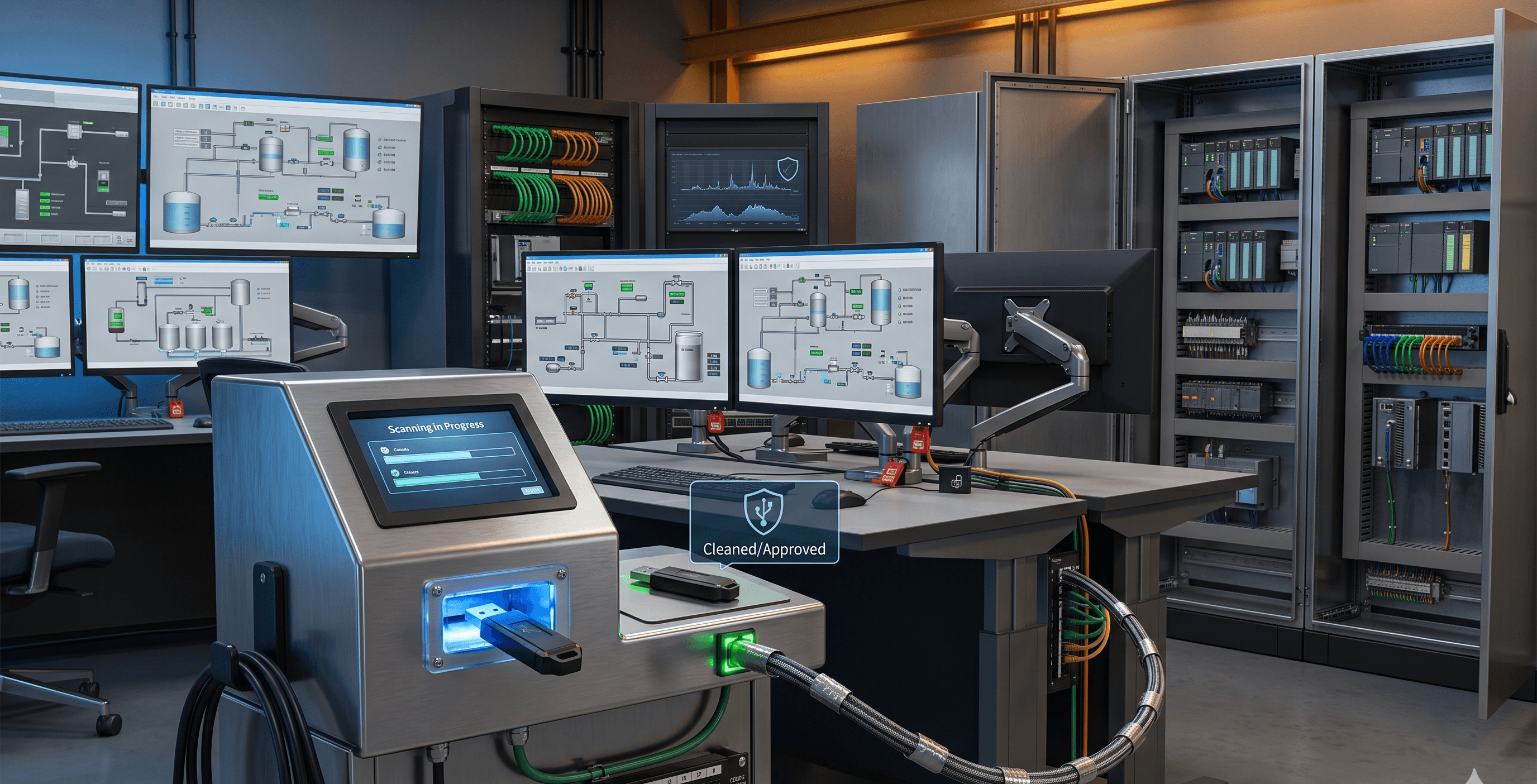
2. Implementar quioscos de desinfección USB (Sheep Dips)
Una táctica altamente efectiva para la seguridad de redes con brecha de aire es el uso obligatorio de quioscos de desinfección, a menudo denominados "sheep dips".
Establecer un punto de control físico: Coloque quioscos independientes y reforzados en las entradas físicas de su instalación o sala de control.
Escaneo obligatorio: Antes de que cualquier unidad USB (incluidas las de contratistas o fabricantes de equipos originales) pueda conectarse a un activo SCADA, debe ser escaneada por el quiosco.
Análisis multimotor: El quiosco debe ejecutar múltiples motores antivirus y antimalware diferentes para detectar firmas conocidas, al mismo tiempo que utiliza sandboxing para identificar amenazas de día cero.
Protocolos de transferencia de archivos: En lugar de permitir el USB físico dentro del entorno de OT, la mejor práctica es que el quiosco escanee los archivos y, si están limpios, los transfiera de forma segura a través de un diodo de datos a un servidor de archivos interno y desinfectado.
3. Reforzar la seguridad de endpoints para sistemas SCADA
El equipamiento SCADA heredado a menudo funciona con sistemas operativos obsoletos y sin soporte, donde el software antivirus tradicional de TI puede causar caídas del sistema o una latencia inaceptable.
Listas de aplicaciones permitidas (Whitelisting): En lugar de intentar detectar comportamientos maliciosos, defina estrictamente cómo es el comportamiento correcto. Implemente listas de aplicaciones permitidas para que solo se ejecuten ejecutables, scripts y librerías preaprobados. Si el malware de USB intenta ejecutar una carga útil desconocida, el sistema la bloqueará por defecto.
Monitoreo de integridad de archivos (FIM): Despliegue FIM para monitorear archivos de configuración SCADA críticos y directorios del sistema. Si un script introducido por USB intenta modificar estos archivos, el equipo de seguridad recibe una alerta inmediata.
Protección de endpoints nativa de OT: Utilice agentes de seguridad diseñados específicamente para sistemas ciberfísicos. Estos agentes deben tener un impacto de recursos insignificante para evitar interrumpir la naturaleza determinista de los procesos ICS.
4. Monitoreo continuo de red y detección de anomalías
Incluso con una estricta prevención de malware en USB instalada, debe asumir un estado de compromiso potencial para garantizar realmente la resiliencia operativa.
Establecer una línea base de su red: Comprenda los patrones de comunicación normales de su entorno SCADA.
Desplegar inspección profunda de paquetes (DPI): Monitoree la red en busca de comportamientos anómalos que normalmente siguen a una infección por USB, como una estación de trabajo de ingeniería que de repente intenta comunicarse con un PLC no autorizado, o comandos inesperados de lectura/escritura que se envían a través de la red.
Aislamiento rápido: Si se detecta un movimiento lateral malicioso, su arquitectura debe admitir un aislamiento rápido y segmentado para contener la amenaza antes de que afecte a los procesos físicos.
Alineación de la seguridad USB con los marcos regulatorios
Las estrategias de ciberseguridad industrial se ven impulsadas cada vez más por rigurosos mandatos globales de cumplimiento. Proteger sus sistemas ciberfísicos contra amenazas de USB respalda directamente su postura de cumplimiento.
Integración con IEC 62443
La norma IEC 62443 enfatiza fuertemente la protección del límite de zona. Los medios extraíbles representan una brecha física de este límite. Al implementar un estricto control de dispositivos USB para SCADA y quioscos de desinfección, usted aborda directamente los requisitos fundamentales para la protección de endpoints y el control de acceso dentro del marco de la norma IEC 62443.
Cumplimiento de la Directiva NIS2
Para los operadores de servicios esenciales en Europa, la Directiva NIS2 exige prácticas de gestión de riesgos rigurosas, en particular con respecto a la seguridad de la cadena de suministro y la gestión de incidentes. Debido a que contratistas y proveedores introducen con frecuencia unidades USB en el entorno, establecer protocolos estrictos de seguridad para medios extraíbles es un componente crítico del cumplimiento de NIS2.
NERC CIP
Para el sector energético, NERC CIP-003 y CIP-010 requieren controles explícitos sobre activos cibernéticos transitorios y medios extraíbles. Documentar sus procesos de autorización de USB, utilizar estaciones de desinfección y desplegar listas de aplicaciones permitidas son pasos obligatorios para evitar severas sanciones regulatorias y garantizar la resiliencia de la red eléctrica.
Guías de referencia prácticas
Para ayudarlo a traducir estos conceptos en acciones inmediatas, hemos recopilado listas de verificación prácticas y tablas de referencia para sus equipos de seguridad de OT.
Vectores comunes de ataque USB y tácticas de mitigación
Vector de ataque | Cómo funciona | Táctica principal de mitigación |
Ejecutables maliciosos | Archivos disfrazados en los que los usuarios hacen clic manualmente en las HMI. | Lista de aplicaciones permitidas (Whitelisting); políticas estrictas de ejecución de archivos. |
BadUSB / Suplantación de HID | La unidad de almacenamiento se registra como un teclado para inyectar comandos maliciosos rápidamente. | Control de dispositivos USB basado en hardware; bloquear perfiles de USB que no sean de almacenamiento. |
Infección del sector de arranque | Modifica la secuencia de arranque para cargar malware antes que el sistema operativo. | Implementación de arranque seguro (Secure Boot); deshabilitar el arranque desde USB en la BIOS/UEFI. |
Cargas útiles de día cero | Malware desconocido diseñado para explotar vulnerabilidades específicas de SCADA. | Quioscos de desinfección USB con capacidades de sandboxing. |
Higiene diaria de USB en entornos SCADA
Los gerentes de planta y los ingenieros de OT deben integrar esta lista de verificación en sus rutinas diarias de resiliencia operativa.
Verificar bloqueos físicos: Asegúrese de que todos los bloqueadores físicos de puertos USB en PLCs, RTUs y HMIs críticos estén intactos y no hayan sido alterados.
Hacer cumplir el uso de quioscos: Confirme que todos los contratistas externos hayan procesado sus actualizaciones de firmware y archivos a través del quiosco de desinfección USB designado.
Revisar registros de acceso: Verifique los registros de seguridad de endpoints para confirmar que no se montaron dispositivos USB no autorizados durante el turno anterior.
Actualizar listas de permitidos: Asegúrese de que cualquier nueva unidad USB cifrada propiedad de la empresa se haya agregado correctamente a la lista central de permitidos por ID de hardware.
Verificar firmas del quiosco: Compruebe que las definiciones de antivirus en los quioscos de desinfección USB aislados estén actualizadas (a través de actualizaciones manuales seguras o diodos de datos administrados).
Respuesta a incidentes para medios extraíbles
Si se detecta una unidad USB no autorizada o se sospecha de una infección por malware a través de USB, siga estos pasos inmediatos:
Aislar el endpoint: Desconecte inmediatamente la estación de trabajo de ingeniería o HMI afectada de la red local de OT para evitar el movimiento lateral.
NO reiniciar: Deje el sistema encendido para preservar la memoria volátil (RAM) para el análisis forense, a menos que la seguridad física requiera el apagado inmediato del proceso.
Confiscar el medio óptico/físico: Retire con cuidado y asegure la unidad USB sospechosa para la investigación forense. No la conecte a ninguna otra máquina.
Analizar el tráfico de red: Revise los registros de monitoreo de red para determinar si el endpoint comprometido intentó comunicarse con otros activos en el sistema ciberfísico.
Iniciar revisión de FIM: Verifique las alertas del Monitoreo de Integridad de Archivos para ver exactamente qué archivos del sistema o configuraciones de SCADA fueron alterados por la carga útil.
Protegiendo el futuro de su infraestructura crítica
La dependencia de los medios extraíbles es una realidad de las operaciones industriales modernas, pero no tiene por qué ser un punto ciego en su postura de seguridad. Al cambiar su perspectiva de defensas puramente basadas en la red hacia una resiliencia operativa integral, puede neutralizar eficazmente los vectores de amenazas físicas.
Implementar un control estricto de dispositivos USB, desplegar quioscos de desinfección y utilizar seguridad de endpoints nativa para OT en sistemas SCADA no son solo mejores prácticas, son necesidades para salvaguardar los sistemas ciberfísicos contra actores de amenazas altamente motivados.
En Shieldworkz, entendemos las limitaciones únicas y las rigurosas exigencias de la infraestructura crítica. Nos especializamos en adaptar controles técnicos avanzados a la realidad de la planta, asegurando que mantenga operaciones ininterrumpidas mientras cumple plenamente con las complejas regulaciones globales.
¿Listo para construir una defensa resiliente contra amenazas físicas y digitales? Proteger sus sistemas ciberfísicos requiere un enfoque personalizado de zero trust para los medios extraíbles. Solicite una demostración hoy mismo con nuestros expertos en ciberseguridad industrial y permítanos ayudarlo a proteger sus operaciones desde el endpoint hasta la empresa corporativa.
Recursos adicionales:
¿Qué son los medios extraíbles? Riesgos, políticas y soluciones de seguridad para OT industrial aquí
Plantilla gratuita de política de medios extraíbles para equipos de OT y TI aquí
Guías de remediación aquí
Recibe semanalmente
Recursos y Noticias
Vea cómo nuestras soluciones de seguridad de OT líderes en la industria abordan los desafíos de seguridad críticos
También te puede interesar

CVE-2026-92817: Ignition SCADA Privilege Escalation - Affected Versions & Mitigation

Team Shieldworkz

Preventing USB-Based Cyberattacks in OT: From Malware Detection to Secure File Approval
Team Shieldworkz

OpenPLC Runtime v3 Security Advisory: Potential Risks for Industrial Deployments
Team Shieldworkz

Yggdrasil, Russia-linked cyber operations, and emerging risks to global enterprises and governments
Prayukth K V

Cybersecurity Week in Review: Major Data Breaches, Critical Vulnerabilities and Supply-Chain Attacks (October 17–23, 2026)
Team Shieldworkz

NERC CIP Asset Inventory Management: Closing Visibility Gaps Across OT Networks
Team Shieldworkz