Equipo Shieldworkz
Todos los gerentes de planta han visto suceder esto. Un proveedor llega para el mantenimiento programado, conecta una unidad USB en una HMI para cargar una actualización de firmware y se retira sin pensarlo dos veces. Nadie se detiene a preguntar qué más podría estar viajando en esa unidad. Este único y rutinario momento es uno de los puntos de entrada más persistentes y subestimados para incidentes cibernéticos en los entornos industriales de hoy en día.
Los medios extraíbles han sido el método de entrega detrás de algunos de los ataques más disruptivos a los sistemas de control industrial en la historia. Siguen siendo una de las pocas vías capaces de puentear una red con brecha de aire (air-gapped), eludiendo por completo las defensas perimetrales. Esta es precisamente la razón por la que la norma IEC 62443, el estándar reconocido internacionalmente para la seguridad de los sistemas de automatización y control industrial (IACS), pone un énfasis directo en controlar y escanear los medios portátiles antes de que toquen la tecnología operativa (OT).
Antes de continuar, no olvide consultar nuestra publicación de blog anterior sobre Dominando NIST SP 800-18 Revisión 2: aquí
Esta guía desglosa lo que realmente significa el escaneo de medios en un contexto de OT, por qué la norma IEC 62443 lo trata como un control fundacional en lugar de una ocurrencia tardía, y cómo se ve en la práctica un programa de manejo de medios maduro y en cumplimiento. Ya sea que esté construyendo una hoja de ruta de cumplimiento, preparándose para una auditoría o simplemente tratando de cerrar una brecha conocida en sus defensas, este es el entendimiento básico que todo líder de seguridad de OT necesita.
¿Qué es el escaneo de medios en la seguridad cibernética de OT?
El escaneo de medios, en el contexto de la tecnología operativa, se refiere al proceso estructurado de inspeccionar dispositivos de almacenamiento extraíbles, unidades USB, discos duros externos, tarjetas SD, CD y cualquier dispositivo portátil de transmisión de datos, antes de que se les permita conectarse a las redes o endpoints de los sistemas de control.
A diferencia de un escaneo típico de TI empresarial, que generalmente se ejecuta de manera silenciosa en segundo plano en una computadora portátil corporativa, el escaneo de medios de OT tiene que tomar en cuenta un entorno muy diferente. Los sistemas de control a menudo ejecutan sistemas operativos heredados, protocolos patentados y equipos que no pueden tolerar reinicios no planificados o sobrecarga de rendimiento. Una solución de escaneo de medios para OT necesita detectar cargas útiles maliciosas, tipos de archivos no autorizados y violaciones de políticas sin poner nunca en riesgo la disponibilidad o la seguridad.
En esencia, el escaneo de medios en entornos industriales normalmente implica:
Detección de malware y firmas: identificación de código malicioso conocido, incluidas las familias de malware específicas de OT diseñadas para dirigirse a PLC, RTU y sistemas SCADA.
Análisis heurístico y de comportamiento: marcar comportamientos de archivos sospechosos incluso cuando no exista una firma conocida.
Validación de tipos de archivos y contenido: garantizar que solo se permitan configuraciones y formatos de archivo aprobados.
Aplicación de políticas: bloquear por completo los dispositivos no autorizados, independientemente de los resultados del escaneo.
Creación de registros y pistas de auditoría: registrar cada evento de escaneo para fines de cumplimiento y análisis forense.
El objetivo es fácil de enunciar pero difícil de ejecutar bien: nada entra al entorno de OT a través de medios extraíbles a menos que haya sido verificado como seguro, autorizado y registrado.
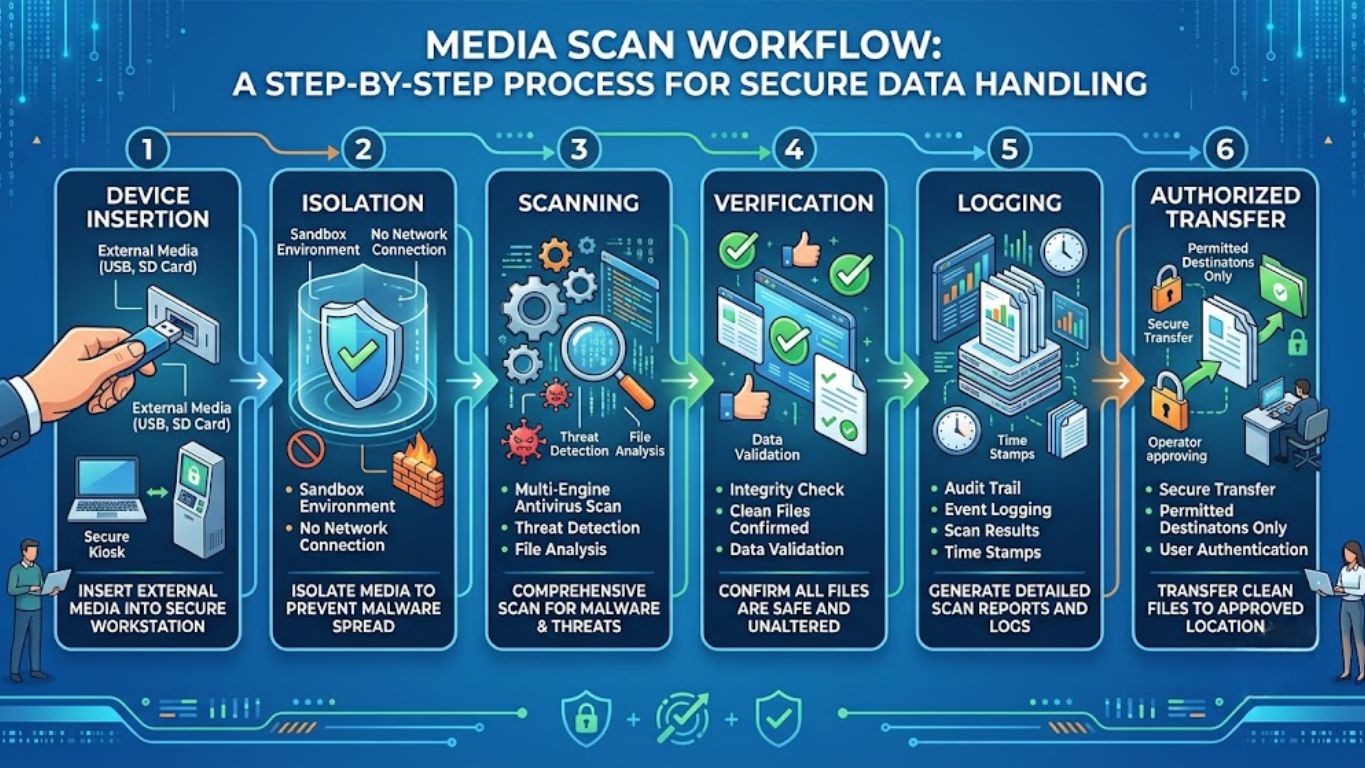
flujo de trabajo de escaneo de medios: inserción de dispositivos, aislamiento, escaneo, verificación, registro y transferencia autorizada
Por qué la norma IEC 62443 trata a los medios extraíbles como un control prioritario
La norma IEC 62443 se desarrolló específicamente porque los marcos de seguridad de TI tradicionales no se trasladan de manera limpia a los entornos industriales. El estándar se organiza en varias partes, que cubren la gobernanza (62443-2-1), los requisitos del sistema (62443-3-3) y los requisitos a nivel de componentes (62443-4-2), y el control de medios extraíbles se entrelaza a través de múltiples capas de esta estructura.
El razonamiento es sencillo. Las brechas de aire (air gaps), consideradas durante mucho tiempo el estándar de oro de la protección de OT, rara vez son absolutas en la práctica. Las actividades de mantenimiento, las actualizaciones de firmware, las transferencias de estaciones de trabajo de ingeniería y las visitas de proveedores externos crean razones legítimas para que los medios físicos crucen el límite entre TI y OT, o entre una red de OT aislada y el mundo exterior. Cada uno de esos cruces legítimos es también un vector de ataque potencial.
Los requisitos fundacionales (FR) de la norma IEC 62443 más relevantes para el manejo de medios incluyen:
Requisito fundacional | Relevancia para el escaneo de medios |
FR 1 – Control de identificación y autenticación | Garantiza que solo el personal autorizado y los dispositivos autorizados puedan iniciar una transferencia de medios |
FR 3 – Integridad del sistema | Requiere mecanismos para detectar y prevenir software no autorizado o cambios de configuración introducidos a través de medios |
FR 5 – Flujo de datos restringido | Gobierna cómo se mueven los datos, incluidos los archivos de medios extraíbles, entre zonas y conductos |
FR 6 – Respuesta oportuna a eventos | Requiere el registro y la generación de alertas cuando se detectan violaciones de escaneo o contenido malicioso |
FR 7 – Disponibilidad de recursos | Garantiza que los procesos de escaneo no comprometan el tiempo de actividad del sistema ni las funciones de seguridad |
En lugar de exigir una tecnología específica, la norma IEC 62443 se centra en los resultados: controle lo que entra en su entorno, verifíquelo antes de que se conecte y mantenga una pista documentada que demuestre que el proceso se siguió de manera constante. Esto es lo que hace que el escaneo de medios sea un requisito de cumplimiento en sustancia, incluso en los casos en que no siempre se deletrea con ese nombre exacto en cada cláusula.
Riesgos, desafíos y perspectivas de la industria
El precedente del mundo real: cómo los medios extraíbles han dado forma a la historia de la ciberseguridad industrial
Las amenazas transmitidas por medios no son teóricas. Varios de los eventos de seguridad de ICS más trascendentales en las últimas dos décadas tienen su origen en dispositivos de almacenamiento portátiles.
Uno de los casos más antiguos y más estudiados involucró un malware sofisticado diseñado específicamente para atacar sistemas de control industrial, descubierto alrededor de 2010. Fue diseñado para propagarse a través de unidades USB infectadas, lo que le permitió saltar a través de redes con brecha de aire que no tenían conectividad directa a Internet. Esta única característica, la capacidad de moverse físicamente en lugar de a través de una red, fue lo que hizo que el ataque fuera tan efectivo contra instalaciones que creían que el aislamiento por sí solo era protección suficiente.
Años más tarde, el malware diseñado específicamente para interferir con los sistemas instrumentados de seguridad industrial demostró una lección similar: los atacantes entienden que las estaciones de trabajo de seguridad y de ingeniería, que a menudo son las mismas máquinas que se utilizan para cargar configuraciones desde medios extraíbles, son objetivos de alto valor precisamente porque se sitúan en la intersección de la conveniencia y la función crítica.
Incluso fuera de los incidentes específicos de malware, los eventos provocados por personas internas que involucran el acceso no autorizado a los sistemas de control, como el caso bien documentado de un excontratista descontento que manipuló un sistema de aguas residuales en Australia a principios de la década de 2000, refuerzan un principio relacionado: el control de acceso y el monitoreo alrededor de las interfaces de los sistemas de control, incluidas las interfaces físicas y extraíbles, no pueden ser una ocurrencia tardía.
Estos casos comparten un hilo común. En cada uno de ellos, el compromiso no comenzó con una sofisticada intrusión en la red. Comenzó con algo físico, algo que un empleado o proveedor consideraba rutinario, y algo que no tenía implementado ningún paso de verificación.
Por qué este riesgo persiste en las instalaciones modernas
A pesar de la conciencia generalizada sobre estos incidentes históricos, el riesgo de los medios extraíbles no ha desaparecido. En todo caso, ha evolucionado.
Dependencia de proveedores y OEM: la mayoría de las instalaciones industriales dependen de terceros proveedores para las actualizaciones de firmware, diagnósticos y mantenimiento, y muchos de esos proveedores todavía utilizan unidades USB como su método de transferencia predeterminado
Limitaciones de los sistemas heredados: los PLC, HMI y estaciones de trabajo de ingeniería más antiguos con frecuencia carecen de soporte antivirus nativo o del margen de procesamiento para el escaneo en tiempo real, lo que deja la transferencia de medios como una de las pocas vías prácticas de actualización
Suposiciones de la brecha de aire: muchos equipos de planta todavía tratan el aislamiento de la red como un límite de seguridad completo, cuando en la práctica solo aborda las amenazas basadas en la red, no las físicas
Aplicación de políticas inconsistente: incluso cuando existe una política de medios en papel, su aplicación a menudo depende del cumplimiento manual en lugar de controles técnicos
Brechas de visibilidad: sin una infraestructura de escaneo dedicada, los equipos de seguridad con frecuencia no tienen registro de qué dispositivos se conectaron, cuándo o por quién
El impacto comercial de hacer esto mal
Para los tomadores de decisiones que evalúan dónde invertir un presupuesto de seguridad limitado, ayuda enmarcar el riesgo de los medios extraíbles en términos de consecuencias operativas y financieras, en lugar de términos puramente técnicos.
Categoría de impacto | Consecuencia potencial |
Tiempo de inactividad de producción | El malware introducido a través de medios puede forzar paradas de emergencia, deteniendo las líneas de producción durante horas o días |
Compromiso del sistema de seguridad | Las cargas útiles maliciosas dirigidas a los sistemas instrumentados de seguridad pueden desactivar las funciones de protección, creando un riesgo de seguridad física |
Exposición regulatoria | El incumplimiento de la norma IEC 62443 o de los mandatos específicos del sector puede dar lugar a sanciones, pérdida de certificaciones o descalificación de contratos |
Daño a la reputación | Los incidentes de OT publicados erosionan la confianza de los clientes y las partes interesadas, particularmente en los sectores de infraestructura crítica |
Costo de recuperación | La respuesta a incidentes, la investigación forense y la restauración del sistema tras un compromiso de OT rutinariamente resultan en gastos no planificados significativos |
Riesgo de seguro y contractual | Cada vez más, los aseguradores de riesgos cibernéticos y los socios de la cadena de suministro requieren evidencia documentada de controles como el escaneo de medios como condición para la cobertura o el contrato |
Ninguna de estas consecuencias requiere un atacante a nivel de Estado-nación. Una sola unidad USB infectada, introducida por un empleado o proveedor bien intencionado, es suficiente para desencadenar cualquiera de ellas.

Gráfico de barras que ilustra el costo promedio del tiempo de inactividad por hora en los sectores de manufactura, energía y servicios públicos
Recomendaciones prácticas y mejores prácticas para la seguridad de medios extraíbles en OT
Construir un programa de escaneo de medios que satisfaga las expectativas de la norma IEC 62443 tiene menos que ver con comprar un solo producto y más con diseñar un proceso estructurado en capas y ejecutable. Las siguientes prácticas reflejan lo que suelen implementar los programas maduros de seguridad de OT.
1. Establecer una estación dedicada al escaneo de medios (modelo de kiosco)
En lugar de permitir que los medios extraíbles se conecten directamente a cualquier endpoint de OT, las organizaciones líderes despliegan kioscos de escaneo dedicados ubicados en el límite entre el mundo exterior y la red de OT. Cada dispositivo, ya sea traído por un empleado, proveedor o auditor, se escanea en esta estación antes de que se permita el movimiento de cualquier archivo.
Este enfoque aísla por completo la función de escaneo de los sistemas de producción, lo que significa que incluso si un dispositivo contiene contenido malicioso, el kiosco de escaneo mismo absorbe el riesgo en lugar de un endpoint operativo.
2. Aplicar una política de denegación de dispositivos por defecto (Default-Deny)
Una política sólida de control de medios asume que ningún dispositivo es confiable hasta que se demuestre lo contrario. Esto significa:
Deshabilitar los puertos USB en las estaciones de trabajo de ingeniería, HMI y PLC de forma predeterminada
Requerir autorización explícita para cualquier excepción
Utilizar listas blancas de dispositivos para que solo los dispositivos registrados con número de serie conocido puedan conectarse, incluso después del escaneo
3. Combinar la detección basada en firmas y comportamiento
El escaneo basado únicamente en firmas no es suficiente contra amenazas nuevas o dirigidas. Un proceso de escaneo de medios resiliente superpone la detección de firmas con el análisis heurístico y de comportamiento, detectando actividad sospechosa incluso cuando no coincide ninguna firma de malware conocida.
4. Sanitizar, no solo escanear
Incluso en entornos de mayor riesgo, algunas organizaciones van un paso más allá del escaneo al implementar procesos de desarme y reconstrucción de contenido (CDR), que reconstruyen los archivos en versiones limpias y verificadas en lugar de simplemente marcar el contenido malicioso. Esto es particularmente valioso para los archivos de ingeniería y los paquetes de firmware, donde incluso un resultado de escaneo "limpio" puede no dar cuenta por completo de los riesgos de macros o scripts integrados.
5. Mantener registros detallados y resistentes a manipulaciones
El énfasis de la norma IEC 62443 en la respuesta oportuna y la rendición de cuentas significa que cada evento de escaneo, aprobado o fallido, debe registrarse con:
Identificador y propietario del dispositivo
Marca de tiempo y ubicación
Resultado del escaneo y cualquier anomalía detectada
Personal autorizado que aprobó la transferencia
Estos registros se vuelven esenciales durante las auditorías de cumplimiento y, si ocurre un incidente, durante la investigación forense.
6. Capacitar al personal y a los proveedores como un control central, no como una ocurrencia tardía
La tecnología por sí sola no puede cerrar esta brecha. Los proveedores, contratistas y empleados necesitan una capacitación clara y repetitiva sobre por qué es importante el escaneo de medios y qué requiere el proceso de ellos. Un kiosco de escaneo que los proveedores omiten rutinariamente porque los ralentiza no proporciona ninguna protección real.
7. Alinear las políticas de medios con la arquitectura de zonas y conductos
El modelo de zonas y conductos de la norma IEC 62443 segmenta las redes en función del riesgo y la función. Las políticas de manejo de medios deben reflejar esta segmentación, lo que significa que un dispositivo autorizado para una zona de menor riesgo no debe considerarse confiable automáticamente en una zona crítica para la seguridad o de alta consecuencia sin una nueva verificación.
8. Probar y auditar periódicamente el programa
Un programa de escaneo de medios no debe ser un control de "configurar y olvidar". Las auditorías internas periódicas, los ejercicios teóricos que simulan un incidente transmitido por medios y las revisiones periódicas de los registros de escaneo ayudan a confirmar que el programa está funcionando como se diseñó y adaptándose a las nuevas amenazas.
Mejor práctica | Beneficio de cumplimiento principal |
Kioscos de escaneo dedicados | Soporta FR 5 – Flujo de datos restringido |
Política de denegación de dispositivos por defecto | Soporta FR 1 – Control de identificación y autenticación |
Detección de firmas + comportamiento | Soporta FR 3 – Integridad del sistema |
Desarme y reconstrucción de contenido (CDR) | Refuerza la garantía de integridad más allá del escaneo básico |
Registro de auditoría detallado | Soporta FR 6 – Respuesta oportuna a eventos |
Capacitación para proveedores y personal | Refuerza la adherencia a las políticas en FR 1 y FR 3 |
Política de medios alineada con zonas | Soporta los requisitos generales de segmentación de zonas y conductos |
Cómo apoya Shieldworkz a las organizaciones
Shieldworkz trabaja junto a los líderes de seguridad de OT, gerentes de planta y equipos de cumplimiento para diseñar e implementar controles de medios extraíbles que se alineen directamente con los requisitos de la norma IEC 62443, sin interrumpir la continuidad operativa. Nuestro enfoque se basa en las realidades prácticas de los entornos industriales, no en suposiciones genéricas de seguridad de TI.
Evaluaciones integrales de riesgos de OT que identifican cada punto donde los medios extraíbles ingresan actualmente a su entorno, incluyendo vías no documentadas o informales
Diseño de arquitectura de escaneo de medios personalizado, adaptado a su segmentación de red existente, limitaciones de equipos heredados y flujos de trabajo operativos
Análisis de brechas de la norma IEC 62443 y desarrollo de hojas de ruta de cumplimiento, mapeando sus prácticas actuales de manejo de medios frente a los requisitos fundacionales y niveles de seguridad pertinentes
Desarrollo de políticas y orientación para su aplicación, incluidos marcos de denegación por defecto, estrategias de listas blancas de dispositivos y protocolos de acceso de proveedores
Programas de capacitación para personal y proveedores diseñados específicamente para las realidades de la planta, no contenido genérico de concientización sobre ciberseguridad
Soporte de documentación listo para auditorías, ayudando a su equipo a mantener la pista de registro y evidencia necesaria tanto para la gobernanza interna como para las auditorías de certificación externas
Soporte de asesoramiento continuo, asegurando que su postura de seguridad de medios evolucione junto con las nuevas amenazas, nuevos equipos y nuevas expectativas regulatorias
Nuestro objetivo no es entregarle un producto e irnos. Trabajamos como una extensión de su equipo, ayudando a construir un programa de seguridad de medios que se mantenga firme bajo la presión operativa real y el escrutinio de auditoría real.
Conclusión
Los medios extraíbles seguirán siendo parte de las operaciones industriales en el futuro previsible. Los proveedores seguirán trayendo unidades USB para las actualizaciones de firmware. Los ingenieros seguirán transfiriendo archivos de configuración entre sistemas. La pregunta no es si esta actividad sucederá, sino si su organización tiene implementados los controles para garantizar que suceda de manera segura, visible y alineada con las expectativas de la norma IEC 62443.
Un programa de escaneo de medios bien diseñado cierra una de las brechas históricamente más explotadas en la seguridad de OT, al tiempo que desarrolla la madurez del proceso y de la documentación que los marcos de cumplimiento, las aseguradoras y los socios comerciales esperan ver cada vez más. Este no es un control que se deba posponer hasta que un incidente fuerce el asunto. Es una pieza fundamental de una postura de ciberseguridad industrial resiliente, y que refleja directamente la seriedad con la que su organización se toma la protección de sus operaciones físicas.
Las organizaciones que se adelantan a este riesgo no son las que tienen presupuestos ilimitados. Son aquellas que tratan cada unidad USB, cada dispositivo externo y cada computadora portátil de proveedor como un punto de entrada potencial que vale la pena verificar, cada vez.
Reserve una consulta gratuita con nuestros expertos
Si está evaluando las prácticas actuales de manejo de medios de su organización, preparándose para una auditoría de la norma IEC 62443 o simplemente desea una evaluación honesta y experta de dónde se encuentra hoy su riesgo de medios extraíbles, nuestro equipo está listo para ayudarlo.
Reserve una consulta gratuita con los expertos en ciberseguridad de OT de Shieldworkz y dé el siguiente paso hacia un entorno industrial más resiliente, en cumplimiento y protegido con confianza.
Recursos adicionales:
Asesoría de Inteligencia de Ciberamenazas de OT - Medio Oriente aquí
Directiva NIS2: Logrando el cumplimiento de NIS2 a través de IEC 62443 aquí
¿Qué son los medios extraíbles? Riesgos, políticas y soluciones de seguridad para OT industrial aquí
Plantilla gratuita de política de medios extraíbles para equipos de OT y TI aquí
Recibe semanalmente
Recursos y Noticias
Vea cómo nuestras soluciones de seguridad de OT líderes en la industria abordan los desafíos de seguridad críticos
También te puede interesar

What the French supermarket cyberattack reveals about OT security
Prayukth K V

Inside the Albert Heijn cyber incident: Investigating the attack, the IT/OT exposure, and the risks to critical operations
Team Shieldworkz

50°C by cyberattack? Inside France’s supermarket refrigeration crisis
Prayukth K V

Automating IEC 62443 Compliance Assessments Without Losing Expert Control
Team Shieldworkz

Investigative cyber threat intelligence report: Daiichi Kosho supply-chain data exposure
Prayukth K V

How AI Is Changing IEC 62443 Assessments
Team Shieldworkz