Schadsoftware-Präventionsstrategien mittels Media Scan in der OT


Team Shieldworkz
Jeder Betriebsleiter hat diese beruhigende Aussage schon einmal gehört: „Unser Steuerungsnetzwerk ist physisch isoliert (Air-gapped), also sind wir sicher.“ Dies ist einer der hartnäckigsten und gefährlichsten Mythen in der industriellen Cybersicherheit. Air Gaps verhindern nicht, dass Bedrohungen durch die Vordertür eindringen – und in OT-Umgebungen ist diese Vordertür oft ein USB-Stick, eine externe Festplatte oder das Laptop eines Dienstleisters, das für ein routinemäßiges Firmware-Update angeschlossen wird.
Bevor wir beginnen, vergessen Sie nicht, unseren vorherigen Beitrag zu „CEA-Cybersicherheitsvorschriften 2026: Was indische Energieversorgungsunternehmen tun müssen“ hier zu lesen.
Wechselmedien haben sich klammheimlich zu einem der beständigsten Wege entwickelt, über die Schadsoftware in industrielle Steuerungssysteme, SCADA-Netzwerke und Fertigungshallen gelangt. Im Gegensatz zu Phishing-E-Mails oder exponierten Fernzugriffshäfen benötigen medienbasierte Bedrohungen keine Internetverbindung, um sich zu verbreiten – sie benötigen lediglich einen Menschen mit einem Gerät und einer auszuführenden Aufgabe. Für OT-Sicherheitsverantwortliche, CISOs und Anlagenbetreiber ist das Verständnis zur Vermeidung von Schadsoftware durch strukturiertes Medienscanning keine technische Spielerei. Es ist betriebliches Risikomanagement.
Dieser Blog zeigt auf, warum Wechselmedien eine der Hauptinfektionsquellen in der OT bleiben, was die IEC 62443 von Unternehmen diesbezüglich erwartet, wie modernes Medienscanning tatsächlich funktioniert und welche praktischen Schritte Industrieteams unternehmen können, um diese Sicherheitslücke zu schließen, ohne die Betriebsabläufe zu verlangsamen.
Warum Wechselmedien nach wie vor eine Bedrohung für OT-Umgebungen darstellen
Der Air-Gap-Mythos
Die physische Trennung (Air-Gapping) ist eine wertvolle Sicherheitsmaßnahme, aber sie wurde nie dafür konzipiert, die Bewegung physischer Geräte zu stoppen. Ein Steuerungsnetzwerk ohne Internetverbindung kann in dem Moment kompromittiert werden, in dem jemand einen USB-Stick einsteckt, um eine Konfigurationsdatei zu übertragen, ein Patch zu installieren oder Diagnoseprotokolle abzurufen. Tatsächlich gilt: Je isolierter ein Netzwerk von der routinemäßigen Überwachung ist, desto attraktiver werden Wechselmedien als Einfallstor, da sie netzwerkbasierte Abwehrmechanismen vollständig umgehen.
Dies wird durch die tatsächliche tägliche Praxis in OT-Umgebungen noch verstärkt. Ingenieure bewegen sich mit Laptops und Datenträgern zwischen Standorten. Dienstleister reisen mit eigenen Medien für geplante Wartungsarbeiten an. Historian-Daten werden exportiert und zwischen Systemen übertragen, die eigentlich nie miteinander vernetzt werden sollten. Jede dieser alltäglichen, notwendigen Aktivitäten ist gleichzeitig eine Gelegenheit für Schadsoftware, von einem kompromittierten Gerät in eine Produktionsumgebung zu gelangen.
Praxisnahe Lehren: Wenn tragbare Medien zum Einfallstor wurden
Die Geschichte der industriellen Cybersicherheit bietet mehrere ernüchternde Erinnerungen daran, was passiert, wenn Kontrollen für Wechselmedien fehlen oder unzureichend sind. Diese Vorfälle, die inzwischen in der Öffentlichkeit weitgehend dokumentiert sind, prägen weiterhin das Risikobewusstsein seriöser Organisationen in Bezug auf physische Datenträger.
Jahr | Vorfall | Sektor | Einfallstor | Geschäftsauswirkung |
2008 | Agent.btz-Infiltration in US-Militärnetzwerke | Verteidigung | Infizierter USB-Stick | Auslösung einer mehrjährigen, behördenübergreifenden Bereinigungsmaßnahme und ein dauerhaftes Verbot von Wechselmedien in klassifizierten Netzwerken |
2009 | Conficker-Wurm breitete sich in Fertigungs- und Gesundheitsnetzwerken aus | Fertigung, Gesundheitswesen | Wechseldatenträger und freigegebene Netzwerkordner | Weitreichende Ausfallzeiten, da infizierte Engineering-Workstations isoliert und neu aufgesetzt werden mussten |
2010 | Stuxnet-Angriff auf Urananreicherungszentrifugen | Energie / Nuklear | USB-Stick, der in eine physisch isolierte Anlage eingebracht wurde | Physische Schäden an den Zentrifugen und eine dauerhafte Veränderung der Absicherung physisch isolierter Standorte |
2017 | WannaCry-Ransomware legt Produktionslinien lahm | Fertigung, Logistik | Netzwerkweite Verbreitung, beschleunigt durch unmanaged Endpunkte | Stillstand von Produktionsschichten; verdeutlichte, wie schnell IT-Infektionen bei schwacher Segmentierung in die OT übergreifen |
Tabelle 1: Eine kurze Historie darüber, wie Wechselmedien und tragbare Datenträger zu schwerwiegenden Sicherheitsvorfällen in der Industrie und bei kritischen Infrastrukturen beigetragen haben.
Was diese Vorfälle eint, ist nicht ihre Komplexität, sondern die Gelegenheit. In mehreren Fällen war die Schadsoftware selbst nicht sonderlich fortschrittlich. Was sie effektiv machte, war das Fehlen eines Kontrollpunkts, an dem das Medium überprüft werden konnte, bevor es ein sensibles System erreichte. Dieser einzige fehlende Schritt – ein Scan vor dem Anschließen – ist die Lücke, die diese gesamte Strategie schließen soll.
Warum das Risiko wächst und nicht schrumpft
Da IT- und OT-Netzwerke konvergieren und Ferndiagnosen, Cloud-angebundene Historians sowie Wartungsverträge mit Dritten zum Standard werden, wächst die Anzahl der Personen und Geräte, die mit industriellen Systemen in Berührung kommen, kontinuierlich. Jedes zusätzliche Dienstleister-Laptop, jeder weitere USB-Stick eines Herstellers ist ein neuer, unüberwachter Pfad in die Umgebung. Gleichzeitig werden an vielen Industriestandorten immer noch Legacy-Betriebssysteme eingesetzt, die keine Echtzeit-Sicherheitsupdates erhalten können. Dies macht sie überproportional anfällig für Schadsoftware, die ein moderner IT-Endpunkt sofort abfangen würde.
Grundlagen der Mediensicherheit nach IEC 62443
Was der Standard von Organisationen erwartet
Die IEC 62443, das international anerkannte Rahmenwerk für die Sicherheit industrieller Automatisierungs- und Steuerungssysteme, behandelt tragbare Medien als eigenständige Risikokategorie und nicht als Nebensache. Die Systemanforderungen des Standards fordern Kontrollmaßnahmen zur Einschränkung der Nutzung tragbarer und mobiler Geräte, die Verifizierung, dass Wechselmedien vor der Nutzung auf schädliche Inhalte überprüft werden, und die lückenlose Protokollierung, wann und wie Medien in eine Steuerungsumgebung eingebracht werden.
Auf organisatorischer Ebene fordert die IEC 62443-2-1 eine dokumentierte Richtlinie für den Umgang mit Wechselmedien: Wer ist berechtigt, Geräte auf das Gelände zu bringen, welche Scans müssen vor dem Anschließen durchgeführt werden und wie werden Ausnahmen genehmigt und protokolliert? Auf Systemebene fordert die IEC 62443-3-3 eine technische Durchsetzung: die Fähigkeit, nicht autorisierten Code von Wechselmedien zu erkennen und zu blockieren, bevor er eine Zone oder ein Conduit innerhalb der Architektur erreicht.
Warum Compliance allein noch keinen Schutz bietet
Die formalen Anforderungen eines Standards zu erfüllen und das tatsächliche Risiko zu reduzieren, sind zwei verschiedene Dinge. Eine schriftliche Richtlinie, die besagt, dass „alle Medien gescannt werden müssen“, hat wenig Wert, wenn das Scannen inkonsistent erfolgt, das Scan-Tool selbst veraltet ist oder es keine Möglichkeit gibt zu überprüfen, ob vor dem Anschließen eines Geräts tatsächlich ein Scan stattgefunden hat. Echte Mediensicherheit erfordert, dass Richtlinie, Technologie und die tägliche Betriebspraxis aufeinander abgestimmt sind – und genau bei dieser Abstimmung tun sich die meisten Organisationen nach wie vor schwer.
Grundlagen des OT-Medienscannings: Wie moderne Überprüfung tatsächlich funktioniert
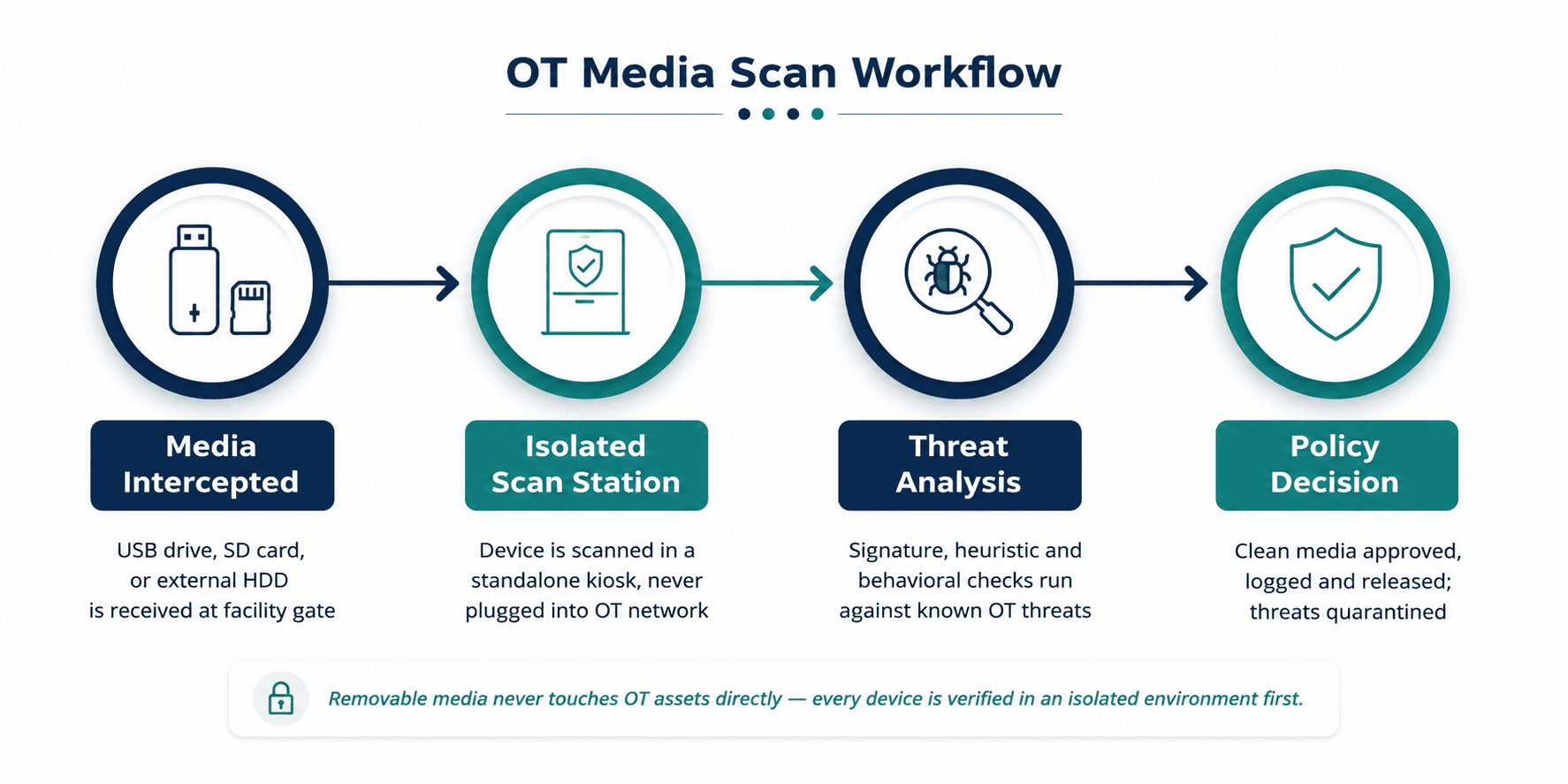
Abbildung 1: Ein typischer Workflow für das OT-Medienscanning – Medien werden an einer isolierten Station überprüft, bevor sie jemals ein Asset im Steuerungsnetzwerk erreichen.
Isolierte Scan-Kioske
Das Fundament eines effektiven OT-Medienscan-Programms ist die physische und logische Trennung. Anstatt einen USB-Stick auf derselben Workstation zu scannen, die einen Prozess steuert, setzen Unternehmen dedizierte Scan-Kioske ein, die an den physischen Zugangspunkten einer Anlage positioniert sind – an der Pforte, im Wartungsbüro oder an der Schwelle zum Leitstand. Diese Kioske sind niemals mit dem Produktionsnetzwerk verbunden. Ihre einzige Aufgabe ist es, Medien zu prüfen und ein Ergebnis zu liefern, bevor diese Medien auch nur in die Nähe eines OT-Assets gelangen.
Signatur-, Heuristik- und verhaltensbasierte Erkennung
Eine leistungsfähige Scan-Station verlässt sich nicht auf eine einzige Erkennungsmethode. Signaturbasiertes Scannen erfasst bekannte Schadsoftware schnell und zuverlässig. Die heuristische Analyse sucht nach verdächtigen Codemustern, die auf bösartiges Verhalten hindeuten, selbst wenn keine exakte Signaturübereinstimmung vorliegt. Die verhaltensbasierte und Sandbox-Analyse geht noch einen Schritt weiter und beobachtet, was eine Datei tatsächlich in einer isolierten Umgebung zu tun versucht. Dies ist besonders wichtig, um neuartige oder gezielte Bedrohungen abzufangen, die speziell darauf ausgelegt sind, Signaturdatenbanken zu umgehen – genau die Art von Bedrohungen, die am wahrscheinlichsten auf industrielle Ziele gerichtet sind.
Protokollierung, Chain of Custody und Auditierbarkeit
Jeder Scan muss ein Protokoll erzeugen: Welches Gerät wurde gescannt, wer hat es vorgelegt, wie lautete das Ergebnis und was geschah als Nächstes? Dies ist keine Bürokratie zum Selbstzweck. Wenn ein Vorfall auftritt, ist dieses Protokoll oft der schnellste Weg, um nachzuvollziehen, wie eine Bedrohung in die Umgebung gelangt ist und wer dasselbe infizierte Gerät möglicherweise an anderer Stelle auf dem Gelände verwendet hat. Für Organisationen, die einer regulatorischen Aufsicht unterliegen (z. B. KRITIS-Betreiber), dient dieser Audit Trail zudem häufig als Nachweis der gebotenen Sorgfaltspflicht.
Warum Wechselmedien ein führender OT-Infektionsvektor bleiben
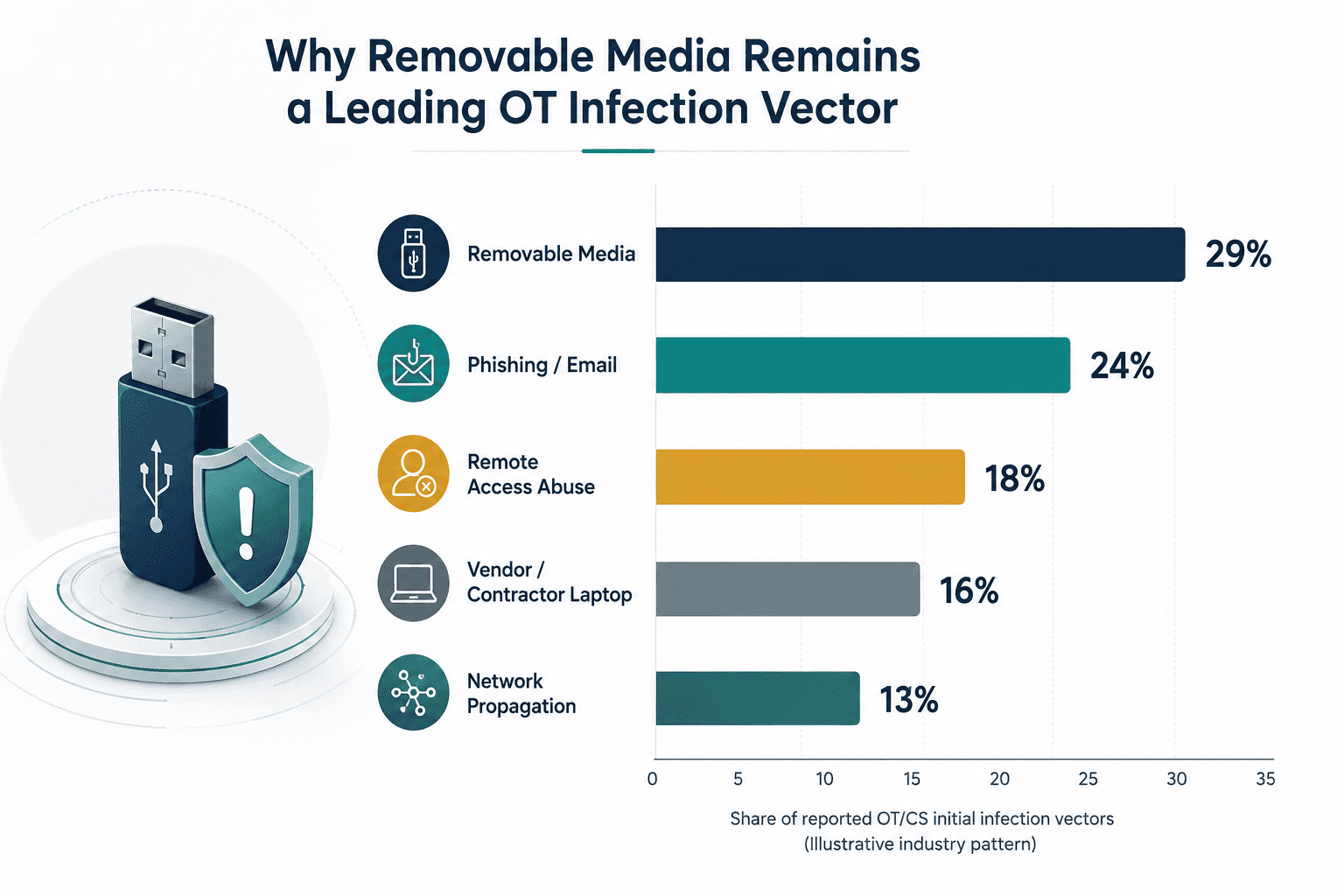
Abbildung 2: Wechselmedien gehören beständig zu den am häufigsten gemeldeten ersten Infektionsvektoren in Industrieumgebungen – ein Muster, das seit über einem Jahrzehnt stabil geblieben ist.
Dieses Muster hält sich aus einem einfachen Grund: Wechselmedien sind der einzige Vektor, der die physische Isolation (Air Gap) zuverlässig überwindet. Firewalls, Netzwerküberwachung und Intrusion Detection setzen alle eine Form von Konnektivität voraus, um Aktivitäten zu beobachten. Ein USB-Stick, der durch eine Tür getragen wird, hebelt jede dieser Kontrollen aus, schlicht weil er das Netzwerk überhaupt nicht nutzt. Genau aus diesem Grund ist ein physischer Scan-Prüfpunkt anstelle einer rein netzwerkbasierten Verteidigung unerlässlich, um diese spezifische Sicherheitslücke zu schließen.
Praktische Empfehlungen und Best Practices für das OT-Medienscanning
Der Aufbau eines effektiven Medienscan-Programms erfordert keinen Austausch der bestehenden Infrastruktur. Es erfordert das Schließen der spezifischen Lücke, an der ungeprüfte Geräte auf sensible Systeme treffen. Der folgende Vergleich verdeutlicht, warum speziell für die OT entwickelte Scan-Ansätze in dieser Umgebung zweckentfremdeten IT-Tools durchweg überlegen sind.
Funktion | Klassischer IT-Virenschutz | Speziell entwickeltes OT-Medienscanning |
Bereitstellungsort | Direkt auf den mit dem Netzwerk verbundenen Endpunkten installiert | Läuft auf einem eigenständigen Kiosk, der physisch von OT-Assets isoliert ist |
Signatur-Updates | Setzt eine ständige Internetverbindung voraus | Aktualisierung über einen kontrollierten, offline-fähigen Prozess, der für isolierte Netzwerke geeignet ist |
Unterstützung von Legacy-Systemen | Oft keine Unterstützung für ältere Windows-Versionen, die in der OT noch weit verbreitet sind | Konzipiert für das Scannen von Medien, die für ältere Engineering-Workstations und HMIs bestimmt sind |
Auswirkung auf die Produktion | Echtzeit-Scanning kann Ressourcen beanspruchen, die für die Prozesssteuerung benötigt werden | Das Scannen erfolgt, bevor das Medium das Steuerungsnetzwerk erreicht, wodurch die Produktionssysteme nicht belastet werden |
Audit Trail | Fokus auf Protokolle auf Endpunktebene | Erfasst Geräteidentität, Bediener, Zeitstempel und Scan-Ergebnis für jedes Medium, das den Standort erreicht |
Tabelle 2: Wie sich speziell entwickeltes OT-Medienscanning von klassischem IT-Virenschutz in einer Industrieumgebung unterscheidet.
Empfohlene Sicherheitsmaßnahmen für das OT-Medienscanning
Stellen Sie dedizierte, eigenständige Scan-Kioske an jedem physischen Punkt bereit, an dem Medien in die Anlage gelangen können – nicht nur an der Hauptpforte.
Setzen Sie eine „Deny-by-Default“-USB-Richtlinie auf Engineering-Workstations und HMIs durch, sodass ungescannte Medien schlicht nicht gelesen werden können, selbst wenn ein Kiosk umgangen wird.
Verknüpfen Sie jeden Scan über Ausweise oder Zugangsdaten mit einer identifizierten Person, um neben der technischen Prüfung auch eine Verantwortlichkeit zu schaffen.
Halten Sie die Scan-Signaturdatenbanken über einen kontrollierten, offline-sicheren Update-Mechanismus aktuell, der für isolierte Netzwerke geeignet ist.
Nutzen Sie Sandbox- oder Verhaltensanalysen, um gezielte Bedrohungen abzufangen, die rein signaturbasierte Tools übersehen würden.
Leiten Sie Scan-Ergebnisse und Anomalien an das Security Operations Center weiter, damit medienbezogene Ereignisse zusammen mit der Netzwerktelemetrie sichtbar sind und nicht isoliert bleiben.
Etablieren Sie eine formelle Medienrichtlinie für Lieferanten und Dienstleister als Teil des Onboardings, einschließlich klarer Regeln für den Fall, dass ein Gerät den Scan nicht besteht.
Führen Sie regelmäßige Audits und Simulationen (Tabletop Exercises) durch, die speziell eine medienbasierte Infektion simulieren, um zu testen, wie schnell das Team diese zurückverfolgen und eindämmen kann.
Weiten Sie Sicherheits-Awareness-Schulungen über das IT-Personal hinaus auf alle Bediener, Techniker und Dienstleister aus, die Geräte auf das Gelände bringen könnten.
Häufige Herausforderungen für Unternehmen
Selbst gut durchdachte Programme stoßen auf Hindernisse. Ältere Engineering-Workstations mit nicht mehr unterstützten Betriebssystemen können oft keine modernen Endpunkt-Agents hosten – genau deshalb ist ein externer, eigenständiger Scan-Ansatz in der OT wichtiger als in der IT. Über mehrere Standorte verteilte Anlagen weisen häufig eine inkonsistente Durchsetzung auf: Ein Werk scannt gewissenhaft, während ein anderes den Prozess als optional behandelt. Dienstleister, die an weniger regulierte Umgebungen gewöhnt sind, sträuben sich mitunter gegen einen Prozess, der ihre Ankunft um einige Minuten verzögert. Zudem fehlt an vielen Industriestandorten schlicht eine dedizierte OT-Sicherheitsressource, deren Aufgabe es ist, dieses Programm im Alltag zu leiten und zu pflegen.
Keine dieser Herausforderungen ist ein Grund, auf Medienscanning zu verzichten. Sie sind vielmehr Gründe dafür, das Programm von Anfang an auf Akzeptanz auszulegen – unterstützt durch das Management und einen Partner, der sowohl die technischen als auch die betrieblichen Realitäten von Industriestandorten versteht.
Wie Shieldworkz Organisationen unterstützt
Shieldworkz arbeitet eng mit Teams aus der Industrie und KRITIS-Bereichen zusammen, um Mediensicherheitsprogramme zu konzipieren und zu implementieren, die sich in der Praxis bewähren – nicht nur auf dem Papier. Unser Ansatz umfasst:
Durchführung einer Standortanalyse jedes physischen Punkts, an dem Wechselmedien derzeit in Ihre Umgebung gelangen, einschließlich Sicherheitslücken, derer sich die meisten Teams nicht bewusst sind.
Konzeption und Implementierung von Medienscan-Workflows, die an den Anforderungen der IEC 62443 ausgerichtet und auf Ihr Anlagenlayout sowie Ihre Betriebsabläufe zugeschnitten sind.
Unterstützung bei der Auswahl und Konfiguration von Scan-Technologie, die für die Realitäten von OT-Legacy-Systemen geeignet ist und nicht aus zweckentfremdeten IT-Tools besteht.
Erstellung von Richtlinien und Onboarding-Verfahren für Mitarbeiter, Lieferanten und Dienstleister, die so praxisnah sind, dass sie auch tatsächlich befolgt werden.
Integration von Medienscan-Ergebnissen und Audit-Protokollen in eine umfassendere OT-Bedrohungserkennung, damit das Risiko von Wechselmedien parallel zum Netzwerk- und Endpunktrisiko überwacht wird.
Bereitstellung fortlaufender Beratung, Simulationen und Programm-Reviews, um die Effektivität der Strategie bei der Weiterentwicklung Ihrer Umgebung sicherzustellen.
Fazit
Schadsoftware benötigt keine Netzwerkverbindung, um ein Steuerungssystem zu erreichen – sie benötigt lediglich ein ungeprüftes Gerät und einen kurzen Moment des routinemäßigen Zugriffs. Das macht Wechselmedien zu einem der hartnäckigsten und zugleich am besten lösbaren Risiken in der industriellen Cybersicherheit. Ein strukturiertes Medienscan-Programm, das an der IEC 62443 ausgerichtet ist und auf isoliertem Scannen, mehrschichtiger Erkennung und klarer Verantwortlichkeit basiert, schließt eine Lücke, für deren Absicherung Firewalls und Netzwerküberwachung nie konzipiert wurden.
Für OT-Sicherheitsverantwortliche stellt sich nicht die Frage, ob Wechselmedien ein Risiko für ihre Umgebung darstellen. Die Frage ist, ob ein verifizierter, auditierbarer Prüfpunkt vorhanden ist, bevor dieses Risiko jemals ein Produktions-Asset erreicht. Unternehmen, die diese Frage heute beantworten, sind diejenigen, die verhindern, zur Fallstudie von morgen zu werden.
Sie sind sich unsicher, wo die Sicherheitslücken in Ihrer Mediensicherheit liegen?
Jedes Risikoprofil einer Anlage ist individuell. Unsere OT-Sicherheitsspezialisten analysieren gerne Ihre aktuellen Praktiken im Umgang mit Medien, identifizieren, wo ungeprüfte Geräte kritische Systeme erreichen könnten, und zeigen Ihnen einen praktischen, unverbindlichen Weg zu einem Schutz auf, der den Anforderungen der IEC 62443 entspricht.
Buchen Sie ein kostenloses Beratungsgespräch mit unseren Experten
Zusätzliche Ressourcen:
OT Cyber Threat Intelligence Advisory – Naher Osten hier
NIS2-Richtlinie: Erreichen der NIS2-Konformität durch IEC 62443 hier
Was sind Wechselmedien? Risiken, Richtlinien und industrielle OT-Sicherheitslösungen hier
Kostenlose Vorlage für eine Wechselmedien-Richtlinie für OT- und IT-Teams hier
Wöchentlich erhalten
Ressourcen & Nachrichten
Erfahren Sie, wie unsere branchenführenden OT-Security-Lösungen kritische Sicherheitsherausforderungen gemäß KRITIS-Anforderungen bewältigen
Dies könnte Ihnen auch gefallen.

Fresenius medical care cyber incident: Investigating trusted access, third-party exposure and enterprise blast radius
Team Shieldworkz

OT Removable Media Security: Close the USB Risk Gap Before It Reaches Production
Team Shieldworkz
The Canva breach and the hidden risk of third-party trust
Prayukth K V

NERC CIP Compliance Assessment: Find Gaps Before Auditors Do
Team Shieldworkz

Beyond substitution: Strategic takeaways from India’s SCADA indigenisation
Team Shieldworkz

Investigative cyber threat research report: Colorado water utilities OT attacks
Prayukth K V