Team Shieldworkz
Every plant manager has heard the reassurance before: “Our control network is air-gapped, so we're safe.” It's one of the most persistent and dangerous myths in industrial cybersecurity. Air gaps don't stop threats from walking in through the front door , and in OT environments, the front door is often a USB drive, an external hard disk, or a contractor's laptop plugged in for a routine firmware update.
Before we begin, don’t forget to check out our previous post on “CEA Cybersecurity Regulations 2026: What Indian power companies need to do” here.
Removable media has quietly become one of the most consistent ways malware finds its way into industrial control systems, SCADA networks, and manufacturing floors. Unlike phishing emails or exposed remote access ports, media-borne threats don't need an internet connection to spread , they only need a human being with a device and a task to complete. For OT security leaders, CISOs, and plant operators, understanding how to prevent malware through structured media scanning isn't a technical nicety. It's operational risk management.
This Blog breaks down why removable media remains a leading infection vector in OT, what IEC 62443 expects organizations to do about it, how modern media scanning actually works, and the practical steps industrial teams can take to close this gap without slowing down operations.
Why Removable Media Still Threatens OT Environments
The Air-Gap Myth
Air-gapping is a valuable control, but it was never designed to stop the movement of physical devices. A control network with no internet connection can still be compromised the moment someone inserts a USB drive to transfer a configuration file, install a patch, or pull diagnostic logs. In fact, the more isolated a network is from routine monitoring, the more attractive removable media becomes as an entry point , because it bypasses network-based defenses entirely.
This is compounded by how OT environments actually operate day to day. Engineers move between sites carrying laptops and drives. Vendors arrive for scheduled maintenance with their own media. Historian data gets exported and moved between systems that were never meant to be networked together. Each of these ordinary, necessary activities is also an opportunity for malware to travel from a compromised device into a production environment.
Real-World Lessons: When Portable Media Became the Entry Point
Industrial cybersecurity history offers several sobering reminders of what happens when removable media controls are absent or inconsistent. These incidents, now widely documented in the public record, continue to shape how serious organizations think about physical media risk.
Year | Incident | Sector | Entry Vector | Business Impact |
2008 | Agent.btz intrusion into US military networks | Defense | Infected USB flash drive | Triggered a multi-year, multi-agency remediation effort and a lasting ban on removable media in classified networks |
2009 | Conficker worm spread across manufacturing and healthcare networks | Manufacturing, Healthcare | Removable drives and shared network folders | Widespread downtime as infected engineering workstations had to be isolated and rebuilt |
2010 | Stuxnet targeting uranium enrichment centrifuges | Energy / Nuclear | USB drive carried into an air-gapped facility | Physical damage to centrifuge equipment and a permanent shift in how air-gapped sites are secured |
2017 | WannaCry ransomware disrupting production lines | Manufacturing, Logistics | Network propagation, accelerated by unmanaged endpoints | Halted production shifts and highlighted how quickly IT infections cross into OT when segmentation is weak |
Table 1: A brief history of how removable and portable media contributed to major industrial and infrastructure security incidents.
What these incidents share is not sophistication, it's opportunity. In several cases, the malware itself was not especially advanced. What made it effective was the absence of a control point where the media could have been checked before it reached a sensitive system. That single missing step , a scan before connection , is the gap this entire strategy is built to close.
Why the Risk Is Growing, Not Shrinking
As IT and OT networks converge, and as remote diagnostics, cloud-connected historians, and third-party maintenance contracts become the norm, the number of people and devices touching industrial systems keeps expanding. Every additional contractor laptop, every additional vendor USB stick, is another unmonitored path into the environment. At the same time, many industrial sites still run legacy operating systems that cannot receive real-time security updates, which makes them disproportionately vulnerable to malware that a modern IT endpoint would catch immediately.
Understanding IEC 62443 Media Security Fundamentals
What the Standard Expects From Organizations
IEC 62443, the internationally recognized framework for industrial automation and control systems security, treats portable media as a distinct risk category rather than an afterthought. The standard's system requirements call for controls that restrict the use of portable and mobile devices, verify that removable media is checked for malicious content before use, and maintain records of when and how media is introduced into a control environment.
At the organizational level, IEC 62443-2-1 expects a documented policy governing how removable media is handled , who is authorized to bring devices on-site, what scanning must occur before connection, and how exceptions are approved and logged. At the system level, IEC 62443-3-3 expects technical enforcement: the ability to detect and block unauthorized code from removable media reaching a zone or conduit within the architecture.
Why Compliance Alone Isn't Protection
Meeting the letter of a standard and actually reducing risk are two different achievements. A written policy that says “all media must be scanned” means little if scanning happens inconsistently, if the scanning tool itself is outdated, or if there's no way to verify that a scan actually took place before a device was connected. True media security requires that the policy, the technology, and the day-to-day operational habit are all aligned , and that alignment is where most organizations still struggle.
OT Media Scan Fundamentals: How Modern Scanning Actually Works
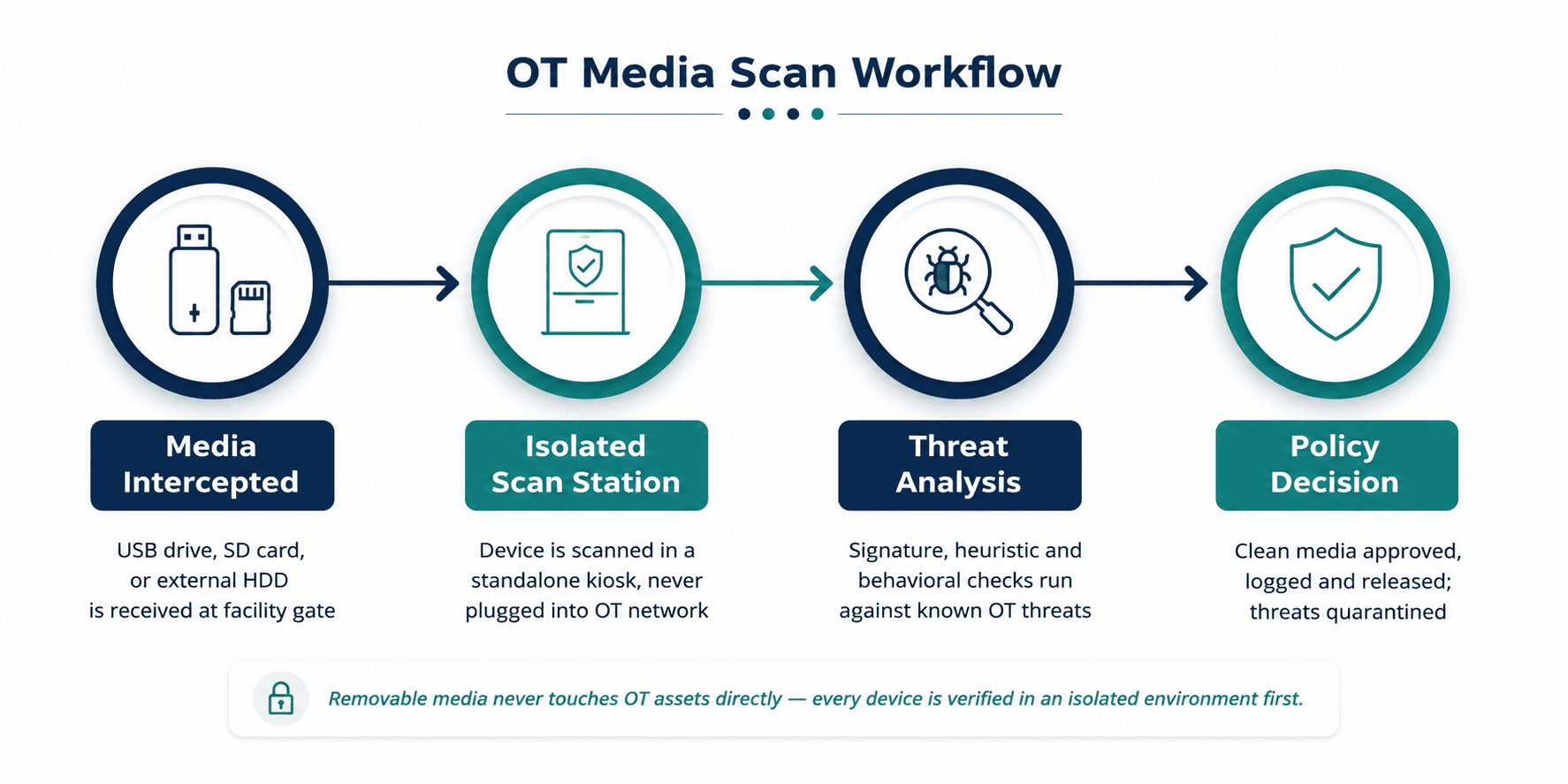
Figure 1: A typical OT media scanning workflow , media is verified in an isolated station before it ever reaches a control network asset.
Isolated Scanning Kiosks
The foundation of an effective OT media scanning program is physical and logical separation. Rather than scanning a USB drive on the same workstation that controls a process, organizations deploy dedicated scanning kiosks positioned at the physical entry points to a facility , the guardhouse, the maintenance office, the control room threshold. These kiosks are never connected to the production network. Their only job is to inspect media and render a verdict before that media is allowed anywhere near an OT asset.
Signature, Heuristic, and Behavioral Detection
A capable scanning station doesn't rely on a single detection method. Signature-based scanning catches known malware quickly and reliably. Heuristic analysis looks for suspicious code patterns that resemble malicious behavior even without an exact signature match. Behavioral and sandboxed analysis goes a step further, observing what a file actually attempts to do in a contained environment , which is particularly important for catching novel or targeted threats designed specifically to evade signature databases, the kind most likely to be aimed at industrial targets.
Logging, Chain of Custody, and Auditability
Every scan should generate a record: which device was scanned, who presented it, what the result was, and what happened next. This isn't bureaucracy for its own sake. When an incident does occur, this log is often the fastest way to trace how a threat entered the environment and who else may have used the same infected device elsewhere on-site. For organizations operating under regulatory oversight, this audit trail is also frequently the evidence that demonstrates due diligence.
Why Removable Media Remains a Leading OT Infection Vector
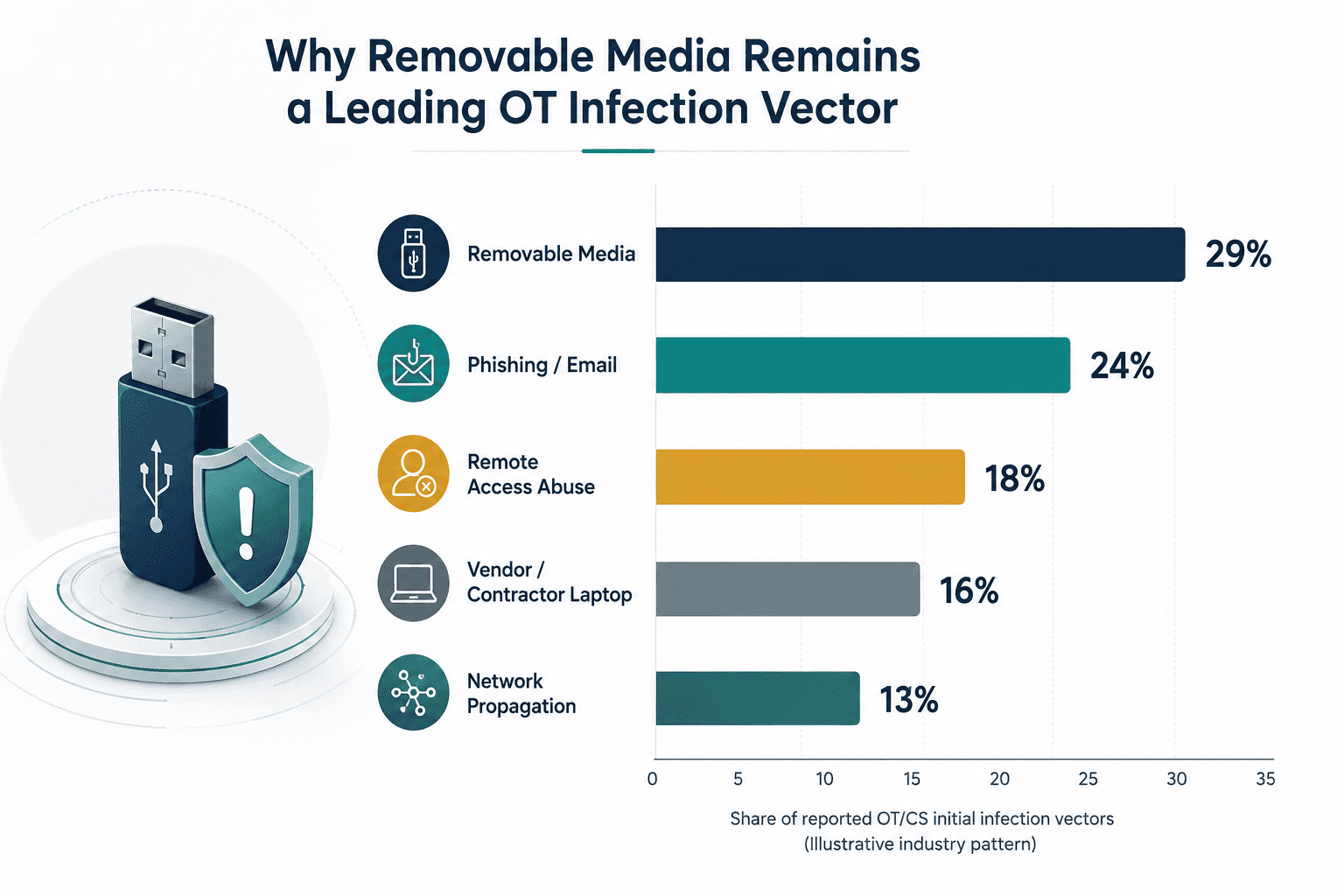
Figure 2: Removable media consistently ranks among the top initial infection vectors reported across industrial environments , a pattern that has held steady for over a decade.
This pattern persists for a straightforward reason: removable media is the one vector that reliably crosses the air gap. Firewalls, network monitoring, and intrusion detection all assume some form of connectivity to observe. A USB drive carried through a door defeats every one of those controls simply by not using the network at all. That's precisely why a physical scanning checkpoint, rather than a purely network-based defense, is essential to closing this specific gap.
Practical Recommendations and Best Practices for OT Media Scanning
Building an effective media scanning program doesn't require replacing existing infrastructure. It requires closing the specific gap where unchecked devices meet sensitive systems. The comparison below illustrates why purpose-built OT scanning approaches consistently outperform repurposed IT tools in this environment.
Capability | Traditional IT Antivirus | Purpose-Built OT Media Scanning |
Deployment location | Installed directly on endpoints connected to the network | Runs on a standalone kiosk, physically isolated from OT assets |
Signature updates | Assumes constant internet connectivity | Updated through a controlled, offline-capable process suited to isolated networks |
Legacy system support | Often unsupported on older Windows versions still common in OT | Designed to scan media intended for legacy engineering workstations and HMIs |
Impact on production | Real-time scanning can consume resources needed for process control | Scanning happens before media ever reaches the control network, with zero load on production systems |
Audit trail | Focused on endpoint-level logs | Captures device identity, operator, timestamp and scan result for every piece of media entering the site |
Table 2: How purpose-built OT media scanning differs from traditional IT antivirus deployed in an industrial setting.
Recommended Controls for OT Media Scanning
Deploy dedicated, standalone scanning kiosks at every physical point where media can enter the facility , not just at the primary gate.
Enforce a deny-by-default USB policy on engineering workstations and HMIs so unscanned media simply cannot be read, even if a kiosk is bypassed.
Tie every scan to an identified individual through badge or credential linkage, creating accountability alongside the technical check.
Keep scanning signature databases current through a controlled, offline-safe update mechanism suited to isolated networks.
Layer in sandboxing or behavioral analysis to catch targeted threats that signature-only tools would miss.
Feed scan results and anomalies into the security operations center so media-related events are visible alongside network telemetry, not siloed away from it.
Formalize a vendor and contractor media policy as part of site onboarding, including what happens when a device fails a scan.
Run periodic audits and tabletop exercises specifically simulating a media-borne infection to test how quickly the team can trace and contain it.
Extend awareness training beyond IT staff to every operator, technician, and contractor who might reasonably carry a device on-site.
Common Challenges Organizations Face
Even well-intentioned programs run into friction. Legacy engineering workstations running unsupported operating systems often can't host modern endpoint agents, which is exactly why an external, standalone scanning approach matters more in OT than in IT. Facilities spread across multiple sites frequently end up with inconsistent enforcement , one plant scans diligently while another treats it as optional. Contractors accustomed to working in less regulated environments can be resistant to a process that adds a few minutes to their arrival. And many industrial sites simply don't have a dedicated OT security resource whose job it is to own and maintain this program day to day.
None of these challenges are reasons to abandon media scanning , they're reasons to design the program with adoption in mind from the start, backed by leadership support and a partner who understands both the technical and operational realities of industrial sites.
How Shieldworkz Supports Organizations
Shieldworkz works alongside industrial and critical infrastructure teams to design and operationalize media security programs that hold up in the field, not just on paper. Our approach includes:
Conducting a site-level assessment of every physical point where removable media currently enters your environment, including gaps most teams don't know exist.
Designing and deploying media scanning workflows aligned to IEC 62443 requirements, tailored to your facility layout and operational tempo.
Helping select and configure scanning technology suited to the realities of legacy OT systems, not repurposed IT tooling.
Building policies and onboarding procedures for employees, vendors, and contractors that are practical enough to actually be followed.
Integrating media scan results and audit logs into broader OT threat visibility, so removable media risk is monitored alongside network and endpoint risk.
Providing ongoing advisory support, tabletop exercises, and program reviews to keep the strategy effective as your environment evolves.
Conclusion
Malware doesn't need a network connection to reach a control system, it only needs an unchecked device and a moment of routine access. That's what makes removable media one of the most persistent, and most solvable, risks in industrial cybersecurity. A structured media scanning program, aligned to IEC 62443 and built around isolated scanning, layered detection, and clear accountability, closes a gap that firewalls and network monitoring were never designed to cover.
For OT security leaders, the question isn't whether removable media poses a risk to their environment. It's whether there's a verified, auditable checkpoint in place before that risk ever reaches a production asset. Organizations that answer that question today are the ones that avoid becoming tomorrow's case study.
Not Sure Where Your Media Security Gaps Are?
Every facility's risk profile is different. Our OT security specialists can walk through your current media handling practices, identify where unchecked devices could reach critical systems, and outline a practical path toward IEC 62443-aligned protection, with no obligation attached.
Book a Free Consultation with Our Experts
Additional resources:
OT Cyber Threat Intelligence Advisory - Middle East here
NIS2 Directive Achieving NIS2 Compliance Through IEC 62443 here
What Is Removable Media? Risks, Policies, and Industrial OT Security Solutions here
Free Removable Media Policy Template for OT and IT Teams here
Get Weekly
Resources & News
See How Our Industry-Leading OT Security Solutions Address Critical Security Challenges
You may also like

Fresenius medical care cyber incident: Investigating trusted access, third-party exposure and enterprise blast radius
Team Shieldworkz

OT Removable Media Security: Close the USB Risk Gap Before It Reaches Production
Team Shieldworkz
The Canva breach and the hidden risk of third-party trust
Prayukth K V

NERC CIP Compliance Assessment: Find Gaps Before Auditors Do
Team Shieldworkz

Beyond substitution: Strategic takeaways from India’s SCADA indigenisation
Team Shieldworkz

Investigative cyber threat research report: Colorado water utilities OT attacks
Prayukth K V