Team Shieldworkz
Why OT Networks Need Media Scanning for Cyber Defense: Closing the Air Gap's Last Open Door
Every industrial security leader has heard the phrase "our OT network is air-gapped, so we're safe." It's a comforting idea. It's also one of the most dangerous assumptions in operational technology today. Air gaps do not stop malware from walking through the front door on a USB drive, a contractor's laptop, or a firmware update disk. They only stop it from arriving over the internet. Everything else still gets carried in by hand, and that is precisely why media scanning has become one of the most important, and most overlooked, layers of industrial cyber defense.
This blog breaks down why removable media has quietly become one of the largest attack vectors into plants, utilities, and critical infrastructure, what media scanning actually involves, and how OT security leaders can build a practical, auditable program around it, without slowing down operations or frustrating the engineers who depend on portable devices to do their jobs.
For a plant manager or CISO evaluating where to invest limited security budget next, this matters more than it might first appear. Removable media sits at the intersection of two things every industrial leader cares about: operational continuity and demonstrable risk reduction. Unlike many cybersecurity investments that are hard to explain in a board meeting, a media scanning program produces something concrete, a documented control, a log of every device that crossed the threshold, and a measurable reduction in one of the most exploited entry points into industrial networks today.
The Air-Gap Myth: Why "Disconnected" Doesn't Mean "Protected"
For decades, industrial environments relied on physical isolation as their primary defense strategy. Control networks were kept separate from corporate IT, and the logic was simple: if there's no connection to the outside world, there's no way in. That logic made sense when programmable logic controllers and human-machine interfaces lived in a world without laptops, cloud dashboards, or remote vendor support.
That world no longer exists. Modern plants depend on a constant flow of people, devices, and files moving between the corporate network, contractor equipment, and the control floor. Firmware needs updating. Historian data needs to be pulled for reporting. Engineers travel between sites carrying the same laptop and the same USB drive. Vendors show up with diagnostic tools plugged into a dozen other client environments before they ever reach yours. Every one of those touchpoints is a potential entry point, and none of them require an internet connection to introduce a threat.
Independent industry research into removable media threats has tracked this shift closely. In 2019, roughly 9 percent of malware analyzed from industrial environments was specifically engineered to spread through USB devices. By 2022, that figure had climbed past 50 percent, and it has remained at similarly elevated levels since. More striking still, the majority of that malware, well over 80 percent by recent estimates, is capable of causing a genuine operational disruption once it reaches a control system: loss of view, loss of control, or an unplanned shutdown.
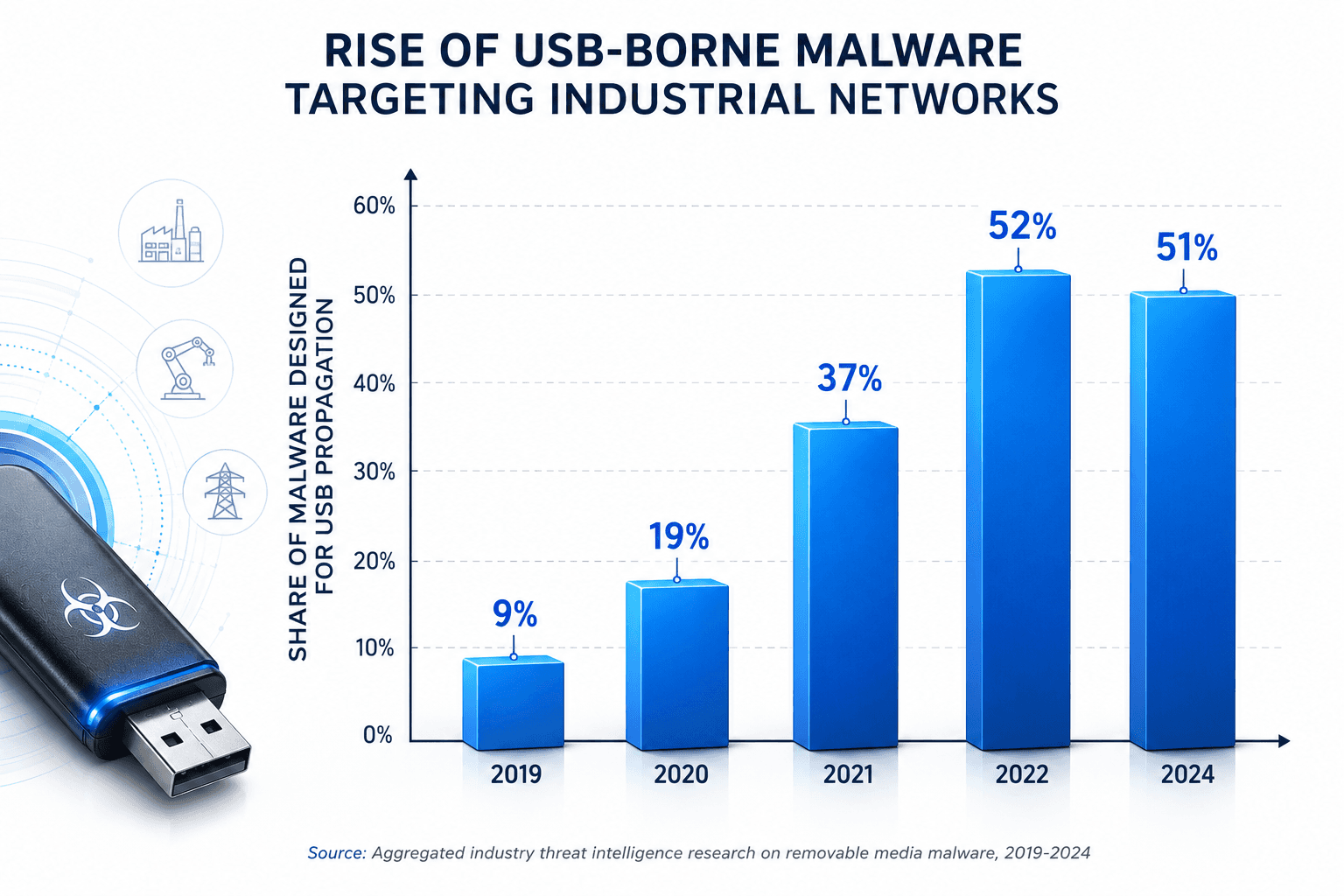
Figure 1: The share of malware engineered specifically for USB propagation has grown more than fivefold in recent years, according to aggregated industrial threat intelligence research.
The pattern is consistent across sectors. Manufacturing plants, water utilities, energy operators, and pharmaceutical facilities all share the same structural weakness: a hardened perimeter with a soft, largely unmonitored side door in the form of removable media.
It's also worth noting how this trend intersects with the broader convergence of IT and OT systems. As plants adopt more data-driven maintenance, remote monitoring, and cloud-connected analytics, the boundary between corporate IT and the control floor becomes less distinct, and the people, laptops, and devices moving across that boundary become more numerous, not fewer. A media scanning checkpoint is one of the few controls that stays relevant regardless of how connected or disconnected the rest of the environment becomes, because it governs the physical movement of devices rather than network traffic alone.
What Media Scanning Actually Means in an OT Context
Media scanning is the practice of inspecting every removable device, USB drive, external hard disk, SD card, or portable diagnostic tool, before it is allowed to connect to any asset on the OT network. It sounds simple, but doing it correctly in an industrial environment is different from running antivirus software on an office laptop.
Beyond Traditional Antivirus
Conventional endpoint antivirus tools are designed for IT systems that receive constant signature updates over the internet. Most OT devices, by design, don't have that connectivity, and many run legacy operating systems that modern antivirus software doesn't even support. Media scanning solves this differently: rather than installing detection software on every fragile legacy endpoint, organizations inspect the media itself at a controlled checkpoint before it ever reaches the control network.
Where Scanning Fits in the OT Security Stack
Media scanning is not a replacement for network segmentation, monitoring, or endpoint protection. It is a complementary control that closes a gap none of those other layers can fully address on their own. Firewalls and segmentation control network traffic; they do nothing to stop a technician from plugging an infected USB drive directly into an HMI. Media scanning is purpose-built for that exact scenario.
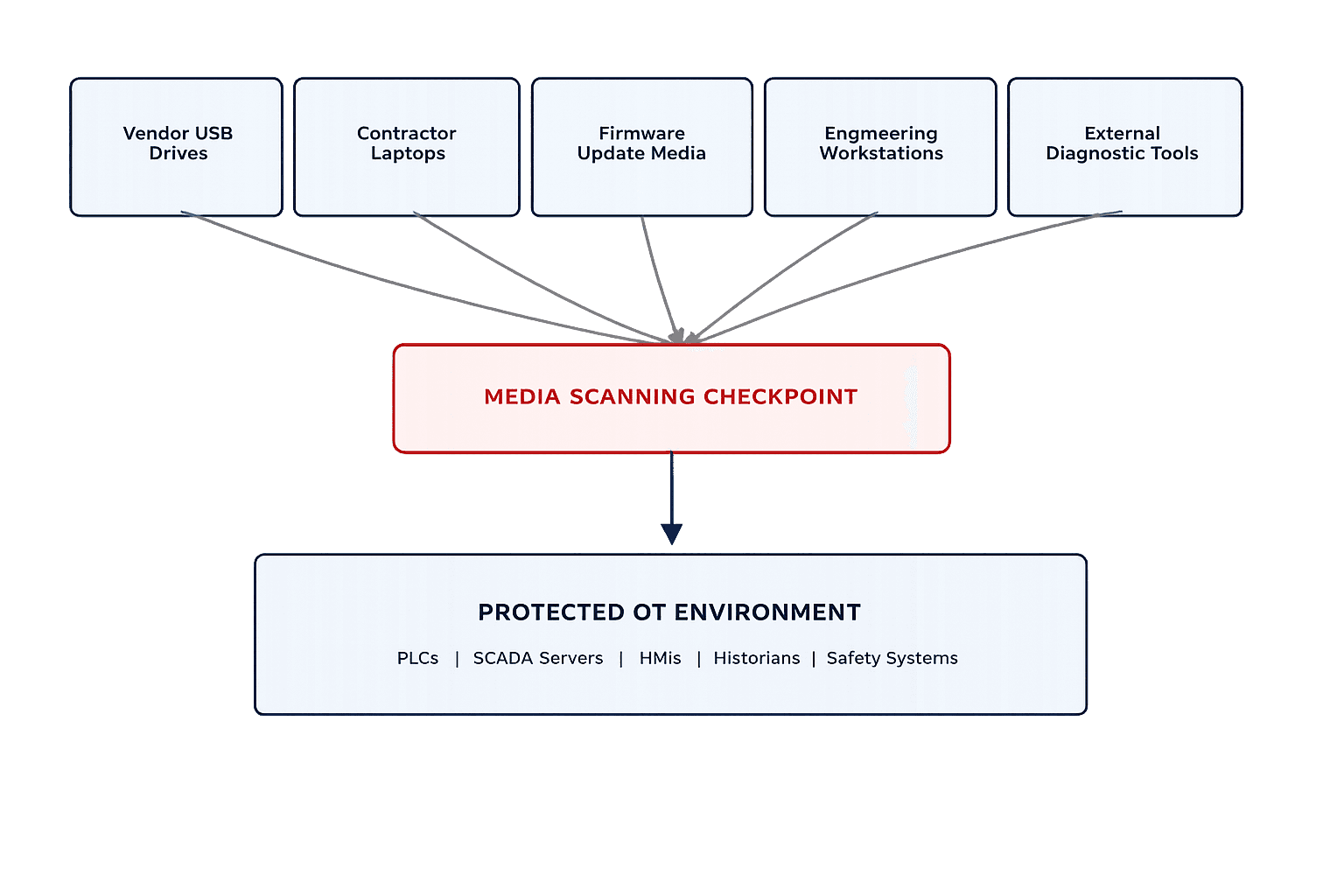
Figure 2: Removable media enters OT environments through many legitimate channels. A dedicated scanning checkpoint is the one control point common to all of them.
Real-World Incidents That Prove the Point
The theoretical risk of removable media is well documented, but the real-world track record is what tends to change minds in the boardroom. A handful of incidents have shaped how the industry thinks about USB-borne threats.
Stuxnet (2010): Perhaps the most consequential industrial cyberattack in history, Stuxnet was designed to specifically target Siemens programmable logic controllers used in uranium enrichment centrifuges at a nuclear facility. The malware did not arrive over the internet. It was carried in on a USB drive, crossing an air gap that was assumed to be secure, and went on to physically damage equipment while feeding operators false readings that masked the sabotage in progress.
Agent.btz (2008): A worm introduced through an infected USB flash drive spread across classified and unclassified U.S. military networks, triggering a major, multi-year effort to overhaul removable media policy across defense networks. It remains one of the clearest examples of how a single unscreened device can compromise networks that were otherwise considered tightly controlled.
Ongoing trend across manufacturing and utilities: Beyond these landmark cases, recent industry threat intelligence has flagged a steady stream of trojans, ransomware droppers, and remote-access tools riding in on removable media across manufacturing plants, water treatment facilities, and energy sites worldwide. Ransomware activity against industrial operators alone rose sharply in the most recent reporting period, with removable media consistently cited as one of the primary initial access routes.
Notable Incidents at a Glance
Year | Incident | Entry Vector | Impact |
2008 | Agent.btz worm | Infected USB flash drive | Compromised classified and unclassified defense networks; triggered a multi-year removable media policy overhaul |
2010 | Stuxnet | USB drive carried across an air-gapped facility | Physical damage to uranium enrichment centrifuges; falsified operator readings |
2019-2024 | Industry-wide USB malware growth | Removable media across manufacturing, energy, and utilities | Share of malware built for USB propagation rose from roughly 9% to over 50%; most capable of disrupting operations |
Table 1: A sample of documented incidents illustrating how removable media has repeatedly bypassed perimeter and air-gap defenses.
A Closer Look at Content-Based Threats
One trend worth understanding in detail is the rise of what researchers call content-based malware. Rather than exploiting a software vulnerability, this type of threat hides inside ordinary-looking files, spreadsheets, word processing documents, PDFs, or scripts, that rely on built-in scripting functions to execute malicious code once opened. Recent industry analysis found that roughly one in five pieces of malware blocked from industrial USB devices falls into this category. That matters because a scanning checkpoint focused only on known virus signatures can miss threats that look, on the surface, like a routine engineering document a contractor was asked to bring on-site.
This is also why the entry vector matters as much as the payload. A trojan or dropper delivered through removable media doesn't need to punch through a firewall or exploit an internet-facing service. It simply needs someone, a well-meaning engineer, a vendor technician, a plant manager checking email offline, to plug in a device that was infected somewhere else entirely, often without that person ever knowing it happened.
Why Traditional IT Security Tools Fall Short in OT Environments
It's tempting to assume that any antivirus software is better than none. In OT environments, that assumption can create a false sense of security. Traditional endpoint protection depends on frequent cloud-based signature updates, behavioral telemetry, and modern operating systems. Most control system assets have none of these. A twenty-year-old engineering workstation running an unsupported operating system simply cannot host modern endpoint protection, and even where it can, taking a production HMI offline to patch or scan it carries its own operational risk.
This is why dedicated, standalone media scanning stations have become the practical answer. Rather than trying to protect every fragile endpoint individually, organizations install a hardened, purpose-built kiosk at the perimeter of the OT environment. Every device is scanned there first, using multiple detection engines and OT-aware threat intelligence, before anything is allowed to move further inward.
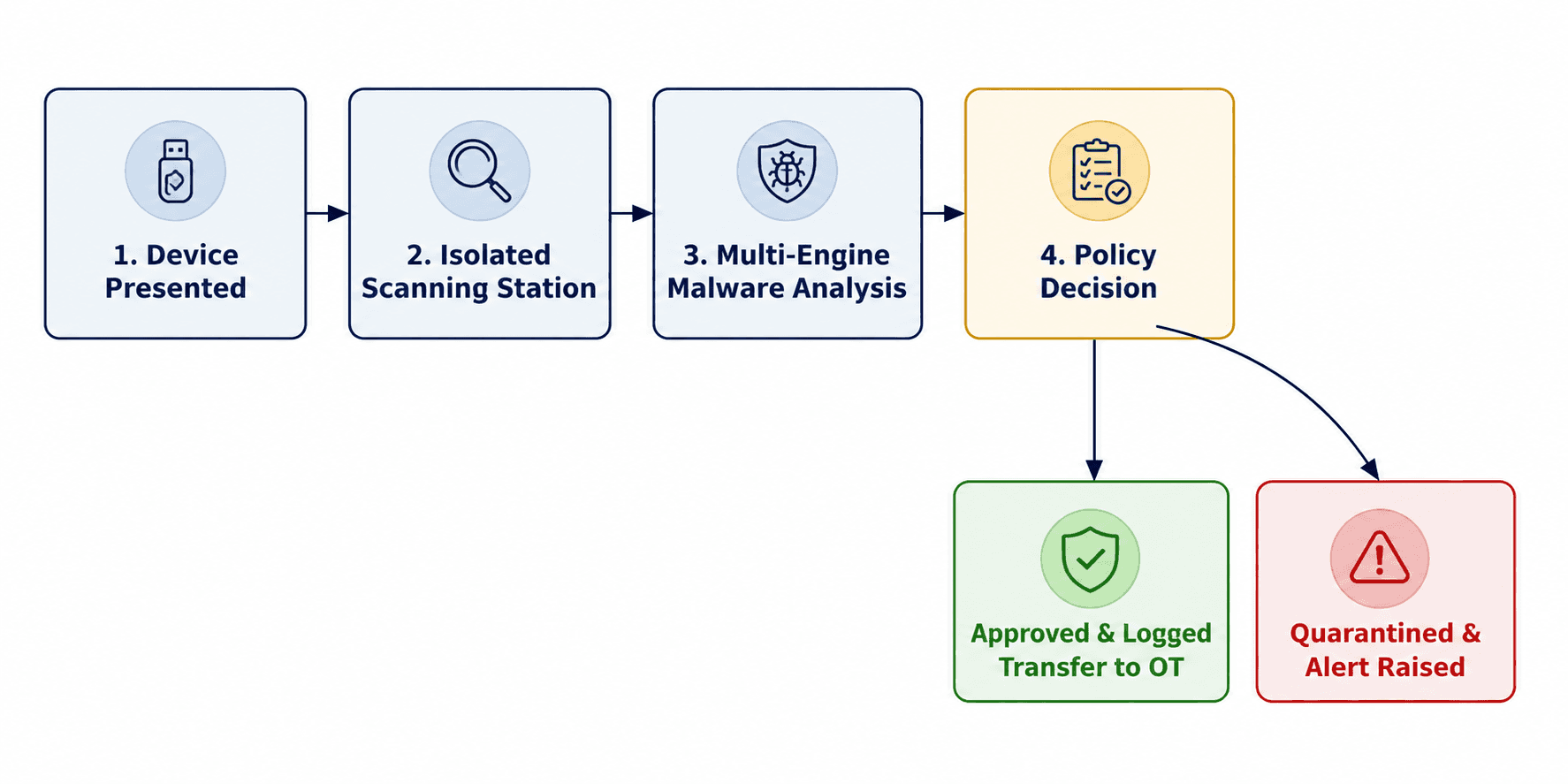
Figure 3: A well-designed media scanning workflow inspects, decides, and logs every device before it ever touches a control system asset.
Risks and Business Impact of Unmonitored Removable Media
Leaving removable media unmanaged doesn't just create a technical vulnerability. It creates business exposure that shows up in production schedules, safety reporting, insurance conversations, and regulatory audits. Some of the most common consequences include:
Unplanned downtime: Malware that corrupts historian data, disrupts communications, or forces a controlled shutdown can halt production for hours or days, with direct revenue impact.
Loss of process visibility and control: Independent research consistently finds that most malware found on industrial USB devices is capable of causing loss of view or loss of control, the two outcomes operators fear most.
Safety exposure: In environments where control systems manage pressure, temperature, or chemical dosing, a compromised HMI or PLC is not just a data problem. It can become a physical safety incident.
Regulatory and compliance gaps: Frameworks such as IEC 62443, NERC CIP, and various national critical infrastructure directives increasingly expect documented removable media controls. Auditors ask for policy evidence, not good intentions.
Reputational and contractual risk: A publicized incident traced back to an unscreened USB drive damages trust with regulators, insurers, customers, and the communities that depend on critical infrastructure operating safely.
Incident response cost: Investigating and remediating a malware incident that has spread across multiple control system assets is dramatically more expensive than the cost of a scanning checkpoint that would have caught it at the door.
Industry-Specific Considerations
While the core risk is universal, the way media scanning should be implemented varies meaningfully by sector.
Manufacturing
Manufacturing environments typically see the highest volume of removable media activity, driven by frequent firmware updates, recipe changes, and data pulls from machine controllers. Production lines often can't tolerate unplanned downtime, which makes a fast, well-integrated scanning checkpoint especially important. Manufacturers with multiple production lines or facilities also benefit from centralizing scan logs, so a threat caught at one site can immediately inform monitoring at others.
Energy and Utilities
Energy generation, transmission, and distribution sites often include remote and unmanned facilities, substations, pumping stations, wind and solar assets, where technicians visit only periodically. These locations need a scanning strategy that doesn't rely on a fixed checkpoint at a central office, since the media risk shows up wherever a technician's laptop or diagnostic tool physically travels. Portable scanning solutions and strict pre-visit device screening are particularly valuable here.
Water and Wastewater Facilities
Water utilities frequently operate with smaller technical teams and older control system infrastructure, which makes them attractive, lower-effort targets. Because these systems often manage public health and safety functions directly, the tolerance for any compromise, even one that only affects visibility rather than control, is extremely low. A documented, simple-to-follow media policy tends to work better here than a highly complex program that a small team can't sustain long term.
Pharmaceutical and Process Manufacturing
Regulatory validation requirements in pharmaceutical and chemical processing environments mean that any unplanned system change, including a scan-triggered quarantine or a device restriction, can carry compliance implications. Media scanning programs in these environments need close coordination between security teams and quality or regulatory affairs functions, so that security controls and validation requirements reinforce each other rather than conflict.
Comparing Approaches to Removable Media Control
Not every organization treats removable media the same way, and the differences in risk exposure are significant. The table below compares three common postures.
Approach | OT-Specific Detection | Audit Trail & Logging | Overall Risk Level |
No formal control (media used freely) | None | None | Severe |
Standard IT antivirus check only | Limited; not tuned for ICS protocols or legacy files | Partial, often disconnected from OT records | Moderate to High |
Dedicated OT media scanning kiosk with policy enforcement | High; multi-engine, OT-aware analysis | Full device history, approvals, and quarantine records | Low |
Table 2: The gap between informal media handling and a structured scanning program is the difference between hoping for the best and having evidence of control.
Common Challenges When Implementing Media Scanning Programs
Even organizations that recognize the risk often struggle with the rollout. Understanding these obstacles in advance makes the difference between a program that sticks and one that quietly falls apart within a year.
Operational Friction and Workforce Pushback
Engineers and technicians are often under pressure to complete work quickly, and an extra step at a checkpoint can feel like a bureaucratic delay, especially during an unplanned outage when every minute counts. Programs that succeed treat scanning stations as fast, well-placed, and genuinely useful, rather than an afterthought bolted onto an existing process. When a scan takes thirty seconds and a device is cleared with a simple indicator light, resistance drops sharply.
Multi-Site and Remote Facility Coverage
A single scanning kiosk at corporate headquarters does nothing for a remote substation, a compressor station three hours from the nearest city, or a satellite production line staffed by a skeleton crew. Distributed operations need a distributed answer, whether that means portable scanning units, regional checkpoints, or a hybrid model that combines fixed stations at major sites with mobile units for smaller or remote locations.
Vendor and Contractor Coordination
Third-party technicians frequently carry devices that have already touched multiple other client environments before arriving at your site. Getting vendors to accept your scanning policy, rather than treating it as optional, requires it to be written into contracts and service agreements well before the technician shows up at the gate with a laptop bag full of unscanned tools.
Legacy Systems and File Format Diversity
Older engineering software often relies on proprietary file formats that generic scanning tools don't recognize well. A mature program accounts for this by using detection engines and policies specifically tuned to the file types common in industrial environments, rather than assuming a one-size-fits-all IT scanning tool will catch everything relevant to a control system.
Building an Effective Media Scanning Strategy for Critical Infrastructure
A media scanning program works best when it's treated as a formal process rather than a one-off tool purchase. The following practices consistently separate organizations with mature programs from those still exposed.
1. Establish a Formal Removable Media Policy
Define exactly which devices are permitted, who is authorized to bring media on-site, and what happens when an unapproved or unscanned device shows up. Put it in writing, and make sure contractors and vendors are briefed on it before they arrive, not after an incident.
2. Deploy Dedicated Scanning Stations at Every Entry Point
Every physical location where media could enter the OT environment, main gates, engineering rooms, remote substations, needs its own scanning checkpoint or a clear process for routing devices through one. A policy that only covers the main site gate misses every side door.
3. Use Multi-Engine, OT-Aware Detection
A single antivirus engine will always miss something. Layering multiple detection engines together, tuned to recognize the file types and protocols common in industrial environments, dramatically improves catch rates for the kind of targeted, content-based malware increasingly seen in ICS-focused threat campaigns.
4. Maintain Approved Device Lists and Full Logging
Every scan should generate a record: device identifier, timestamp, operator, scan result, and disposition. This isn't just good hygiene, it's the evidence auditors and incident responders will ask for when something goes wrong, and it's often the difference between a fast investigation and a weeks-long forensic exercise.
5. Integrate Scanning with the Broader OT Security Architecture
Media scanning shouldn't operate in isolation. Feed scan results and quarantine alerts into the same monitoring environment that watches network traffic and asset behavior, so a flagged device correlates with anything unusual that happens afterward on the control network.
6. Train Personnel and Contractors Continuously
The best scanning kiosk in the world doesn't help if operators bypass it because it's inconvenient, or if a contractor doesn't know it exists. Regular, practical training, not once-a-year compliance videos, keeps the human side of the control as strong as the technical side.
How Shieldworkz Supports Organizations
Shieldworkz works alongside OT security leaders, plant managers, and CISOs to design and operationalize removable media defenses that fit real industrial environments, not generic IT playbooks. Our approach includes:
OT-focused risk assessments: Identifying every point where removable media, vendor devices, or portable diagnostic tools could enter your control environment, including the entry points that internal teams often overlook.
Media scanning program design: Building a practical, site-specific policy and checkpoint architecture that matches your operational tempo, without creating unnecessary friction for engineers and contractors.
Detection tuned for industrial environments: Helping deploy scanning solutions capable of recognizing the file types, protocols, and threat patterns most relevant to PLCs, SCADA systems, and HMIs.
Compliance alignment: Mapping your media control program to the documentation and audit expectations found in IEC 62443, NERC CIP, and other critical infrastructure frameworks relevant to your sector.
Incident readiness and response support: Ensuring that when something is caught, or missed, your team has a clear, tested process for containment, investigation, and recovery.
Ongoing advisory partnership: Continuous guidance as your operations, vendor relationships, and threat landscape evolve, rather than a one-time assessment that goes stale within a year.
What sets a strong media scanning partnership apart isn't the checkpoint hardware itself, it's the surrounding program: the policy that holds up under audit, the workforce that actually follows it because it was designed with their workflow in mind, and the visibility that lets a security team see a flagged device as part of a broader pattern rather than an isolated event. Shieldworkz builds that surrounding program alongside your team, so the technology serves the operation instead of becoming another disconnected tool competing for attention on the plant floor.
Frequently Asked Questions
1.Is media scanning necessary if our OT network is fully air-gapped?
Yes. An air gap only prevents network-based, internet-borne threats from reaching your control systems. It does nothing to stop malware carried in physically on a USB drive, laptop, or diagnostic tool. In fact, air-gapped environments are often more exposed to removable media risk precisely because so much data has to move in and out by hand.
2.Will a media scanning checkpoint slow down maintenance and outage work?
A well-designed scanning station adds seconds, not hours, to the process. The organizations that struggle with speed usually have a poorly placed or poorly resourced checkpoint, not a fundamentally slow process. Properly implemented, scanning fits into existing outage and maintenance workflows without becoming a bottleneck.
3.Can standard corporate antivirus software cover this risk instead?
Generally, no. Corporate antivirus tools are built for internet-connected, frequently updated IT endpoints. Most control system assets can't run modern antivirus software at all, and even where they can, taking a live HMI or engineering workstation offline to scan it introduces its own operational risk. A dedicated, standalone scanning checkpoint avoids that trade-off entirely.
4.How often should removable media policies be reviewed?
At minimum, annually, and immediately after any change to vendor relationships, plant layout, or regulatory requirements. Threat patterns targeting industrial environments continue to evolve quickly, and a policy written three years ago is unlikely to reflect the tactics attackers are using today.
5.Who should own the media scanning program: IT or OT security?
Ideally, both, working from a shared policy. IT teams often bring experience with endpoint security tooling and vendor management, while OT teams understand the operational constraints, legacy systems, and safety implications unique to the control environment. Programs that succeed long term usually have a named owner on the OT side, with IT security as a close partner rather than the sole decision-maker.
Conclusion
The air gap was never a wall. It was always a door, one that opens every time a USB drive, laptop, or diagnostic tool crosses into the control environment. The organizations that treat that door with the same seriousness they apply to network firewalls are the ones building genuine resilience into their operations. Media scanning is not a bolt-on convenience. It is a foundational control for any industrial operator serious about protecting uptime, safety, and trust.
The data is clear, the incidents are documented, and the cost of inaction only grows each year removable media goes unmanaged. The question for every OT security leader is no longer whether to address this gap, but how quickly it can be closed.
Ready to Close the Gap in Your OT Security Strategy?
Book a Free Consultation with Our Experts
Talk to the Shieldworkz team about assessing your removable media exposure and building a scanning program suited to your plant, utility, or facility.
Additional resources:
Incident Response Plan for Municipal & Wastewater Utilities here
What Is Removable Media? Risks, Policies, and Industrial OT Security Solutions here
Free Removable Media Policy Template for OT and IT Teams here
Remediation Guides here
Get Weekly
Resources & News
See How Our Industry-Leading OT Security Solutions Address Critical Security Challenges
You may also like

IEC 62443 for Pharmaceutical Manufacturing: Secure Critical Production OT
Team Shieldworkz

Investigative cyber threat research report: Cyberattacks on U.S.-bound energy tankers
Team Shieldworkz

The OT Lull: What a 30-day decline in direct intrusion activity actually tells us
Prayukth K V

Inside the Revolut data disclosure incident
Prayukth K V

NERC CIP Compliance Software: 9 Capabilities Utilities Should Compare
Team Shieldworkz

Investigative Cyber Threat Research Report: Alleged Cyberattack and U.S. Investigation of VLCC VL Prosperity
Prayukth K V