استراتيجيات الحماية من البرمجيات الضارة عبر منافذ USB لأنظمة SCADA

فريق شيلدوركز
لطالما كان مفهوم "الفجوة الهوائية" (air gap) ركيزة أساسية للأمن السيبراني الصناعي. ولسنوات عديدة، اعتقد مديرو المصانع ومهندسو تكنولوجيا التشغيل (OT) أن العزل المادي للبنية التحتية الحيوية عن شبكة تكنولوجيا المعلومات (IT) الخاصة بالشركة وعن شبكة الإنترنت العامة كان كافيًا لإبقاء الجهات الفاعلة المهدِّدة بعيدة. ومع ذلك، خلق هذا العزل ثغرة أمنية خطيرة تكمن في الاعتماد على الوسائط المادية.
اليوم، تُعد الوسائط القابلة للإزالة بمثابة حصان طروادة للقطاع الصناعي. بدءًا من تحديثات البرامج الثابتة وسجلات التشخيص ووصولاً إلى حزم الصيانة الروتينية، تعبر محركات أقراص USB الحدود المادية لأمن الشبكات المعزولة بهوائي كل يوم.
بالنسبة للأنظمة الفيزيائية السيبرانية، لا يقتصر خطر محرك أقراص USB المخترق على كونه مصدر إزعاج لتكنولوجيا المعلومات؛ بل يمثل تهديدًا مباشرًا للمرونة التشغيلية. وتستغل التهديدات المتقدمة المستمرة (APTs) هذا الناقل باستمرار للتسلل إلى الشبكات المعزولة بطرق أخرى، مما يؤدي إلى فترات توقف كارثية، وتلف المعدات، ومخاطر سلامة جسيمة.
في هذه المدونة، سنقوم بتفكيك آليات التهديدات المنقولة عبر USB وتقديم استراتيجيات عملية خطوة بخطوة للحماية من البرامج الضارة لـ USB. سواء كنت تهدف إلى الامتثال لتوجيه NIS2، أو معيار IEC 62443، أو NERC CIP، فإن هذا المنشور سيزودك بالمعرفة العملية اللازمة لتأمين أنظمة SCADA الخاصة بك.
قبل أن نمضي قدمًا، لا تنسَ الاطلاع على منشور مدونتنا السابق حول سبب عدم جدوى تقييمات مخاطر تكنولوجيا التشغيل التقليدية وكيف يعمل نظام OThello Assess على إصلاح ذلك هنا.
لماذا تُعد الوسائط القابلة للإزالة نقطة ضعف الأنظمة الفيزيائية السيبرانية
في البيئات الصناعية الحديثة، تلاشت الحدود بين العالمين المادي والرقمي تمامًا. إذ تملي الأنظمة الفيزيائية السيبرانية تدفق الكهرباء، وتنقية المياه، وتجميع السلع المعقدة. ويتطلب تأمين هذه البيئات تحولاً في التركيز من دفاعات تكنولوجيا المعلومات التقليدية إلى المرونة التشغيلية القوية.
وعلى الرغم من الاستثمارات الهائلة في تأمين حدود الشبكة، فإن محركات أقراص USB تتجاوز هذه الدفاعات ببساطة بمجرد حملها عبر الباب الأمامي.
مشهد التهديدات المستمر
تعلم الجهات الفاعلة التي ترعاها الدول ونقابات الجرائم السيبرانية المتطورة أن استهداف نقاط دخول شبكة SCADA مباشرةً أمر صعب في كثير من الأحيان. وبدلاً من ذلك، فإنهم يستهدفون سلسلة التوريد، ومقاولي الطرف الثالث، وموظفي الصيانة.
تمتلك مجموعات التهديد مثل APT 41 وMuddyWater تاريخًا موثقًا في الاستفادة من الوسائط القابلة للإزالة لتجاوز الفجوات الهوائية. إنهم يصممون برامج ضارة متخصصة تظل خاملة على محرك أقراص فلاش الخاص بالمقاول، بانتظار اللحظة الدقيقة التي يتم فيها توصيله بمحطة عمل هندسية حيوية أو واجهة آلة وبشرية (HMI).
بمجرد توصيل جهاز USB، يتم تشغيل البرنامج الضار، مما يؤسس موطئ قدم له داخل نظام التحكم الصناعي (ICS). ومن هناك، يبدأ التحرك الجانبي، مهدداً جوهر مرونتك التشغيلية.
كيف تظهر هجمات USB في أنظمة SCADA
لبناء حماية فعالة من البرامج الضارة لشبكات SCADA، يجب عليك فهم كيفية تنفيذ هذه الهجمات:
الحمولات الضارة (التشغيل والتنفيذ التلقائي): على الرغم من أن أنظمة Windows الأقدم كانت تعتمد على ميزات "التشغيل التلقائي" (Autorun)، إلا أن برامج USB الضارة الحديثة تستخدم ملفات تنفيذية مقنعة. قد ينقر أحد الفنيين على ما يبدو أنه أداة تشخيص مشروعة أو ملف PDF، مما يؤدي إلى تشغيل الحمولة الضارة بصمت في الخلفية.
محاكاة أجهزة الواجهة البشرية (BadUSB): يمكن إعادة برمجة جهاز USB ليعرّف نفسه كجهاز واجهة بشرية (HID)، مثل لوحة المفاتيح. وبمجرد توصيله، فإنه يقوم على الفور بحقن مئات من نقرات المفاتيح الضارة في الثانية، متجاوزًا أمن النهاية الطرفية التقليدي لأنظمة SCADA وينفذ الأوامر قبل أن يدرك المستخدم ما حدث.
فيروسات قطاع الإقلاع: تستهدف بعض البرامج الضارة المنقولة عبر USB قطاع الإقلاع (boot sector) لمحطة عمل SCADA، لتبدأ بالعمل قبل تحميل نظام التشغيل وبرامجه الأمنية.
تسريب البيانات: لا تؤدي جميع تهديدات USB إلى إدخال برامج ضارة. بل تم تصميم بعضها خصيصًا لنسخ ملفات التكوين الحساسة وخرائط الشبكة والملكية الفكرية بصمت من بيئة SCADA وإعادتها إلى محرك الأقراص.
الاستراتيجيات الأساسية للحماية من برامج USB الضارة
يتطلب تأمين الأنظمة الفيزيائية السيبرانية ضد الوسائط المادية نهجًا دفاعيًا متعدد الطبقات (defense-in-depth). لا يمكنك الاعتماد على حل برمجية فردي؛ بل تحتاج إلى مزيج من السياسات الإدارية، والضوابط المادية، والضمانات التقنية المتقدمة.
إليك الاستراتيجيات العملية التي يمكنك تنفيذها لتحقيق أمن شامل لأجهزة USB في أنظمة التحكم الصناعية.
1. فرض رقابة صارمة على أجهزة USB لنظام SCADA
الخطوة الأولى في حماية أنظمة التحكم الصناعية (ICS) من البرامج الضارة هي فرض السيطرة المطلقة على الأجهزة المسموح بتوصيلها بنقاط النهاية الخاصة بك.
تطبيق حظر المنافذ: قم بحظر أو تعطيل منافذ USB غير المستخدمة فعليًا على الأصول الحيوية باستخدام أقفال المنافذ أو مادة الإيبوكسي. إذا لم يكن المنفذ مطلوبًا للحجم التشغيلي المستمر، فيجب ألا يكون متاحًا.
نشر برمجيات التحكم في الأجهزة: استخدم أمن النقاط الطرفية المخصص لأنظمة SCADA والذي يتميز بالتحكم الدقيق في الأجهزة. يجب عليك إدراج أجهزة USB المحددة والمملوكة للشركة في القائمة البيضاء من خلال معرفات الأجهزة الفريدة الخاصة بها (معرف البائع/معرف المنتج والرقم التسلسلي). ويجب حظر أي محرك أقراص غير معتمد تلقائيًا من التشغيل.
تعطيل التشغيل التلقائي والتشغيل التلقائي للمحتوى: تأكد من تكوين كائنات نهج المجموعة (GPOs) بشكل صارم عبر جميع واجهات HMI المستندة إلى Windows ومحطات العمل الهندسية لتعطيل ميزتي Autorun وAutoplay بشكل دائم.
2. تنفيذ كشك تطهير USB (Sheep Dips)
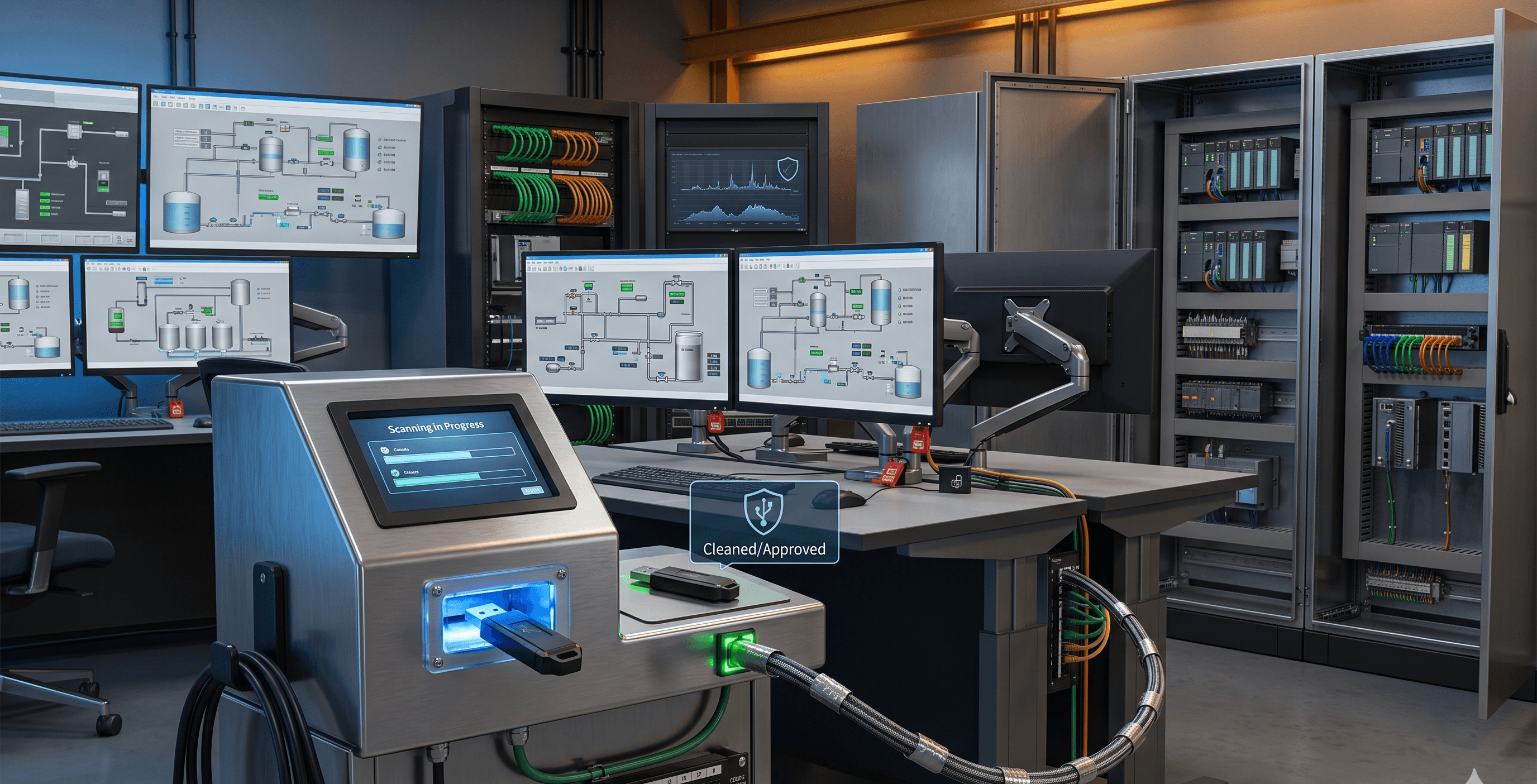
تعد الاستعانة بأكشاك التطهير الإلزامية، التي تسمى غالبًا "sheep dips"، تكتيكًا فعالاً للغاية لأمن الشبكات المعزولة بهوائي.
إنشاء نقطة فحص مادية: ضع أكشاكًا مستقلة ومحصنة عند المداخل المادية لمنشأتك أو غرفة التحكم الخاصة بك.
الفحص الإلزامي: قبل توصيل أي محرك أقراص USB (بما في ذلك تلك الخاصة بالمقاولين أو مصنعي المعدات الأصليين) بأي أصل من أصول SCADA، يجب فحصه بواسطة الكشك.
التحليل متعدد المحركات: يجب أن يقوم الكشك بتشغيل محركات متعددة ومتميزة لمكافحة الفيروسات والبرامج الضارة للكشف عن التوقيعات المعروفة، مع استخدام تقنية بيئة الاختبار المعزولة (sandboxing) لتحديد تهديدات اليوم الصفر (zero-day).
بروتوكولات نقل الملفات: بدلاً من السماح بدخول جهاز USB المادي إلى بيئة تكنولوجيا التشغيل (OT)، فإن أفضل ممارسة هي جعل الكشك يفحص الملفات، وإذا كانت نظيفة، يتم نقلها بأمان عبر صمام ثنائي للبيانات (data diode) إلى خادم ملفات داخلي مطهر.
3. تعزيز أمن النقاط الطرفية لأنظمة SCADA
غالبًا ما تعمل معدات SCADA القديمة على أنظمة تشغيل عتيقة وغير مدعومة حيث يمكن أن تتسبب برامج مكافحة الفيروسات التقليدية الخاصة بتكنولوجيا المعلومات في تعطل النظام أو حدوث تأخير غير مقبول.
إدراج التطبيقات في القائمة البيضاء: بدلاً من محاولة اكتشاف السلوك السيئ، حدد بدقة شكل السلوك الجيد. قم بتطبيق القائمة البيضاء للتطبيقات بحيث لا يُسمح بتشغيل سوى الملفات التنفيذية والبرامج النصية والمكتبات المعتمدة مسبقًا. وإذا حاولت البرمجيات الضارة لـ USB تشغيل حمولة غير معروفة، فسيقوم النظام بحظرها تلقائيًا.
مراقبة سلامة الملفات (FIM): قم بنشر نظام مراقبة سلامة الملفات (FIM) لمراقبة ملفات التكوين الحيوية لنظام SCADA وأدلة النظام. إذا حاول برنامج نصي تم إدخاله عبر USB تعديل هذه الملفات، يتم تنبيه فريق الأمن على الفور.
حماية النقاط الطرفية الأصلية لـ OT: استخدم وكلاء أمان مصممين خصيصًا للأنظمة الفيزيائية السيبرانية. يجب أن يكون لهؤلاء الوكلاء حد أدنى من التأثير لتجنب تعطيل الطبيعة الحتمية لعمليات أنظمة التحكم الصناعية (ICS).
4. المراقبة المستمرة للشبكة واكتشاف الشذوذ
حتى مع وجود تدابير صارمة لمنع البرامج الضارة لـ USB، يجب أن تفترض حالة اختراق محتملة لضمان المرونة التشغيلية بحق.
وضع خط أساس لشبكتك: افهم أنماط الاتصال العادية لبيئة SCADA الخاصة بك.
نشر الفحص العميق للحزم (DPI): راقب الشبكة للبحث عن السلوك الشاذ الذي يلي عادةً الإصابة عبر USB، مثل محاولة محطة عمل هندسية فجأة الاتصال بوحدة تحكم منطقية قابلة للبرمجة (PLC) غير مصرح بها، أو إرسال أوامر قراءة/كتابة غير متوقع عبر الشبكة.
العزل السريع: في حال تم اكتشاف حركة جانبية ضارة، يجب أن تدعم بنيتك الهندسية العزل السريع والمجزأ لاحتواء التهديد قبل أن يؤثر على العمليات المادية.
مواءمة أمن USB مع الأطر التنظيمية
يتم توجيه استراتيجيات الأمن السيبراني الصناعي بشكل متزايد بموجب تفويضات امتثال عالمية صارمة. إن حماية أنظمتك الفيزيائية السيبرانية من تهديدات USB تدعم بشكل مباشر وضع الامتثال الخاص بك.
التكامل مع معيار IEC 62443
يركز معيار IEC 62443 بشدة على حماية حدود المنطقة. وتمثل الوسائط القابلة للإزالة خرقًا ماديًا لهذه الحدود. من خلال تطبيق رقابة صارمة على أجهزة USB لنظام SCADA واستخدام أكشاك التطهير، فإنك تلبي مباشرة المتطلبات الأساسية لحماية النقاط الطرفية والتحكم في الوصول ضمن إطار عمل IEC 62443.
الامتثال لتوجيه NIS2
بالنسبة لمشغلي الخدمات الأساسية في أوروبا، يفرض توجيه NIS2 ممارسات صارمة لإدارة المخاطر، لا سيما فيما يتعلق بأمن سلسلة التوريد ومعالجة الحوادث. ولأن المقاولين والموردين يدخلون محركات أقراص USB بشكل متكرر إلى البيئة، فإن وضع بروتوكولات صارمة لأمن الوسائط القابلة للإزالة يعد مكوناً حاسماً للامتثال لتوجيه NIS2.
NERC CIP
بالنسبة لقطاع الطاقة، تتطلب معايير NERC CIP-003 وCIP-010 ضوابط صريحة على الأصول السيبرانية العابرة والوسائط القابلة للإزالة. ويعد توثيق عمليات ترخيص USB الخاصة بك، واستخدام محطات التطهير، ونشر القائمة البيضاء للتطبيقات خطوات إلزامية لتجنب العقوبات التنظيمية الشديدة وضمان مرونة شبكة الطاقة.
أدلة مرجعية عملية
لمساعدتك في ترجمة هذه المفاهيم إلى إجراءات فورية، قمنا بتجميع قوائم مرجعية عملية وجداول مرجعية لفرق أمن تكنولوجيا التشغيل (OT) الخاصة بك.
ناقلات هجوم USB الشائعة وتكتيكات التخفيف
ناقل الهجوم | كيف يعمل | تكتيك التخفيف الأساسي |
الملفات التنفيذية الضارة | ملفات مقنعة ينقر عليها المستخدمون يدويًا على واجهات HMI. | إدراج التطبيقات في القائمة البيضاء؛ سياسات صارمة لتنفيذ الملفات. |
BadUSB / محاكاة أجهزة الواجهة البشرية | يسجل محرك الأقراص نفسه كلوحة مفاتيح لحقن أوامر ضارة سريعة. | التحكم في أجهزة USB القائم على الأجهزة؛ حظر ملفات تعريف USB غير المخصصة للتخزين. |
إصابة قطاع الإقلاع | يعدل تسلسل الإقلاع لتحميل البرامج الضارة قبل نظام التشغيل. | تطبيق الإقلاع الآمن؛ تعطيل الإقلاع من منفذ USB في إعدادات BIOS/UEFI. |
حمولات اليوم الصفر (Zero-Day) | برامج ضارة غير معروفة تستهدف ثغرات أمنية محددة في أنظمة SCADA. | أكشاك تطهير USB مع ميزات بيئة الاختبار المعزولة (sandboxing). |
الممارسات اليومية لأمن USB في أنظمة SCADA
يجب على مديري المصانع ومهندسي تكنولوجيا التشغيل دمج هذه القائمة المرجعية في روتين المرونة التشغيلية اليومي الخاص بهم.
التحقق من الأقفال المادية: تأكد من أن جميع أقفال منافذ USB المادية على وحدات PLC وRTU وHMI الحيوية سليمة ولم يتم التلاعب بها.
فرض استخدام الأكشاك: تأكد من قيام جميع مقاولي الطرف الثالث بتمرير تحديثات البرامج الثابتة والملفات الخاصة بهم عبر كشك تطهير USB المخصص.
مراجعة سجلات الوصول: تحقق من سجلات أمن النقاط الطرفية للتأكد من عدم تشغيل أي أجهزة USB غير مصرح بها خلال الوردية السابقة.
تحديث قوائم السماح: تأكد من إضافة أي محركات أقراص USB مشفرة ومملوكة للشركة تم شراؤها حديثًا بشكل صحيح إلى قائمة السماح المركزية لمعرفات الأجهزة.
التحقق من توقيعات الأكشاك: تحقق من أن تعريفات مكافحة الفيروسات على أكشاك تطهير USB المعزولة محدثة (عبر تحديثات يدوية آمنة أو صمامات ثنائية مدارة للبيانات).
الاستجابة للحوادث المتعلقة بالوسائط القابلة للإزالة
إذا تم اكتشاف محرك أقراص USB غير مصرح به، أو في حال الاشتباه بحدوث إصابة ببرنامج ضار منقول عبر USB، فاتبع هذه الخطوات الفورية:
عزل النقطة الطرفية: افصل على الفور محطة العمل الهندسية أو واجهة HMI المصابة عن شبكة تكنولوجيا التشغيل (OT) المحلية لمنع التحرك الجانبي.
لا تقم بإعادة التشغيل: اترك النظام قيد التشغيل للحفاظ على الذاكرة المتطايرة (RAM) للتحليل الجنائي العاجل، ما لم تتطلب السلامة المادية إيقاف تشغيل العملية فورًا.
مصادرة الوسيط: قم بإزالة محرك أقراص USB المشبوه بعناية وتأمينه لإجراء تحقيق جنائي. لا تقم بتوصيله بأي جهاز آخر.
تحليل حركة مرور الشبكة: راجع سجلات مراقبة الشبكة لتحديد ما إذا كانت النقطة الطرفية المخترقة قد حاولت الاتصال بأصول أخرى في النظام الفيزيائي السيبراني.
بدء مراجعة FIM: تحقق من تنبيهات مراقبة سلامة الملفات (FIM) لمعرفة ملفات النظام أو تكوينات SCADA التي تم تعديلها بواسطة الحمولة الضارة بدقة.
تأمين مستقبل بنيتك التحتية الحيوية
إن الاعتماد على الوسائط القابلة للإزالة هو واقع العمليات الصناعية الحديثة، ولكن لا يجب أن يكون نقطة ضعف في وضعك الأمني. ومن خلال تغيير نظرتك من الدفاعات المعتمدة على الشبكة فقط إلى المرونة التشغيلية الشاملة، يمكنك تحييد ناقلات التهديد المادي بفعالية.
إن تطبيق ضوابط صارمة على أجهزة USB، ونشر أكشاك التطهير، واستخدام أمن النقاط الطرفية الأصلي لـ OT لأنظمة SCADA ليست مجرد ممارسات فضلى، بل هي ضرورات لحماية الأنظمة الفيزيائية السيبرانية ضد الجهات المهدِّدة ذات الدوافع العالية.
في Shieldworkz، نتفهم القيود الفريدة والمتطلبات الصارمة للبنية التحتية الحيوية. ونحن متخصصون في مطابقة الضوابط التقنية المتقدمة مع واقع العمليات في المصنع، مما يضمن حفاظك على عمليات خالية من الانقطاع مع الالتزام التام باللوائح العالمية المعقدة.
هل أنت مستعد لبناء دفاع مرن ضد التهديدات المادية والرقمية؟ تتطلب حماية أنظمتك الفيزيائية السيبرانية نهجًا مخصصًا قائمًا على الثقة الصفرية تجاه الوسائط القابلة للإزالة. اطلب تجربة عرض توضيحي مع خبراء الأمن السيبراني الصناعي لدينا اليوم، ودعنا نساعدك في تأمين عملياتك من النقاط الطرفية إلى المؤسسة بالكامل.
موارد إضافية:
ما هي الوسائط القابلة للإزالة؟ المخاطر، السياسات، وحلول أمن تكنولوجيا التشغيل (OT) الصناعية هنا
نموذج مجاني لسياسة الوسائط القابلة للإزالة لفرق تكنولوجيا التشغيل (OT) وتكنولوجيا المعلومات (IT) هنا
أدلة المعالجة هنا
احصل على تحديثات أسبوعية
الموارد والأخبار
تعرف على كيفية معالجة حلولنا الرائدة في مجال أمن تكنولوجيا التشغيل (OT) للتحديات الأمنية الحيوية
قد تود أيضًا

CVE-2026-92817: Ignition SCADA Privilege Escalation - Affected Versions & Mitigation

Team Shieldworkz

Preventing USB-Based Cyberattacks in OT: From Malware Detection to Secure File Approval
Team Shieldworkz

OpenPLC Runtime v3 Security Advisory: Potential Risks for Industrial Deployments
Team Shieldworkz

Yggdrasil, Russia-linked cyber operations, and emerging risks to global enterprises and governments
Prayukth K V

Cybersecurity Week in Review: Major Data Breaches, Critical Vulnerabilities and Supply-Chain Attacks (October 17–23, 2026)
Team Shieldworkz

NERC CIP Asset Inventory Management: Closing Visibility Gaps Across OT Networks
Team Shieldworkz