Deterministic · OT-Native · Fail-Closed
A file that hasn't been inspected hasn't been trusted. It's just been ignored.
A file that hasn't been inspected hasn't been trusted. It's just been ignored.
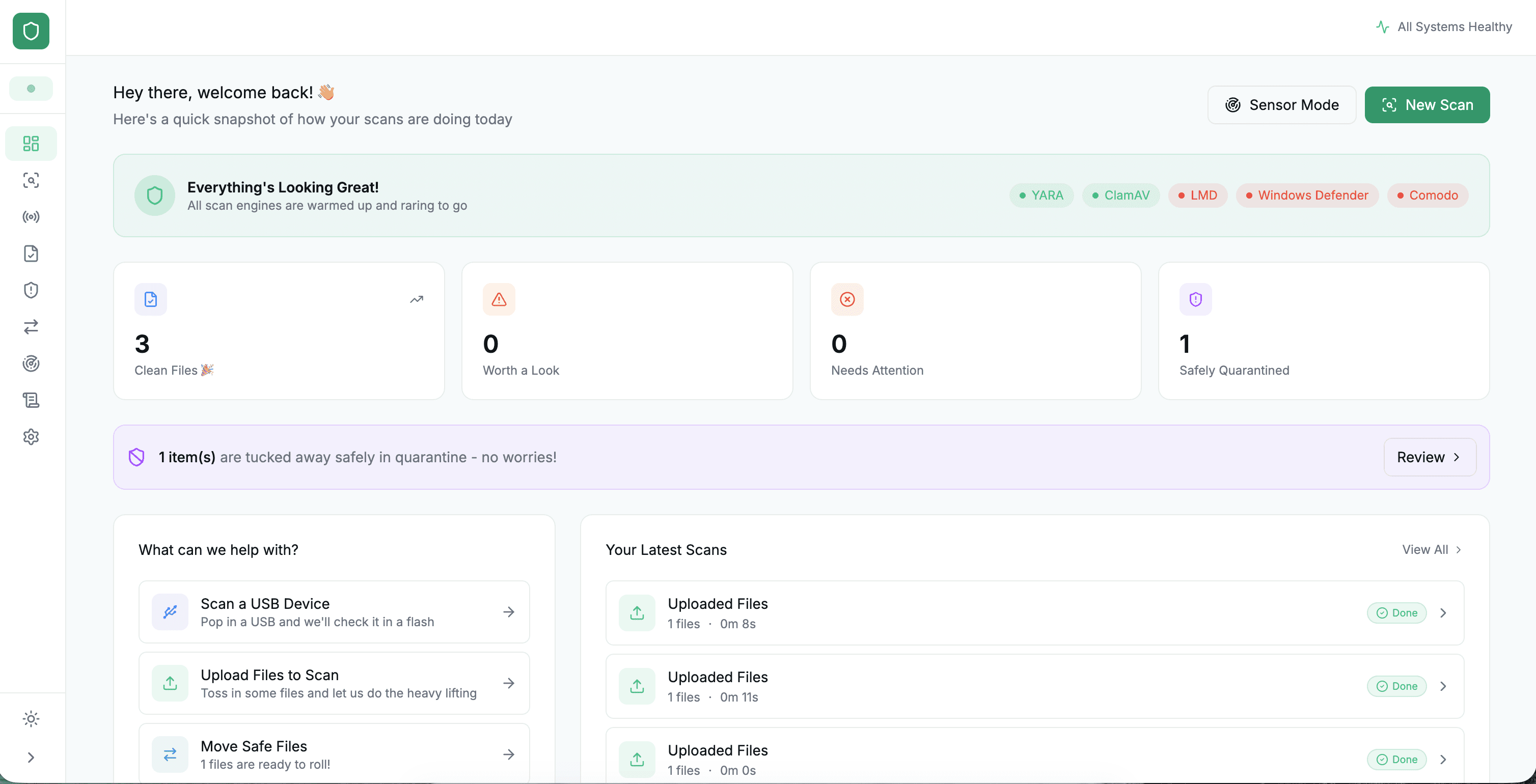
Media Scan controls every file entering or leaving your OT environment. It does not score threats. It does not flag suspicious behaviour for review. It inspects every file through a fixed, deterministic pipeline and issues a single, enforceable verdict: clean, hold, or blocked. The same file always receives the same outcome. No variability. No bypass.
Media Scan controls every file entering or leaving your OT environment. It does not score threats. It does not flag suspicious behaviour for review. It inspects every file through a fixed, deterministic pipeline and issues a single, enforceable verdict: clean, hold, or blocked. The same file always receives the same outcome. No variability. No bypass.
Request a demo →
View the inspection architecture
The Problem
Detection is not control.
Most OT environments have one but not the other.
Traditional security tools detect threats. They flag suspicious files, issue warnings, and prompt a review. In an IT environment where misses are recoverable, that is acceptable. In an OT environment where a single infected firmware update can take a production line offline for weeks, it is not. Control requires something detection cannot provide: a deterministic outcome for every file, every time, with no exceptions and no bypass.
Detection tells you what it found. Not what it missed.
A scanning tool that flags 99% of threats still allows 1% through. In an environment with thousands of files moving across the boundary daily, that 1% is a real and recurring exposure. Probabilistic detection is not a policy. It is a best effort.
Removable media is the most common OT attack vector.
USB drives, laptops, external hard drives, every device a technician, contractor, or vendor brings on-site is a potential entry point. Air-gapped OT environments are only air-gapped until someone plugs something in. Inspection at the point of insertion is the only control that holds.
Compliance requires evidence, not effort.
IEC 62443, NIST SP 800-82, NIS2, NCA OTCC, all require demonstrable control over file transfer at OT boundaries. A scanning tool that issues alerts does not satisfy a compliance requirement. A deterministic pipeline with per-file audit logs does.
Four Form Factors
One inspection pipeline.
Four ways to deploy it.
Every form factor runs the same inspection pipeline, produces the same verdict types, and generates the same audit log. The difference is where and how they sit in your environment.

Media Scan Field
Portable USB
Goes where your technician goes.
A portable USB-based inspection unit carried by field engineers, maintenance teams, and site visitors. Every file on the USB is inspected before it enters the network, at the device, before connection. No infrastructure required. No network dependency. Verdict before contact.
—
Field maintenance visits
—
Vendor firmware delivery
—
Contractor site access
—
Remote and temporary locations

Media Scan Desk
Tabletop
Permanent position. Constant vigilance.
A desk-deployed inspection unit for engineering workstations, IT-OT bridge stations, and operations centres where file intake is continuous. Media Scan Desk sits in the workflow, files go through it before they go anywhere else. Compact form, uncompromising process.
—
Engineering workstation intake
—
IT-OT bridge stations
—
Operations centre file intake
—
Configuration and patch staging

Media Scan Gate
Kiosk
Holds the line at every entry point.
A fixed inspection kiosk positioned at the physical boundary of the OT environment, plant entrance, control room access point, or engineering bay. Operators and visitors present their media at the kiosk. Nothing enters without a verdict. Enforced workflow, every time.
—
Control room access control
—
Engineering bay entry
—
Plant floor boundary enforcement
—
High-traffic entry points

Media Scan Inline
Fully Virtual
Every transfer. Every direction. Always on.
A software-only deployment that inspects every file moving across the IT-OT boundary, in both directions. No physical hardware. No additional workflow steps for operators. Media Scan Inline sits invisibly, enforcing the same inspection pipeline on every file transfer that passes through the network boundary.
—
IT-OT boundary inline inspection
—
OT-IT data extraction control
—
Cloud-connected OT environments
—
Large-scale multi-site deployment
Inspection Pipeline
Five stages. One verdict. No exceptions.
Every file, regardless of source, format, or form factor, passes through the same fixed inspection sequence. The pipeline is deterministic: the same inputs always produce the same outputs. There is no shortcut, no trusted source bypass, no exemption list.
1
Static Analysis
Pattern-based inspection of file structure before any execution. Identifies known malware signatures, suspicious encoding, and embedded threats in file headers and metadata.
2
Multi-Engine Scanning
Parallel inspection across 17+ independent scanning engines simultaneously. No single engine is the arbiter. Consensus across multiple detection approaches eliminates single points of failure.
3
Content Disarm and Reconstruction (CDR)
Files are not just scanned, they are rebuilt. Active content, macros, embedded objects, and exploit vectors are removed. The output is a safe, functional file that carries no threat payload. Original threat is destroyed, not quarantined.
DIFFERENTIATOR
4
Reputation Validation
Hash validation against global threat intelligence databases, OT-specific malware repositories, and industrial control system attack pattern libraries. Every file checked against what is already known.
5
Deterministic Verdict
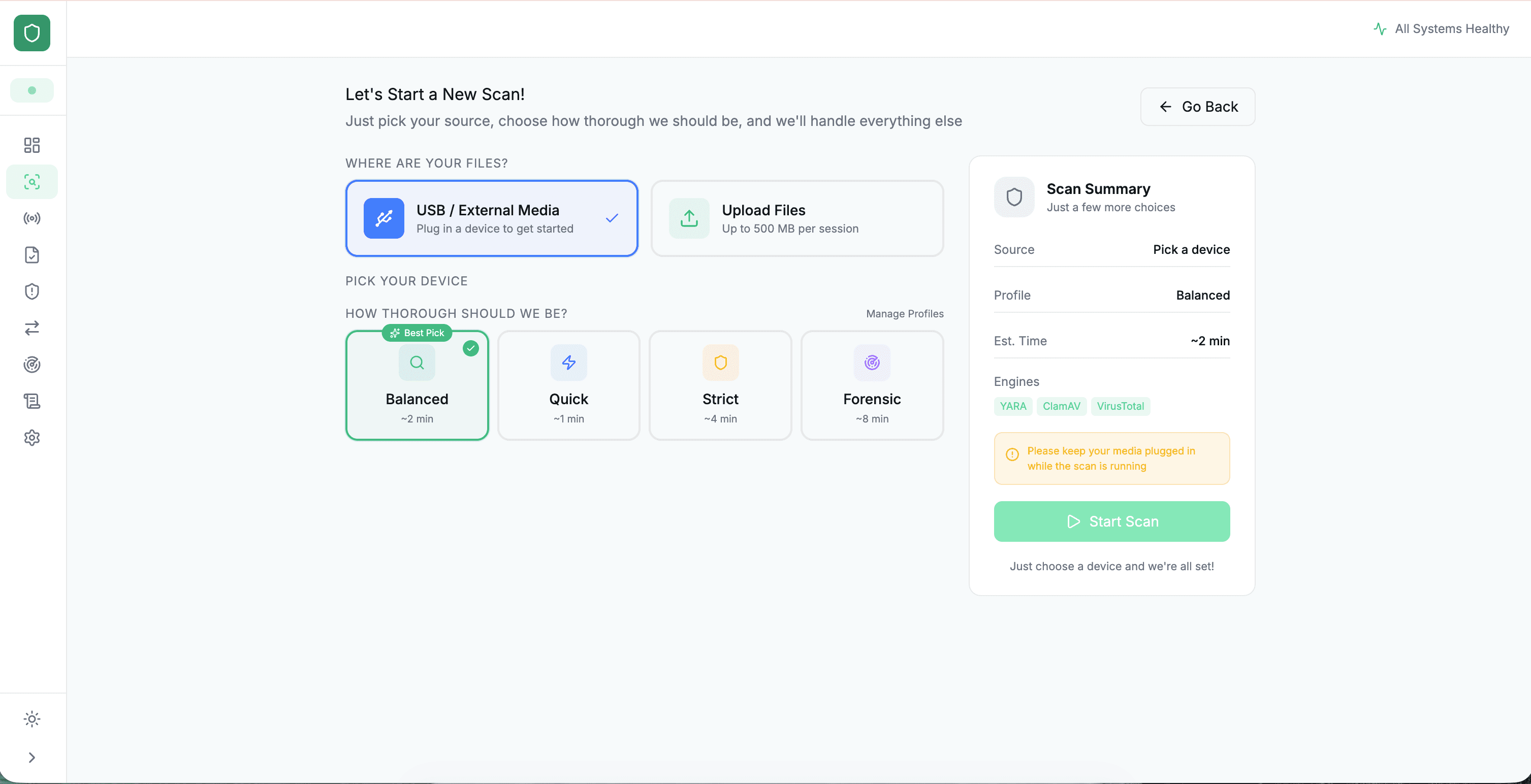
One outcome. Clean. Hold. Blocked. No probabilistic scoring. No ambiguity. The same file always receives the same verdict. Every outcome is logged, traceable, and auditable.
CLEAN
HOLD
BLOCKED
Fail-closed by design.
If Media Scan cannot reach a verdict, connectivity issue, unrecognised format, inspection engine error, the file is held, not passed. The default is control, not convenience. A file that cannot be inspected does not enter your environment.
Full audit trail, every file.
Every file generates a timestamped audit record: source, format, inspection stages completed, verdict issued, disposition applied. The log is complete, immutable, and exportable. Compliance evidence is produced automatically, not assembled after the fact.
Why Media Scan
Control is not detection with a stricter threshold.
The difference between Media Scan and traditional AV or scanning tools is not sensitivity, it is architecture. Media Scan was built to enforce a policy, not to detect a threat.
Media Scan
Traditional AV / Scanning Tools
Verdict type
Deterministic, same file always same outcome
Probabilistic, score-based, variable by engine version
Fail mode
Fail-closed, unknown files are held
Fail-open, unknowns often pass
Content handling
CDR rebuilds files, active content destroyed
Files scanned in place, threats may remain embedded
OT protocol support
Native OT file format support (.bin, .s7p, .acd, .dat, and more)
IT-focused formats, OT support varies
Audit trail
Full per-file audit log with timestamps
Partial, event-level logging only
Deployment
Air-gap, on-premise, inline virtual, all supported
Cloud or on-premise, air-gap typically unsupported
Workflow enforcement
Enforced, files cannot bypass inspection
Advisory inspection is recommended, not enforced
Technical Specifications
Built for industrial environments. Not adapted to them.
File format support
500+
Including native OT formats: .bin, .s7p, .acd, .rsp, .prj, .dat, .cfg, .xml, and engineering file types from Siemens, Rockwell, Schneider, ABB, and others. IT formats fully covered.
Throughput
10,000+ files/day
Sub-5-second average inspection time. Pipeline is parallelised across all 17+ engines simultaneously, not sequential. High-volume operational environments supported without workflow bottleneck.
Deployment models
4 options
On-premise. Air-gapped. IT-OT boundary inline (Media Scan Inline). All four form factors (Field, Gate, Desk, Inline) supported. Mixed deployments are standard.
Integration
Full API
Active Directory, SIEM integration, ITSM workflow integration, SFTP/MFT for secure file transfer. Full API for custom integration. Audit logs exportable in standard formats.
Compliance
IEC 62443+
Designed against IEC 62443, NIST SP 800-82, ISO 27001, and NIS2. Per-file audit logs satisfy compliance evidence requirements.
Availability
99.9%+
Fail-closed architecture means failure mode is hold, not pass. No dependency on external connectivity for core inspection functions. Air-gapped deployments operate fully offline.
Control what enters your environment. And what leaves it.
Deterministic inspection. Four form factors. One pipeline.
Request a demo →
View the inspection architecture
About Us
We secure Operational Technology environments and protect businesses with best-in-class professional services and cyber security solutions.

Resources
Modules
Copyright © 2026, Shieldworkz - All Rights Reserved.