OT Media Scan Solution: What to Evaluate Before Securing Removable Media


Team Shieldworkz

Every drive that enters the plant should pass through an inspection point that cannot be skipped.
Picture an ordinary Tuesday at a water treatment plant, a pharmaceutical packaging line, or a gas compression station. A contractor arrives to update a controller program. He plugs in a USB drive he used at another site last week. Nobody did anything reckless. The drive is simply how the work gets done.
That single moment explains why removable media remains one of the most persistent security gaps in industrial environments.
Most operational technology (OT) networks are deliberately separated from the internet. Firewalls, network segmentation and tight access rules protect them. Yet engineers still need to move project files, firmware, patches, backups and vendor tools across that boundary, and in many plants the fastest way is still a portable drive. Every one of those drives is a bridge between the outside world and the systems that control physical processes.
Buying an OT media scan solution is the logical response, but the market is crowded with products that sound alike. Some are little more than an office antivirus engine placed inside a kiosk. Others were designed for corporate IT and struggle with plant realities: isolated networks, aging operating systems, vendor laptops and engineering files that an ordinary scanner cannot read.
This Blog is written for OT security leaders, CISOs, plant managers and ICS engineers who are about to define requirements or compare options. It explains what a strong media scan solution must do, where weak ones fail, what real incidents teach us, and how to build an evaluation checklist that reflects the way your plant actually works.
Why OT security leaders should read this A media scan purchase is easy to get wrong because every product claims to "detect malware." The real differences sit in how a product behaves when files are unusual, when the network is unavailable, when someone is in a hurry, and when an auditor asks for proof. Those are the situations this checklist is built around. |
Why Removable Media Is Still an Open Door into Industrial Networks
Removable media appeals to attackers for a simple reason: it travels where networks cannot. A drive can carry malicious code across a boundary that no firewall rule would ever permit, and it does so with the full trust of the person holding it.
Many plants describe their control networks as "isolated." In practice, isolation is a policy, not a physical fact. People are the connection. Engineers, operators, maintenance crews and outside vendors move data in and out every day, and each transfer is a chance for something unwanted to ride along.
Real incidents that changed how plants think about USB
The history of industrial cyber incidents includes several well-documented cases in which a portable drive played a central role.
Stuxnet (2010). Reportedly entered a tightly isolated uranium enrichment facility in Iran. It is widely reported to have damaged around 1,000 centrifuges and to have spread to roughly 100,000 computers worldwide. Its real significance was that it targeted controller logic, not just Windows computers, which showed that attackers had studied how industrial engineering actually works.
U.S. power generation facility (2012). A U.S. government advisory described a power generation facility where a third-party technician used a USB drive to update software on a turbine control workstation. Malware spread to other systems at the site, and the plant's restart was delayed by about three weeks. A trusted vendor, a routine task and a long outage: no sophisticated attacker was required.
Agent.btz (2008). Malware spread across U.S. military networks through removable drives, leading to a broad restriction on their use. It showed that even organizations with mature security teams can be reached through a simple drive.
Raspberry Robin (2021 onward). A worm that spreads through USB drives and has been observed as an early step in attacks affecting manufacturing, telecommunications and other sectors. It confirms that the technique remains active and well used.

Publicly documented incidents show the same pattern: trusted people, routine tasks and no inspection point.
Year | Incident | How it entered | What it teaches plant leaders |
2008 | Agent.btz | Infected removable drives on military networks | Even mature organizations need controlled, inspected media handling |
2010 | Stuxnet | Infected removable media carried into an isolated facility | Attackers study engineering workflows and target controller logic |
2012 | U.S. power plant | Contractor USB drive used on turbine control workstation | Trusted vendors and routine updates can cause weeks of downtime |
2021 | Raspberry Robin | USB-spread worm | Removable media is still a live technique, not a historical one |
What the data says
Annual studies of industrial USB threats have, across several editions, found that roughly 30 to 45 percent of the malware detected on removable media in industrial settings was designed specifically to spread through that route. In one recent edition, more than three-quarters of the threats found were capable of disrupting operational technology, not just office computers.
The business consequence is easy to calculate. Analyses of industrial downtime put the cost of an hour of unplanned stoppage in automotive manufacturing at roughly two million dollars, and the figure is high across other heavy industries as well. For a plant that depends on continuous operation, a single infected laptop can be more expensive than a decade of prevention.
Why Common Approaches Fall Short on the Plant Floor
When plants first look at USB risk, they usually reach for a familiar tool. Each of the usual options helps a little, and each leaves a gap that matters in OT.
Approach | What it does | Where it falls short in OT |
Blocking all USB ports | Stops drives at the device | Engineers still need to move files, so staff create workarounds that are invisible to security |
Office antivirus on a shared PC | Checks files against known threats | Struggles with engineering formats, relies on frequent updates, keeps little proof of what was checked |
One-time scan at the site entrance | Checks drives once, early | Does not cover drives that return from the field or are used on the plant network afterward |
Dedicated OT media scan platform | Inspects, decides and records by policy | Effective only when the capabilities in this guide are present and tested |
Three weaknesses appear again and again. First, many tools depend on recognizing malware they have already seen, which leaves a gap for new or customized threats. Second, they are built for office files, so they treat a controller project, a configuration backup or a vendor archive as an unknown object. Third, when something goes wrong, they often let the file through. In an industrial setting, that last behavior is the most dangerous of the three.
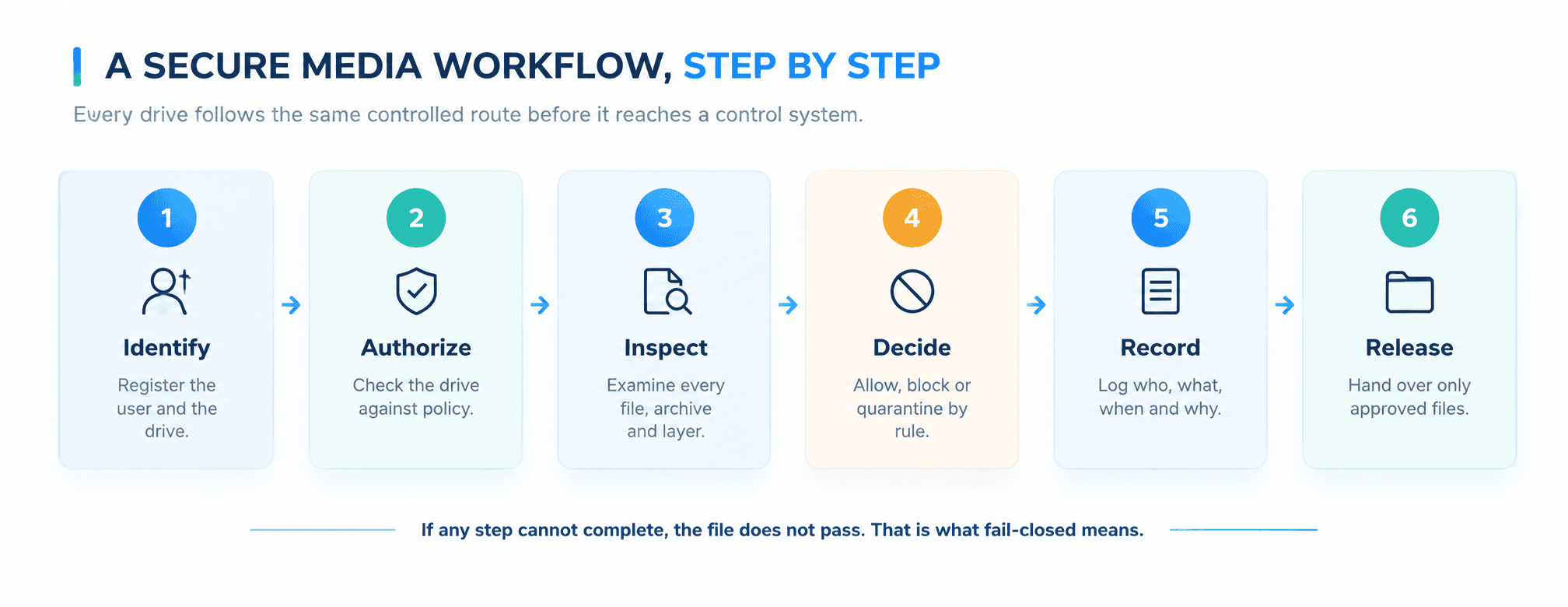
A controlled workflow gives every drive the same route, the same checks and the same record.
Core Capabilities to Evaluate in an OT Media Scan Solution
The following nine capabilities separate a serious industrial media security platform from a basic scanner. Use them as the backbone of your requirements document.
1. Deterministic file inspection
Deterministic means that the same file, checked against the same policy, produces the same result every time. There is no guesswork, no confidence score that shifts from one day to the next, and no dependence on a cloud service that a plant cannot reach.
This matters because a plant needs to explain why a file was allowed or blocked. If the answer is "the engine thought it looked fine," that is not good enough for a safety review or an incident investigation. Ask vendors how they inspect files, what happens to files they cannot fully understand, and whether results are reproducible.
2. Layered detection that goes beyond known threats
Relying on a single method leaves gaps. A strong platform combines several approaches: recognition of known malware, checks on file structure and type, inspection of scripts and embedded content, and rules that flag behavior no legitimate engineering file would show. It should also open compressed archives, and archives inside archives, instead of stopping at the first layer.
Ask how the product treats a file whose extension does not match its contents, or a document that contains a hidden program. Those are common tricks, and simple scanners miss them.
3. Removable media control and device authorization
Inspecting files is only half the job. A mature solution also governs the drive itself. Can it recognize an approved device and reject an unknown one? Can it detect drives that pretend to be a keyboard or another type of device, a well-known attack technique? Can it restrict which users may bring media into which areas?
The ability to control who uses what, and where, turns a scanner into a security program.
4. Quarantine and safe handling
Finding a problem is not the end of the process. What happens next determines whether the plant is safer or just better informed. Look for quarantine that isolates suspicious files in a protected area, prevents accidental release, and allows review by authorized staff only.
Ask whether the product can clean or rebuild files where appropriate, and whether the original is preserved for investigation. A good quarantine process protects the plant and also preserves evidence.
5. Policy enforcement that matches how the plant works
A plant is not one environment. A packaging line, a substation and a laboratory have different risks and different people. The solution should let you set rules by site, area, user role and file type, and apply them consistently without relying on individual judgment at the kiosk.
Strong policy tools answer practical questions. Which file types may enter a safety system? Who may approve an exception? How long may a contractor's access last? If every decision depends on the operator's mood or the pressure of the moment, the policy is a suggestion, not a control.
6. Audit trails and evidence
When an auditor, a regulator or an insurer asks how removable media is controlled, the answer should be a report, not an anecdote. The platform should record who brought a drive, which files were checked, what the result was, which rule applied, and who approved any exception.
These records also support investigation. If a problem appears months later, you need to trace which drives touched which systems. Ask how long records are kept, whether they can be altered, and whether they can be sent to your security monitoring tools.
7. Fail-closed behavior
Fail-closed means that when something goes wrong, the answer is no. If the scanning engine crashes, if a file is too large, if an archive is encrypted, if the update is out of date, the file is held back until a person decides what to do.
Many products fail open without saying so. They skip what they cannot read and report a clean result. This is the quietest and most serious weakness in a media security tool. During evaluation, test it directly: feed the system a damaged file, an encrypted archive and an oversized package, and watch what it does.
8. Offline operation
A product that needs a constant connection to the internet cannot protect a site that is deliberately disconnected. Look for a platform that performs all inspection locally, and that has a clear, secure way to bring updates into the site without opening a path for attackers.
Ask how updates are delivered, how they are checked before use, and how the plant knows whether its protections are current. A scanner that quietly falls months behind is worse than having none, because it creates false confidence.
9. Support for engineering workflows
This is where many products fail in practice. Industrial work involves controller project files, configuration backups, firmware images, historian exports and vendor toolkits, some of them very large and some in formats that office tools cannot read.
If the process is slow or blocks legitimate work, people will bypass it. The best solutions fit the way engineers actually work: they handle industrial file types, process large packages in reasonable time, support vendor laptops, and make the secure path the easy one. Include engineers in your evaluation and measure how long a typical transfer takes.
Evaluation checklist: questions to ask every vendor
Capability | What to ask | What a strong answer looks like |
Deterministic inspection | Is the result reproducible for the same file and policy? | Same input, same result, explained in plain terms |
Layered detection | How are archives, scripts and disguised files handled? | Multiple methods, nested archive inspection, type verification |
Media and device control | Can approved drives be recognized and unknown ones rejected? | Device authorization and detection of disguised devices |
Quarantine | Where do suspicious files go and who can release them? | Protected area, restricted release, evidence preserved |
Policy enforcement | Can rules vary by site, role and file type? | Granular rules applied consistently without operator discretion |
Audit trails | What is recorded and for how long? | Full record of user, drive, files, result and approvals |
Fail-closed design | What happens when a file cannot be read or the engine fails? | The file is held, never passed as clean |
Offline operation | Does inspection work with no internet, and how are updates delivered? | Fully local inspection and a controlled update process |
Engineering workflow support | How are large project files, firmware and vendor laptops handled? | Industrial file types supported with practical transfer times |
Risks and Challenges in Real-World Deployments
Choosing the right product is the first half. The second half is dealing with the realities that make media security difficult in a working plant.
The "isolated network" assumption
Many leaders believe the control network cannot be reached because it is separated from the internet. In reality, it is reached by every laptop, drive and update that crosses the boundary. A security program built on the assumption of isolation will miss the very paths attackers prefer.
Contractors, vendors and third parties
Outside technicians arrive with their own tools, their own laptops and drives that have been used at many other sites. You cannot control their habits, but you can control the point where their media enters your plant. A defined inspection step for visitors is one of the most effective measures available.
Speed versus security
Plants run on schedules, and a maintenance window does not wait. When the secure process is slow, technicians find another way: a personal email account, a phone connected to a laptop, or an unregistered drive. Every workaround is invisible to security and therefore unmanaged.
Aging systems that cannot be changed easily
Many control systems run older operating systems that cannot be patched or fitted with modern protection. Because the endpoint cannot defend itself, the checkpoint in front of it carries much more of the burden.
Compliance and proof
Standards and regulations for industrial and critical infrastructure environments increasingly expect documented control of removable media and evidence that the control works. Without detailed records, it is difficult to demonstrate that a policy exists in practice.
Risk | Business impact | What reduces it |
Infected contractor drive reaches a control workstation | Production halt, extended restart, safety exposure | Mandatory inspection for all outside media |
Scanner fails open on unreadable file | Threat enters the plant unnoticed | Fail-closed design and regular failure testing |
Slow process drives workarounds | Unmanaged and unrecorded transfers | Fast, engineer-friendly workflow |
Outdated protection in disconnected sites | False sense of safety | Controlled offline updates with visible status |
No evidence of control | Failed audit, higher insurance scrutiny | Complete audit trail and reporting |
What Media Risk Looks Like Across Different Industries
The same drive creates different consequences depending on where it lands. Understanding your own sector helps you set priorities and explain the investment to leadership.
Manufacturing
Production lines depend on controller programs, robot configurations and quality systems that are updated often, frequently by outside integrators. A single infected engineering laptop can stop a line, and in high-volume plants every idle hour is measured in lost output and missed deliveries. The priority here is speed: a checkpoint that slows changeovers will be bypassed.
Energy and utilities
Power, water and gas operators run geographically spread sites, many with limited connectivity and small crews. Field technicians carry media between substations, pumping stations and control centers. The consequence of failure is not only financial. It can affect public service and safety, which is why offline operation and strong records matter most.
Pharmaceutical and regulated production
In regulated environments, data integrity is as important as availability. A tampered recipe file or batch record can affect product quality and trigger investigations. Here, audit trails, approval workflows and proof of control carry as much weight as detection itself.
Sector | Typical media pathway | Top evaluation priority |
Manufacturing | Integrator laptops, controller updates, robot programs | Fast transfers and support for industrial file types |
Energy and utilities | Field technician drives, remote and disconnected sites | Offline operation, strict policy and reliable records |
Pharmaceutical | Recipe files, batch records, validation tools | Audit trails, approvals and file integrity |
Water and wastewater | Contractor updates, small teams, older systems | Simple workflow and protection for aging equipment |
Mistakes buyers make most often
Judging products by a detection demonstration instead of testing real engineering files and failure cases.
Leaving engineers out of the evaluation, then discovering the process is too slow to be used.
Treating the scan station as a one-time purchase instead of a program that needs updates, testing and review.
Assuming a vendor's claim of "offline support" covers how updates and records are actually handled.
Ignoring the exception process, which quietly becomes the main route around the control.
Avoiding these mistakes does not require a large budget. It requires asking sharper questions early, and the checklist in this guide is designed to help you do exactly that.
Practical Recommendations and Best Practices
Technology works best when it is introduced with a clear plan. These steps help security and operations teams succeed together.
Map how media really moves
Before choosing a product, spend time with engineers and operators and learn how files actually travel into and out of each area. Include maintenance crews, vendors, laboratories and remote sites. The difference between the official process and the real one is where the risk sits.
Classify areas and set rules by risk
Not every zone needs the same strictness. A safety system or a critical production line deserves tighter rules than a training room. Group areas by consequence and define what may enter each one, who may approve it, and what proof is required.
Place inspection points where people already pass
A scan station that is hard to reach will not be used. Put checkpoints at entrances, engineering rooms and vendor access points, and make sure there is a clear path for out-of-hours work.
Test with your own files and your own failure cases
Do not rely on a demonstration. During evaluation, bring real project files, large firmware packages, encrypted archives and damaged files. Watch how the product handles each one and how long it takes. Also test what happens when the update is stale or the engine is unavailable.
Train people and explain the reason
People follow rules they understand. Explain to technicians and contractors why the process exists, and show them how quickly it works. A short briefing is more effective than a long policy document.
Roll out in phases
Phase | Focus | Outcome |
1. Discover | Map media flows, users and file types across sites | Clear picture of real practice and highest-risk paths |
2. Define | Write requirements, policies and exception rules | A shared standard agreed by security, engineering and operations |
3. Pilot | Deploy at one or two sites with real workloads | Proof of performance and early feedback from users |
4. Expand | Extend to remaining sites and vendor access points | Consistent control across the organization |
5. Improve | Review reports, adjust rules, test failure cases regularly | Steady improvement and audit-ready evidence |
Measure what matters
• Share of removable media inspected before entering controlled areas
• Number of files blocked or quarantined, and the reasons
• Average time to process a typical engineering transfer
• Number of exceptions requested and approved
• Time since the last protection update at each site
• Results of regular tests, including failure scenarios
Questions to Settle Before You Start Evaluating
Strong evaluations begin with internal clarity. Answer these questions with your team before speaking with any vendor.
• Which sites, areas and systems must be protected first?
• Who brings media into the plant: employees, contractors, vendors or all of them?
• Which file types and sizes are part of normal engineering work?
• Which areas have no network connection at all?
• What proof do auditors, regulators or insurers expect?
• Who approves exceptions, and how quickly must they respond?
• What should happen when a file cannot be fully inspected?
• How will records connect to your existing monitoring and incident response?
How Shieldworkz Supports Organizations
Shieldworkz works with manufacturers, utilities, pharmaceutical producers and other critical infrastructure operators to protect the places where industrial work meets digital risk. Our approach to removable media starts with understanding your plant, not with a product demonstration.
Media flow assessment. We study how files, drives and vendors reach your control environment and identify the paths that carry the most risk.
Requirements definition. We turn your operational realities into clear, testable requirements that you can use in any evaluation.
Policy design. We help you design rules by site, area and role that security teams can enforce and engineers can live with.
Practical rollout. We plan and support deployment in phases, starting with a focused pilot and expanding with confidence.
Audit readiness. We help you configure records and reports so that you can answer audit and incident questions quickly.
Offline and remote site support. We guide secure approaches for disconnected sites, including how protections stay current without opening new paths.
Training and adoption. We work with engineers, operators and security staff together, so the secure path becomes the easy path.
Validation and ongoing review. We test deployed controls against realistic scenarios, including failure cases, to confirm they work as intended.
Our team brings experience across PLC and SCADA environments, manufacturing, energy and utilities, and regulated industries. We speak the language of both the control room and the boardroom.
Conclusion
Removable media will remain part of industrial life as long as engineers need to move files into places networks cannot reach. The question is not whether drives will cross the boundary, but whether every one of them passes through a control that is predictable, fast, recorded and safe when things go wrong.
A good OT media scan solution is more than a malware detector. It inspects files in a consistent way, controls the drives themselves, quarantines what it cannot trust, applies policy without relying on individual judgment, produces evidence, refuses to pass what it cannot read, works without internet access, and respects the way engineers work. Use the checklist in this guide to find the gaps in your current approach and define requirements before you compare any platform.
Frequently Asked Questions
1.What is an OT media scan solution?
It is a dedicated system that inspects removable media, such as USB drives and portable storage, before files enter an industrial control environment. It checks files, applies policy, isolates threats and records every decision.
2.Why is a standard antivirus not enough for removable media in OT?
Standard tools are built for office use. They may not understand industrial file formats, may need constant updates, and may not keep the detailed records that audits require. They also often let unreadable files pass.
3.What does fail-closed mean for media scanning?
It means that if a file cannot be fully inspected for any reason, it is held back instead of being allowed through. This prevents a silent failure from becoming a security breach.
4.Can media scanning work in a site with no internet connection?
Yes, provided the platform does all inspection locally and has a controlled method for bringing in updates. This is a key question to ask any vendor.
5.Who should be involved in choosing a media security platform?
Security leaders, plant managers, control engineers, operations staff and compliance teams should all take part. Engineers in particular will decide whether the process is actually used.
Book a Free Consultation with Our Experts Not sure where your removable media controls stand today? Our OT security specialists will walk through how media enters your plants, highlight the gaps that matter most, and help you define clear requirements, with no obligation and no sales pressure. |
احصل على تحديثات أسبوعية
الموارد والأخبار
تعرف على كيفية معالجة حلولنا الرائدة في مجال أمن تكنولوجيا التشغيل (OT) للتحديات الأمنية الحيوية
قد تود أيضًا

How AI Is Changing IEC 62443 Assessments
Team Shieldworkz

Deep investigative threat intelligence report: Alleged SafePay cyberattack on T-Systems
Team Shieldworkz

CEA Compliance Requirements for Power Utilities: What Changes
Team Shieldworkz

G99 cybersecurity evidence pack for UK generators and BESS: What DNOs need to see in the PGMD
Team Shieldworkz

Inside the alleged onsemi Cyberattack: How Far Did Qilin Really Get?
Team Shieldworkz

Best IEC 62443 Risk Assessment Platform for Industrial OT Security
Team Shieldworkz